HCD-SX7/SX7B
34
2-4. Panel Test
It can confi rm the liquid crystal display, model name, destination
and software version.
Procedure:
1. Press the [
@
/
1
] button to turn the power on.
2. Press the buttons on the remote commander in order of the
[ALPHABET SEARCH] → [1] → [9] → [ENTER].
(Press the next button within three seconds)
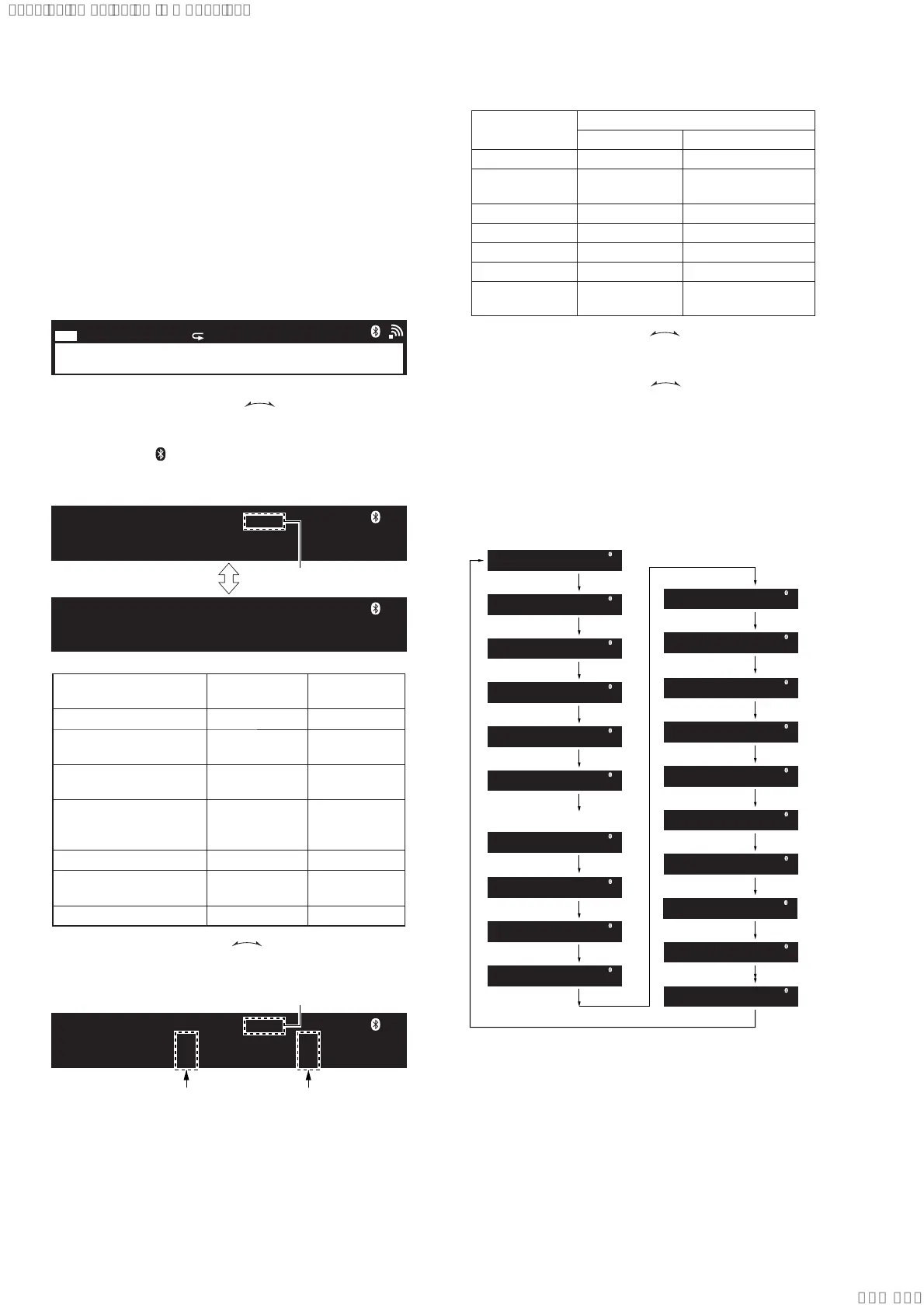
3. It enters the panel test mode, and all segments on the liquid
crystal display.
Screen display
1
NX
REC FLDR SHUF PGM TUNED STEREO
c
PLAY
c
REC
UPDATESLEEP
4. When the [– TUNING +
.
>
] dial turned clock-
wise, the model name and destination are displayed on the liq-
uid crystal display alternately.
(In this mode, “ ”continues lighting up and “STEREO” con-
tinues blinking on the liquid crystal display.)
Screen display
CMT-SX7B
STEREO
CE2
STEREO
Blinking
Model
Model name
display
Destination
display
SX7: Canadian (CA2) CMT-SX7 NA
SX7: AEP, UK
(CEL, CEK)
CMT-SX7 CE2
SX7: Latin American,
Argentina (E32, AR2)
CMT-SX7 LATIN
SX7: Singapore, Thai,
Indonesian
(SP1, TH1, IA2)
CMT-SX7 ASIA2
SX7: Russian (RU1) CMT-SX7 RU
SX7B: AEP, UK
(CEL, CEK)
CMT-SX7B CE2
SX7B: Australian (AU1) CMT-SX7B AU
5. When the [– TUNING +
.
>
] dial turned clockwise
again, the WiFi channel type is displayed on the liquid crystal
display.
Screen display
2.4TYPEX/5TYPEX
STEREO
Blinking
2.4G channel
number
5G channel
number
Channel
number
Channel setting
2.4 GHz band 5 GHz band
1 1 – 13 ch 36 – 165 ch
2–
36 – 116 ch,
132 – 165 ch
3 1–11 ch –
4 – 149 – 161 ch
5– –
6 – 36 – 140 ch
7–
36 – 64 ch,
149 – 165 ch
6. When the [– TUNING +
.
>
] dial turned clock-
wise again, the MC version is displayed on the liquid crystal
display.
7. Each time [– TUNING +
.
>
] dial turned clock-
wise, the display changes MCS version → PF version → Lute
version → Cast version → MTK version → OPU version →
NWM version → BTM version → GC version → USBL ver-
sion → NWA version → NWD version → BTA version → CD
version → CDMA version → CDMB version → ST version
→ TA version → TM version this order, and returns to the MC
version display.
Note: OPU version is not displayed normally.
MC 0.37
STEREO
MC version
MCS version
PF version
MTK version
OPU version
(Version is not displayed)
NWM version
BTM version
GC version
NWA version
NWD version
BTA version
CD version
CDMA version
CDMB version
ST version
TA version
TM version
MCS 1.00
STEREO
PF 23.27
STEREO
MTK 0.010
STEREO
OPU
STEREO
NWM 21.82
STEREO
BTM 21.80
STEREO
GC 0.01
STEREO
NWA 0.13
STEREO
NWD 0.06
STEREO
BTA 0.81
STEREO
CD 0.12
STEREO
CDMA 1.43
STEREO
CDMB 1.17
STEREO
ST 1.39
STEREO
TA 0.40
STEREO
TM 0.01
STEREO
Lute version
Cast version
Lute 21.82
STEREO
Cast 5.00
STEREO
USBL version
USBL 0.00
STEREO
(Displayed values in the above fi gure are example)
Releasing method:
Press the buttons on the remote commander in order of the [AL-
PHABET SEARCH] → [1] → [9] → [ENTER].
(Press the next button within three seconds)
Ver. 1.1
SYSSET
2020/02/2722:53:44(GMT+09:00)



 To Next Page