– 4 –
SECTION 2
GENERAL
This section is extracted
from instruction manual.
Basic Operations4
Playing a CD
Basic Operations
For hookup instructions, see pages 32 - 36.
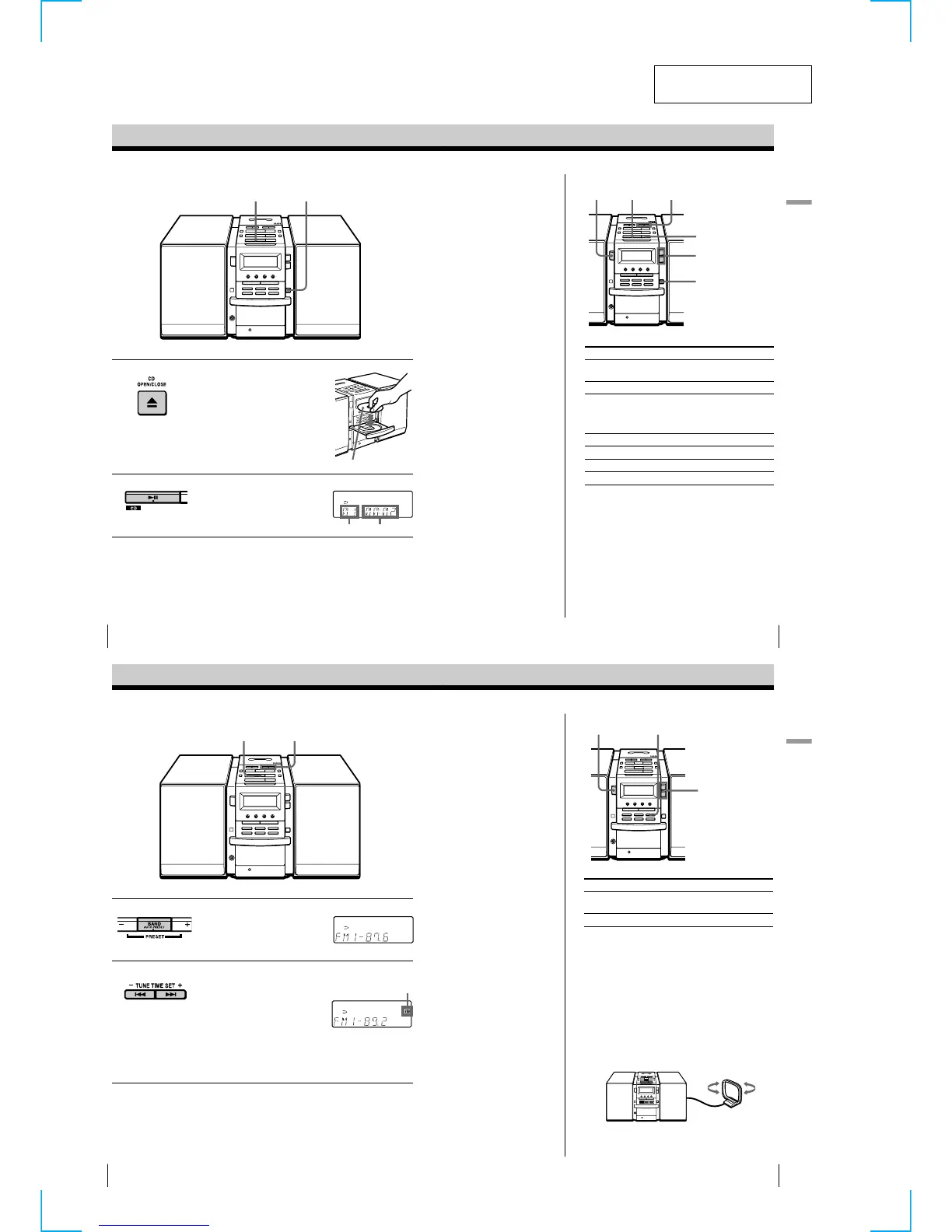
1 Press Z CD OPEN/CLOSE
(direct power-on) and place the
CD on the CD tray.
2 Press u.
(On the remote, press N on the
CD section.)
The CD tray closes and the player
plays all the tracks once.
With the label side up
Display
Playing timeTrack number
21
Basic Operations
Basic Operations
5
Use these buttons for additional operations
Tip
Next time you want to
listen to a CD, just press
u. The player turns on
automatically and starts
playing the CD.
To Press
adjust the volume VOLUME +, –
(VOL +, – on the remote)
stop playback x
pause playback u
(X on the remote)
Press again to resume play
after pause.
go to the next track >
go back to the previous track .
remove the CD Z CD OPEN/CLOSE
turn on/off the player POWER
u
., >
Z CD
OPEN/CLOSE
VOLUME +, –
POWER
x
Basic Operations6
Listening to the radio
For hookup instructions, see pages 32 - 36.
1 Press BAND•AUTO PRESET
until the band you want appears
in the display (direct power-on).
2 Hold down TUNE TIME SET + or
– (TUNE + or – on the remote)
until the frequency digits begin to
change in the display.
The player automatically scans
the radio frequencies and stops
when it finds a clear station.
If you cannot tune in a station,
press the button repeatedly to
change the frequency step by
step.
Display
2
1
Indicates an FM
stereo broadcast.
Basic Operations
Basic Operations
7
Use these buttons for additional operations
Tips
• The “FM1” and “FM2”
bands have the same
functions. You can store
the stations you want
separately in “FM1” and
“FM2”.
• If the FM broadcast is
noisy, press MODE until
“MONO” appears in the
display and the radio
will play in monaural.
• Next time you want to
listen to the radio, just
press the BAND•AUTO
PRESET button. The
player turns on
automatically and starts
playing the previous
station.
To Press
adjust the volume VOLUME +, –
(VOL +, – on the remote)
turn on/off the radio POWER
To improve broadcast reception
FM:
Keep the FM lead antenna as horizontal as possible
and reorient it.
If the FM broadcast is still noisy, disconnect the FM
lead antenna and connect the FM outdoor antenna
(not supplied) (page 36).
AM:
Keep the AM loop antenna as far as possible from the
player and reorient it.
VOLUME +, –
MODE
POWER


 To Next Page