1-4
19
Hookups and Settings
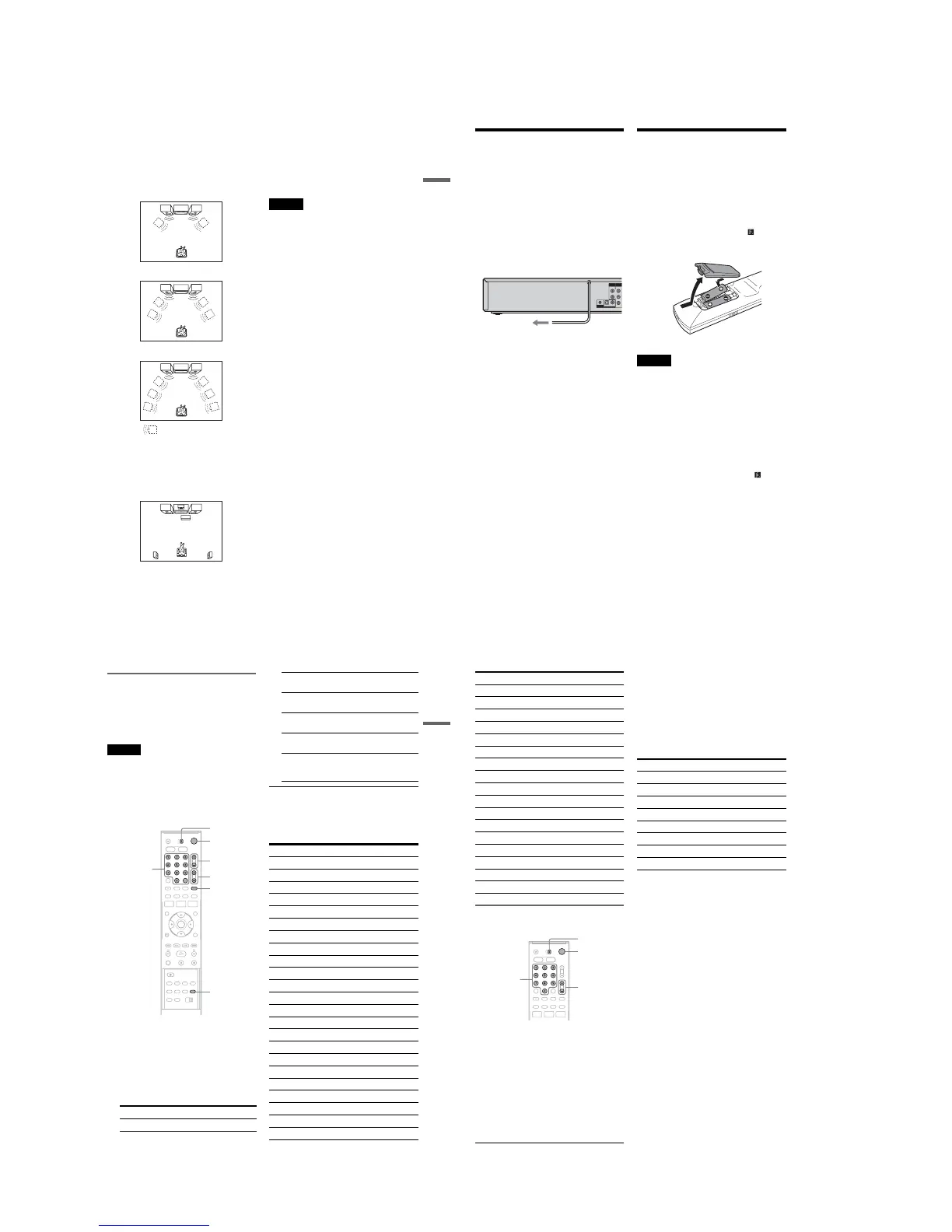
A Connecting to audio L/R jacks
This connection uses a stereo amplifier’s
(receiver’s) two front speakers for sound.
You can enjoy the surround function that creates
virtual speakers from two stereo speakers. Select
from “Surround1,” “Surround2,” or “Surround3”
of the surround effects (page 36).
Surround 1
Surround 2
Surround 3
B Connecting to a digital audio input jack
Use this connection if your AV amplifier
(receiver) has a Dolby
*1
Digital or DTS
*2
decoder
and a digital input jack. You can enjoy the
surround effect of Dolby Digital (5.1ch) or DTS
(5.1ch).
*1
Manufactured under license from Dolby Laboratories.
“Dolby” and the double-D symbol are trademarks of
Dolby Laboratories.
*2
“DTS” and “DTS Digital Out” are trademarks of
Digital Theater Systems, Inc.
z Hints
•For correct speaker location, see the operating
instructions supplied with the connected components.
•During VHS playback, the DIGITAL AUDIO OUT
jacks can also output digital audio signals.
Notes
•During DVD recording, the DIGITAL AUDIO OUT
jacks output DVD audio signals only. You cannot hear
VHS sound by pressing VIDEO.
•After you have completed the connection, make the
appropriate settings under “Audio Connection Setup”
in Easy Setup (page 23). Otherwise, no sound or a loud
noise will come from your speakers.
•With a coaxial or optical digital connection, you cannot
use the virtual surround effects of this recorder.
•When outputting from the DIGITAL AUDIO OUT
jacks, you cannot switch the bilingual sounds on a
DVD-RW (VR mode) or DVD-R (VR mode) by
pressing AUDIO.
Virtual speaker
20
Step 5: Connecting the
Power Cord
Plug the recorder and TV power cords into an AC
outlet. After you connect the power cord, you
must wait for a short while before
operating the recorder. You can operate the
recorder only after the front panel display lights up
and the recorder enters standby mode.
If you connect additional equipment to this
recorder (page 28), be sure to connect the power
cord only after all connections are complete.
Step 6: Preparing the
Remote
You can control the recorder using the supplied
remote.
Insert two size AA (R6) batteries by matching the
3 and # ends on the batteries to the markings
inside the battery compartment. Be sure to close
the battery cover properly. When using the
remote, point it at the remote sensor on the
recorder.
Notes
•If the supplied remote interferes your other Sony DVD
recorder or player, change the command mode number
for this recorder (page 26).
•Use the batteries correctly to avoid possible leakage
and corrosion. Do not touch the liquid with bare hands
should leakage occur. Observe the following:
–Do not use a new battery with an old battery, or
batteries of different manufacturers.
–Do not attempt to recharge the batteries.
–If you do not intend to use the remote for an extended
period of time, remove the batteries.
–If battery leakage occurs, wipe out any liquid inside
the battery compartment, and insert new batteries.
•Do not expose the remote sensor (marked on the
front panel) to strong light, such as direct sunlight or
lighting apparatus. The recorder may not respond to the
remote.
•With normal use, the batteries should last about three to
six months.
•Do not leave the remote in an extremely hot or humid
place.
•Do not drop any foreign object into the remote casing,
particularly when replacing the batteries.
YL
P
B
R
P
R
AUDIO OUT
COMPONENT
VIDEO OUT
SET TOP BOX
CONTROL
DIGITAL AUDIO OUT
OPTICAL COAXIAL
to AC outlet
21
Hookups and Settings
Controlling TVs with the remote
You can adjust the remote control’s signal to
control your TV.
If you connect the recorder to an AV amplifier
(receiver), you can also use the supplied remote to
control the AV amplifier’s (receiver’s) volume.
Notes
•Depending on the connected unit, you may not be able
to control your TV or AV amplifier (receiver) with
some or all of the buttons below.
•If you enter a new code number, the code number
previously entered will be erased.
•When you replace the batteries of the remote, the code
number may be reset to the default setting. Set the
appropriate code number again.
1 Slide the TV/DVD·VIDEO switch to TV.
2 Hold down "/1.
3 Enter your TV’s manufacturer code (see
below) using the number buttons.
4 Release "/1.
When the TV/DVD·VIDEO switch is set to
TV, the remote performs the following:
Code numbers of controllable TVs
If more than one code number is listed, try
entering them one at a time until you find the one
that works with your TV.
Press To
"/1 Turn your TV on or off
TV/DVD·VIDEO
switch
"/1
VOL +/–
Number
buttons,
SET
TV/VIDEO
CH +/–
WIDE MODE
VOL +/– Adjust the volume of
your TV
CH +/– Select the channel on
your TV
TV/VIDEO Switch your TV’s input
source
Number buttons and
SET
Select the channel on a
Sony TV
WIDE MODE Switch to or from the
wide mode of a Sony
wide-screen TV
Manufacturer Code number
Sony 01 (default)
Akai 04
AOC 04
Centurion 12
Coronado 03
Curtis-Mathes 12, 14
Daewoo 04, 22
Daytron 03, 12
Fisher 11
General Electric 04, 06, 10
Hitachi 02, 03, 04
J.C.Penney 04, 10, 12
JVC 09
KMC 03
LG/Gold Star 03, 04, 17
Magnavox 03, 04, 08, 12, 21
Marantz 04, 13
MGA/Mitsubishi 04, 12, 13, 17
NEC 04, 12
Panasonic 06, 19
Philco 02, 03, 04, 08
Philips 08, 21
Pioneer 06, 16
,continued
22
Controlling the volume of your AV
amplifier (receiver) with the remote
1 Slide the TV/DVD·VIDEO switch to
DVD·VIDEO.
2 Hold down "/1, and enter the
manufacturer code (see the table below)
for your AV amplifier (receiver) using the
number buttons.
3 Release "/1.
The VOL +/– buttons control the AV
amplifier’s volume.
If you want to control the TV’s volume, slide
the TV/DVD·VIDEO switch to TV.
z Hint
If you want to control the TV’s volume even when the
TV/DVD·VIDEO switch is set to DVD·VIDEO, repeat
the steps above and enter the code number 90 (default).
Code numbers of controllable AV amplifiers
(receivers)
If more than one code number is listed, try
entering them one at a time until you find the one
that works with your AV amplifier (receiver).
Portland 03
Proscan 10
Quasar 06, 18
Radio Shack 05, 10, 14
RCA 04, 10
Sampo 12
Samsung 03, 04, 12, 20
Sanyo 11, 14
Scott 12
Sears 07, 10, 11
Sharp 03, 05, 18
Sylvania 08, 12
Teknika 03, 08, 14
Toshiba 07, 18
Wards 03, 04, 12
Yorx 12
Zenith 14, 15
Manufacturer Code number
TV/DVD·VIDEO
switch
"/1
VOL +/–
Number
buttons
Manufacturer Code number
Sony 78, 79, 80, 91
Denon 84, 85, 86
Kenwood 92, 93
Onkyo 81, 82, 83
Pioneer 99
Sansui 87
Technics 97, 98
Yamaha 94, 95, 96














 To Next Page