2-19
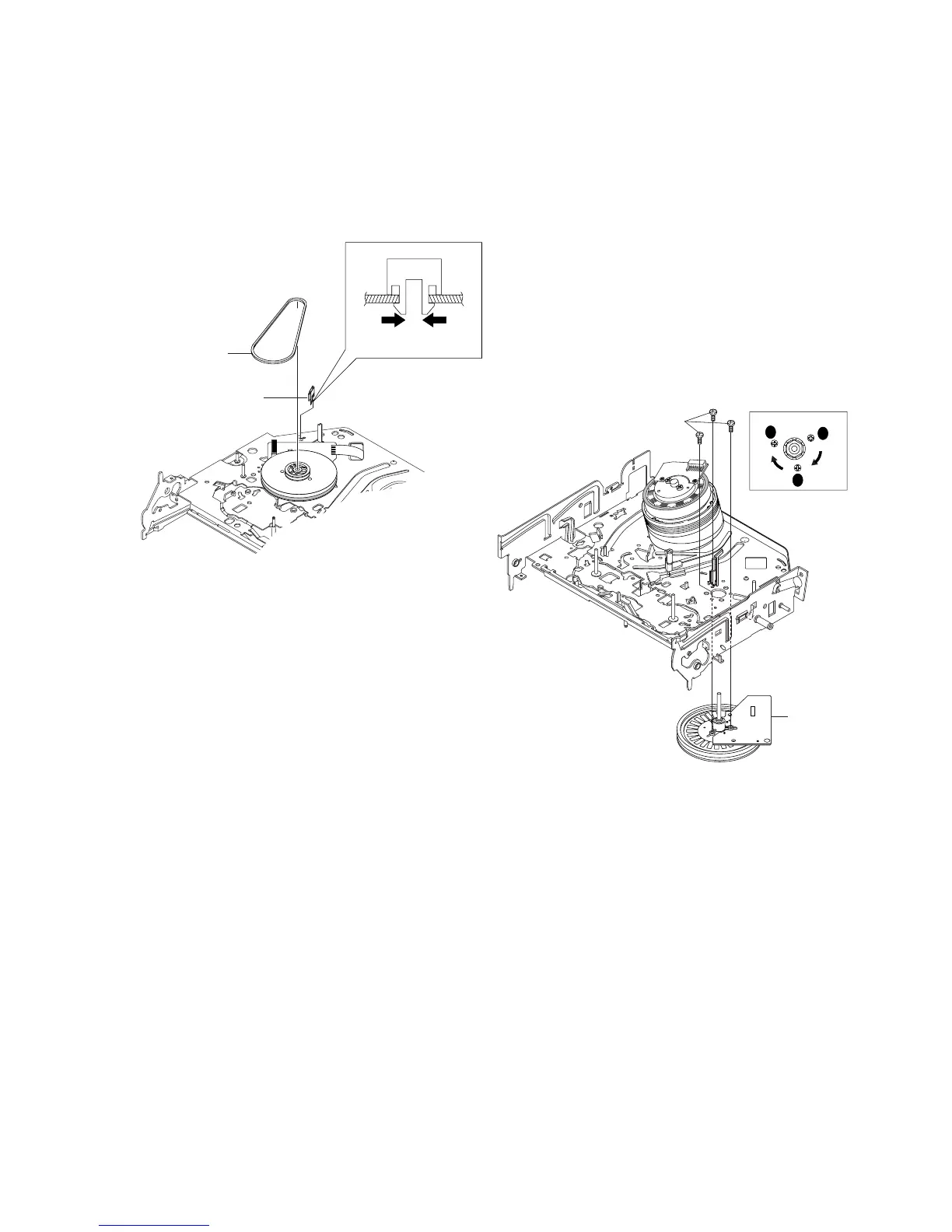
2 BELT PULLEY
1 HOOK CAPSTAN
HOOK
2-4-25 Hook Capstan, Belt Pulley Removal
1) Remove the Hook Capstan 1 after realeasing Hook in the
direction arrow as shown in detail drawing.
2) Remove the Belt Pulley 2.
Note: Take extreme care not to get grease on Belt Pulley 2 at
assembling or reassembling.
Fig. 2-38 Belt Pulley Removal
2-4-26 Ass’y Motor Capstan Removal
1) Remove the 3 Screws 1.
2) Remove the Ass’y Motor Capstan 2.
Assembly:
1) Match the 3 holes of Ass’y Motor Capstan 2 to the 3 holes of
Main Base. Be careful not to drop or knock the Ass’y Motor
Capstan 2.
2) Tighten the 3 Screws 1 in the direction of arrow as shown detail
drawing.
Note: After tightening screws, check if there is gap between the
head of screws and the top side of Main Base. There should have no
gap between the head of screws and the top side of Main Base.
After reinstalling, adjusting the tape transport system again.
Fig. 2-39 Ass’y Motor Capstan Removal
2 ASS'Y MOTOR
CAPSTAN
1 3 SCREWS
A
B
C














 To Next Page