1-8
35
DVD Playback
DVD Playback
Playing
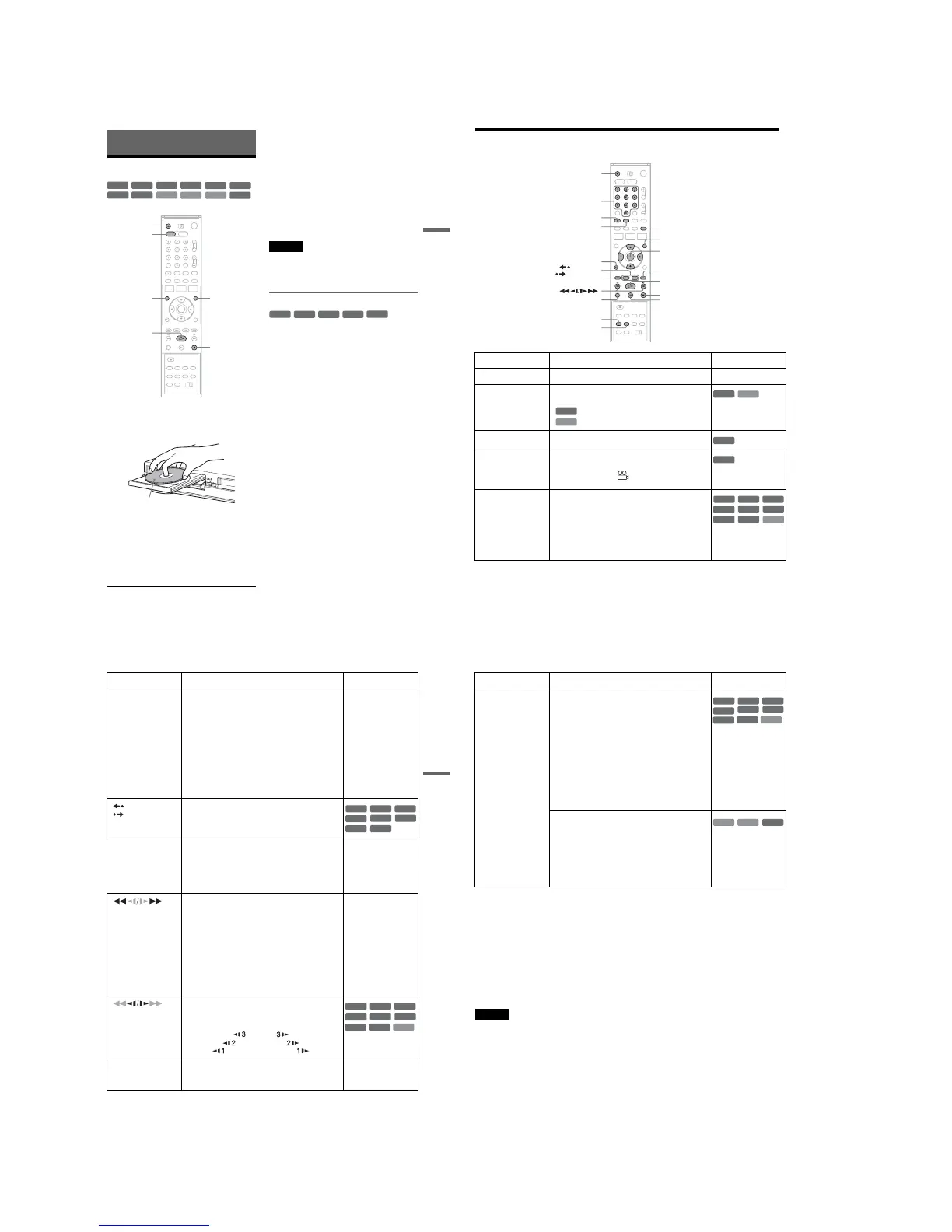
1
Press DVD to operate the DVD recorder.
2 Press Z OPEN/CLOSE, and place a disc on
the disc tray.
3 Press Z OPEN/CLOSE to close the disc
tray.
Wait until “LOAD” disappears from the front
panel display.
4 Press H PLAY.
Playback starts.
To stop playback
Press x STOP.
z Hints
•You can play DATA CDs or DATA DVDs with MP3
audio tracks or JPEG image files (pages 43 or 44).
• If you insert a DVD VIDEO, VIDEO CD, or CD,
playback starts automatically depending on the disc.
•When playing a DVD+RW, DVD-RW, DVD+R,
DVD-R, and DVD-RAM, you can select the title from
the Title List menu (page 40).
•When using a DVD-RAM with a cartridge, remove the
disc from the cartridge.
Notes
•To play a disc recorded with other equipment on this
recorder, finalize the disc on the recording equipment
first.
•For simultaneous VHS and DVD operation, see page 9.
Using the DVD’s Menu
When you play a DVD VIDEO, or a finalized
DVD+RW, DVD-RW (Video mode), DVD+R, or
DVD-R (Video mode), you can display the disc’s
menu by pressing TOP MENU or MENU.
+
RW
+
R
DVD
VCD
CD
-
RWVR
-
RWVideo
DATA DVD
DATA CD
-
RVR
-
RVideo
RAM
x STOP
Z OPEN/
CLOSE
MENU
H PLAY
DVD
TOP MENU
Playback side facing down
+
RW
+
R
DVD
-
RWVideo
+
R
-
RVideo
36
Playback Options
Button Operation Disc
Z OPEN/CLOSE Stops playing and opens the disc tray. All discs
AUDIO Selects one of the audio tracks recorded on the disc
when pressed repeatedly.
: Selects the audio source.
: Selects stereo or monaural audio tracks.
SUBTITLE Selects a subtitle language when pressed repeatedly.
.
ANGLE Selects an angle when pressed repeatedly.
If various angles (multi-angles) for a scene are
recorded on the disc, “ ” appears in the front panel
display.
ZOOM Zooms into a scene during playback or still mode
when pressed repeatedly.
Magnification changes as follows:
normal t ×2 t ×4 t normal
The zoom function may not work depending on the
DVD.
To zoom in a JPEG image, see page 44.
Z OPEN/CLOSE
X PAUSE
AUDIO
. PREV
REPLAY/
ADVANCE
x STOP
SUBTITLE
SUR
ZOOM
REPEAT
MENU
H PLAY
M/m/</,,
ENTER
Number buttons
O RETURN
> NEXT
ANGLE
DVD
VCD
DVD
VCD
DVD
DVD
DVD
VCD
+
RW
-
RWVR
-
RWVideo
+
R
-
RVR
-
RVideo
RAM
37
DVD Playback
SUR
(surround)
Surround lets you enjoy surround sound effects by
using sound imaging to create virtual rear speakers
from a stereo TV or two front speakers (page 19).
Selects one of the effects when pressed repeatedly.
“Off”: No surround effect.
“Surround1”: Creates one set of virtual surround
speakers.
“Surround2”: Creates two sets of virtual surround
speakers.
“Surround3”: Creates three sets of virtual surround
speakers.
This feature is effective when you use two separate
front speakers.
All discs
REPLAY/
ADVANCE
•Replays or briefly fast forwards a scene when
pressed during playback.
•Goes to the previous or next frame when pressed
during pause mode.
. PREV/
NEXT >
•Goes to the beginning of the current or next title/
chapter/scene/track and starts playback when
pressed during playback.
•Goes to the beginning of the previous title/chapter/
scene/track when .PREV is pressed within three
seconds after starting a title/chapter/scene/track.
All discs
(fast reverse/fast
forward)
Fast reverses or fast forwards the disc when pressed
during playback.
Search speed changes with each press:
fast reverse fast forward
FR1 T t FF1
*1
FR2
*2
T T t t FF2
*2
FR3
*3
T T T t t t FF3
*3
All discs
*1
FF1 with sound
(Scan Audio) is
available for DVDs
with Dolby Digital
soundtracks.
*2
FR2 and FF2 are not
available for MP3.
*3
FR3 and FF3 are only
available for DVDs
and VIDEO CDs.
(slow)
Plays in slow motion when pressed in pause mode.
Playback speed changes with each press:
reverse slow motion forward slow motion
T t
T T t t
T T T t t t
*Playback direction
only
X PAUSE Pauses playback.
If you pause playback for more than five minutes,
playback starts automatically.
All discs
Button Operation Disc
+
RW
-
RWVR
-
RWVideo
+
R
DVD
-
RVR
-
RVideo
RAM
VCD
+
RW
+
R
-
RWVR
-
RWVideo
DVD
-
RVR
-
RVideo
RAM
*
,continued
38
To resume normal playback after playing at various speeds, press H PLAY.
z Hints
•You can change playback options, such as subtitle,
audio track, angle, etc., using the TOOLS menu
(page 11).
•During playback or pause mode, the recorder’s m/
M buttons and the remote’s .PREV/>NEXT
buttons work the same way (page 37). Hold the buttons
down during playback to fast forward or fast reverse. In
pause mode, you can play in slow motion. Three speeds
are available, depending on the duration of the press.
•See “DVD Audio/Subtitle Language” on page 124 for
the meaning of the language abbreviation.
Notes
•You cannot use the repeat play function with VIDEO
CDs while the PBC function is on (page 39).
•When the playback signal does not contain a signal for
the surround speakers, the surround effects will be
difficult to hear.
•When you select one of the surround modes, turn off
the surround settings of the connected TV or amplifier
(receiver).
• If you pause playback of a CD, or DATA CD/DATA
DVD containing MP3 audio tracks, playback will not
start until you press H PLAY or X PAUSE.
•Make sure that your listening position is between and
at an equal distance from your speakers, and that the
speakers are located in similar surroundings.
•Sound will be interrupted during Scan Audio
(page 39).
Notes on playing DTS soundtracks on a CD
When playing DTS-encoded CDs, excessive noise
will be heard from the analog stereo jacks. To
avoid possible damage to the audio system, the
consumer should take proper precautions when
the analog stereo jacks of the recorder are
connected to an amplification system. To enjoy
DTS Digital Surround™ playback, an external
5.1-channel decoder system must be connected to
the digital jack of the recorder.
Notes on playing DVDs with a DTS soundtrack
DTS audio signals are output only through the
DIGITAL AUDIO OUT (COAXIAL or
OPTICAL) jack.
When you play a DVD with DTS soundtracks, set
“Digital Out” – “DTS” to “On” of “Audio” in the
“Setup” display (page 102).
REPEAT Displays the items to be repeated when pressed.
Select an item using M/m, and press ENTER.
To cancel Repeat Play, select “Off” and press ENTER.
Press O RETURN to turn off the display.
When playing a DVD
“Chapter”: Repeats the current chapter.
“Title”: Repeats the current title on a disc.
“A-B” (Repeat A-B Play): Repeats a specific portion
(page 39).
When playing a VIDEO CD (with PBC function off)
“Track”: Repeats the current track.
“Disc”: Repeats all of the tracks.
“A-B” (Repeat A-B Play): Repeats a specific portion
(page 39).
*With PBC function off
Selects the item to be repeated when pressed
repeatedly. To cancel Repeat Play, select “Off.”
When playing a CD
“Track”: Repeats the current track.
“Disc”: Repeats all of the tracks.
When playing a DATA CD/DATA DVD (MP3 audio)
“File”: Repeats the current track.
“Folder”: Repeats the current album.
Button Operation Disc
+
RW
-
RWVR
-
RWVideo
+
R
DVD
-
RVR
-
RVideo
RAM
VCD
*
DATA CD
CD
DATA DVD














 To Next Page