1-6
27
Hookups and Settings
4 Select “Command Mode,” and press
ENTER.
5 Select the command mode (“DVD 1,”
“DVD 2,” or “DVD 3”), and press ENTER.
6 Slide the COMMAND MODE switch on the
remote so it matches the mode you
selected above.
To return to the previous display
Press O RETURN.
Note
If the command mode does not match, the recorder’s
command mode appears on the front panel display when
you operate the remote. Set the remote’s command mode
to one that matches the recorder’s.
Options
Language
Parental
Front Display
Command Mode
Factory Setting
: Auto
: DVD1 No
10:10 AM
Setup
Disc Setting
Edit
Title List
Timer
Dubbing
No Disc
DVD 1
DVD 2
DVD 3
28
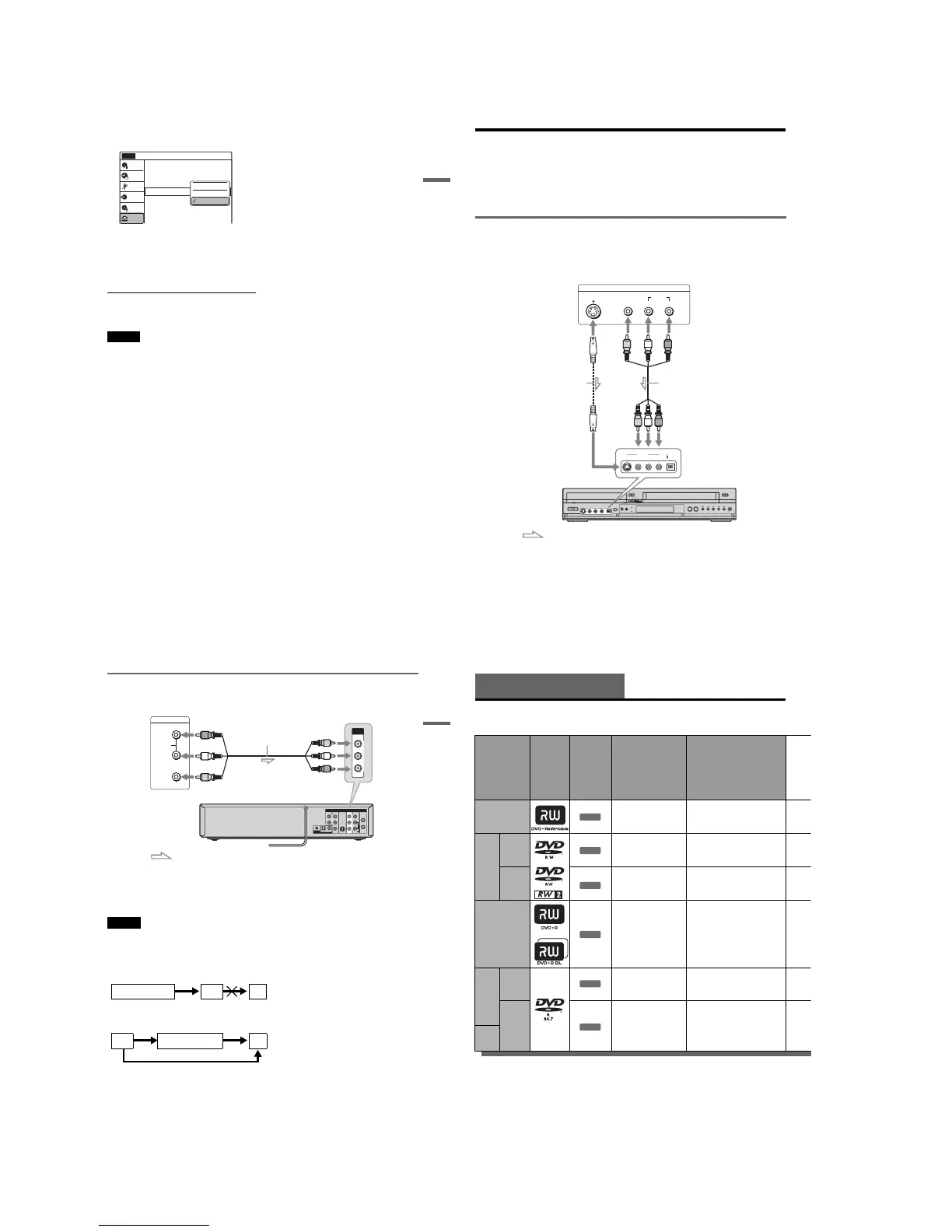
Connecting Another VCR or Similar Device
After disconnecting the recorder’s power cord from an AC outlet, connect the other VCR or similar
recording device to the LINE IN jacks of this recorder. See also the instruction manual supplied with the
connected equipment.
To record on this recorder, see “Recording From Connected Equipment With a Timer (Synchro Rec)” on
page 53 and page 83. Connect the equipment to the LINE 1 IN jacks of the recorder to record using the
Synchro Rec function.
Connecting to the LINE 2 IN jacks on the front panel
Connect other VCR or similar device to the LINE 2 IN jacks of this recorder. If the equipment has an
Svideo jack, you can use an S video cord (not supplied) instead of the yellow (video) plug of the audio/
video cord. Do not connect to the S VIDEO and yellow VIDEO jacks at the same time.
You can connect a second DVD player and record DVDs.
S VIDEO
AUDIO
LR
VIDEO
(MONO)
DV IN
S VIDEO
VIDEO
LINE 2 IN
L AUDIO R
OUTPUT
to LINE 2 IN
VCR-DVD recorder
: Signal flow
Audio/video cord
(not supplied)
Other VCR, etc
S video cord
(not supplied)
29
Hookups and Settings
Connecting to the LINE 1 IN jacks
You can connect a second VCR or similar device.
z Hints
•When the connected equipment outputs only monaural sound, connect an audio cord to the white LINE IN AUDIO L
(mono) jack.
•To record from connected equipment, select an input source (LINE1 or LINE2) to match the jack you connected to
(pages 56 and 86).
Notes
•Do not connect more than one type of video cord between the recorder and your TV at the same time.
•Pictures containing copy protection signals that prohibit any copying cannot be recorded. You cannot dub from DVD
VIDEOs to this recorder.
•Do not connect the output jack of this recorder to another equipment’s input jack with the other equipment’s output
jack connected to the input jack of this recorder. Noise (feedback) may result.
•If you pass the recorder signals via the VCR, you may not receive a clear image on your TV screen.
Be sure to connect your VCR to the VCR-DVD recorder and your TV in the order shown below. To watch video tapes,
watch the tapes through a second line input on your TV.
IN
L
R
VIDEO
AUDIO
OUT
VHF/UHFLINE OUT
VIDEO
YL
P
B
R
P
R
AUDIO
LINE 1 IN
AUDIO OUT S VIDEO OUT
COMPONENT
VIDEO OUT
SET TOP BOX
CONTROL
DIGITAL AUDIO OUT
OPTICAL COAXIAL
LINE OUTPUT
AUDIO
R
L
VIDEO
VIDEO
AUDI O
LINE 1 IN
VCR-DVD recorder
Audio/video cord
(not supplied)
Other VCR, etc.
: Signal flow
to LINE 1 IN
VCRVCR-DVD recorder TV
VCR VCR-DVD recorder TV
Line input 1
Line input 2
30
Quick Guide to Disc Types
Recordable and Playable Discs
Usable disc versions (as of February 2006)
•4×-speed or slower DVD+RWs
•2×-speed or slower DVD-RWs (Ver.1.1, Ver.1.1
with CPRM
*1
)
•4×-speed or slower DVD-RWs (Ver.1.2, Ver.1.2
with CPRM)
• 16×-speed or slower DVD+Rs
• 16×-speed or slower DVD-Rs (Ver.2.0, Ver.2.0
with CPRM, Ver.2.1, Ver.2.1 with CPRM)
•2.4×-speed DVD+R DL (Double Layer) discs
*6
•4×-speed or slower DVD-R DL (Dual Layer)
discs
“DVD+RW,” “DVD-RW,” “DVD+R,” “DVD+R DL,”
and “DVD-R” logos are trademarks.
Disc Type
Disc
Logo
Icon used
in this
manual
Formatting
(new discs)
Compatibility with other
DVD players (finalizing)
DVD+RW
Automatically
formatted
Playable on DVD+RW
compatible players
(automatically finalized)
DVD-
RW
VR
mode
Format in VR mode
*2
(page 49)
Playable only on VR mode
compatible players (finalization
unnecessary) (page 91)
Video
mode
Format in Video
mode
*2
(page 49)
Playable on most DVD players
(finalization necessary)
(page 91)
DVD+R
Automatically
formatted
Playable on DVD+R compatible
players (finalization necessary)
(page 91)
DVD+R DL
DVD-
R
VR
mode
Format in VR mode
using the “Disc Setting”
display (page 49)
Playable only on DVD-R VR
mode compatible players
(finalization necessary)
(page 91)
Video
mode
Automatically
formatted in Video
mode
Playable on most DVD players
(finalization necessary)
(page 91)
DVD-
R DL
+
RW
-
RWVR
-
RWVideo
+
R
-
RVR
-
RVideo














 To Next Page