2-9 (E)
VPL-HW40ES
2-6-3. Scan Converter Upgrade
1. Connect the power cord and set this unit to standby state.
2. Set the Standby Mode to “Standard”. (Refer to Section 2-6-1.)
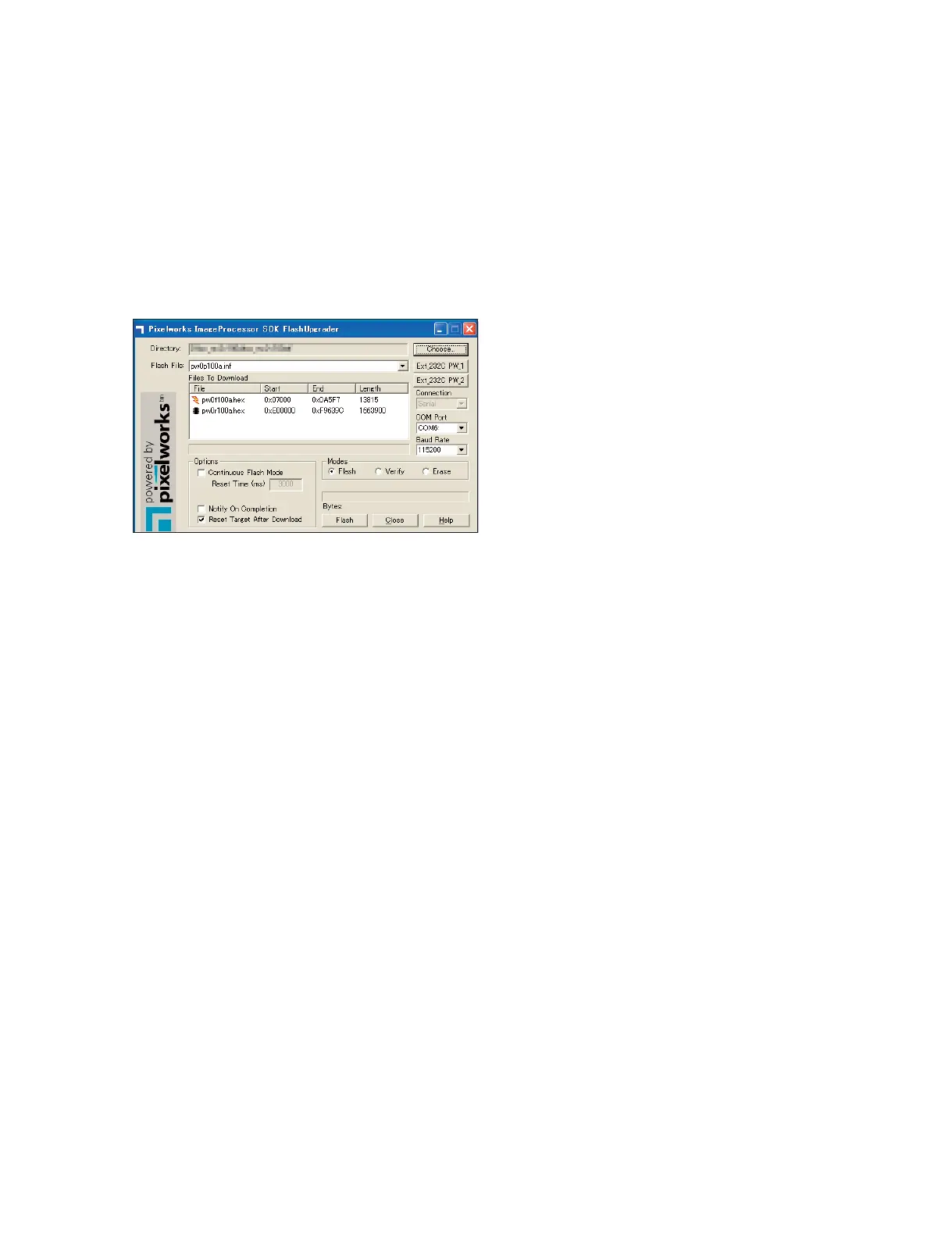
3. Double-click FlashUpgraderForSony35.exe to start the application.
Application name: Pixelworks FlashUpgrader
Execution file name: FlashUpgraderForSony35.exe
Version: 3.5 or later
4. Select the COM port to COM port number used for connecting PC.
5. Select the Baud Rate to “115200”.
6. Click the [Choose...] button.
The file selection window appears.
7. Select the upgrade file.
File to be selected: pw0p****.inf
(**** means version number. Example: pw0p100a.inf)
8. The two hex files appear on the Files To Download field.
9. Click the [Ext|
_
|232C|PW|
_
|1] button.
10. Click the [Flash] button.
The upgrading starts and the status bar appears. And the [Flash] button changes to the [Cancel]
button.
11. After completed, the [Cancel] button changes to the [Flash] button.
12. Disconnect the power cord.


 To Next Page