– 6 –
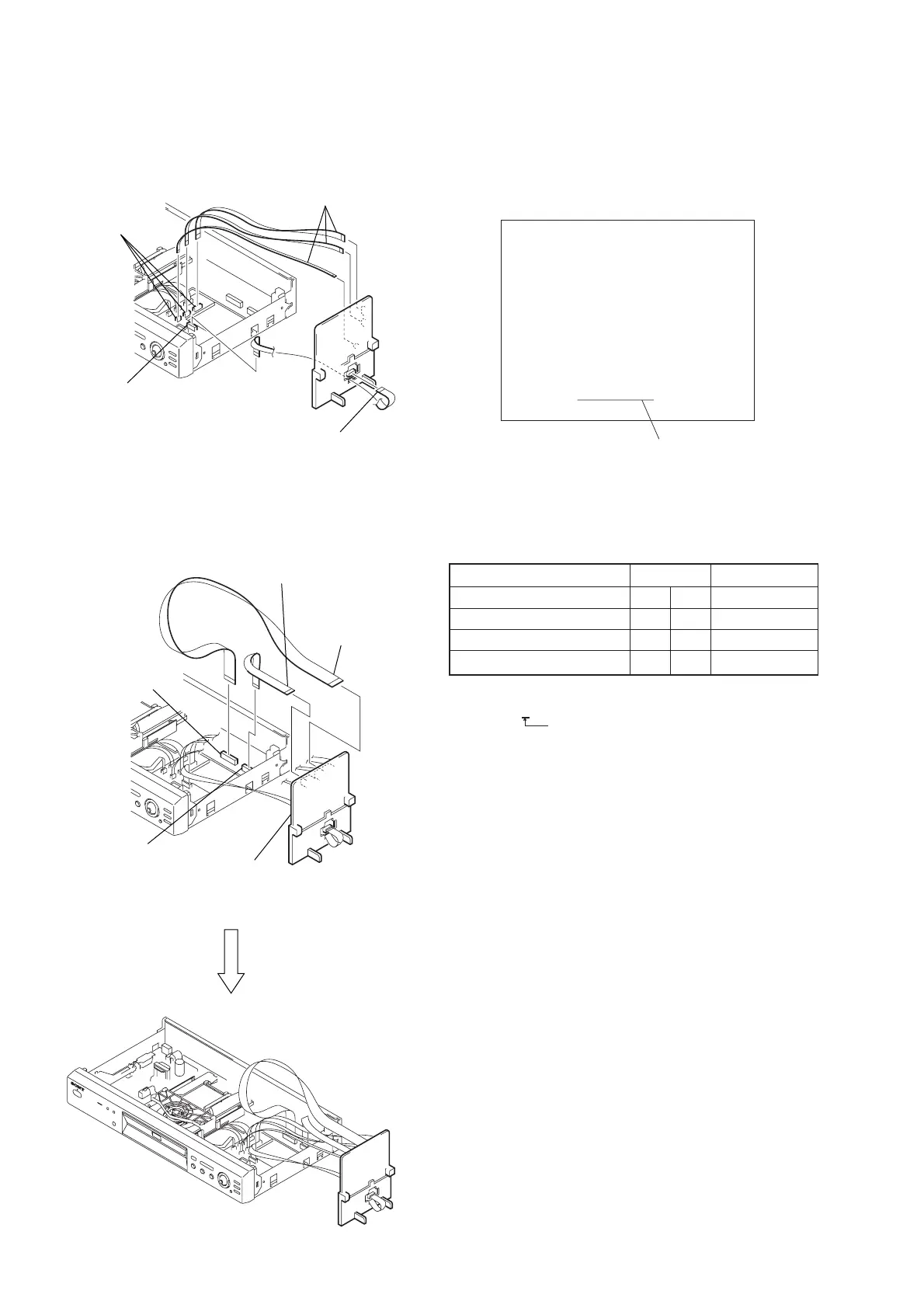
5) Set the four flexible flat cables as shown in Fig. 4.
Fig. 4
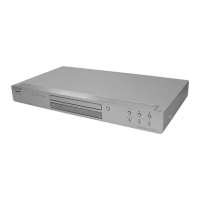
6) Set the MB-98 board as shown in Fig. 5, Fig.6.
Fig. 5
Fig. 6
4 Connector (FFC15P: CN110)
2 Flexible flat cables
(FFC15P: CN201)
3 Three connectors
(FFC26P: CN102/
FFC9P: CN104/
FFC5P: CN106)
1 Three flexible flat cables
(FFC26P: CN201/
FFC9P: CN202/
FFC5P: CN402)
1 Connector
(FFC25P: CN203)
3 Connector
(FFC15P: CN301)
2 Flexible flat cable
(FFC25P: CN801)
4 Flexible flat cable
(FFC15P: CN802)
MB-98 board
4. HOW TO DISCRIMINATE MODEL TYPES IN
AEP MODEL
1) Start up the test mode, display “Test Mode Menu” as shown
below on the monitor, and confirm the model name.
2) Confirm the model type with the menu “2-4 Model Type” in
the test mode, then discriminate the model with referring the
table shown below.
(Refer to page 6-2 to confirm “2-4 Model Type”)
Model Type Model Display
AEP (DPX1411BM) 1 3 DPX-1411CE
AEP (DPX1411HM) 1 3 DPX-1411CE
AEP (DPX1412BM) 1 4 DPX-1412CE
AEP (DPX1412HM) 1 4 DPX-1412CE
• Description about model name
DPX14xxBM
Color of set
B : Black
H : Titanium gray
Model Display
Test Mode Menu
0. Syscon Diagnosis
1. Drive Auto Adjustment
2. Drive Manual Operation
3. Mecha Aging
4. Emergency History
5. Version Information
6. Video Level Adjustment
Exit: POWER Key
_
Model : DPX-14xxxx
Revision : 1.xxxx Last Off: xx



 To Next Page