1-17
69
Using Various Additional Functions
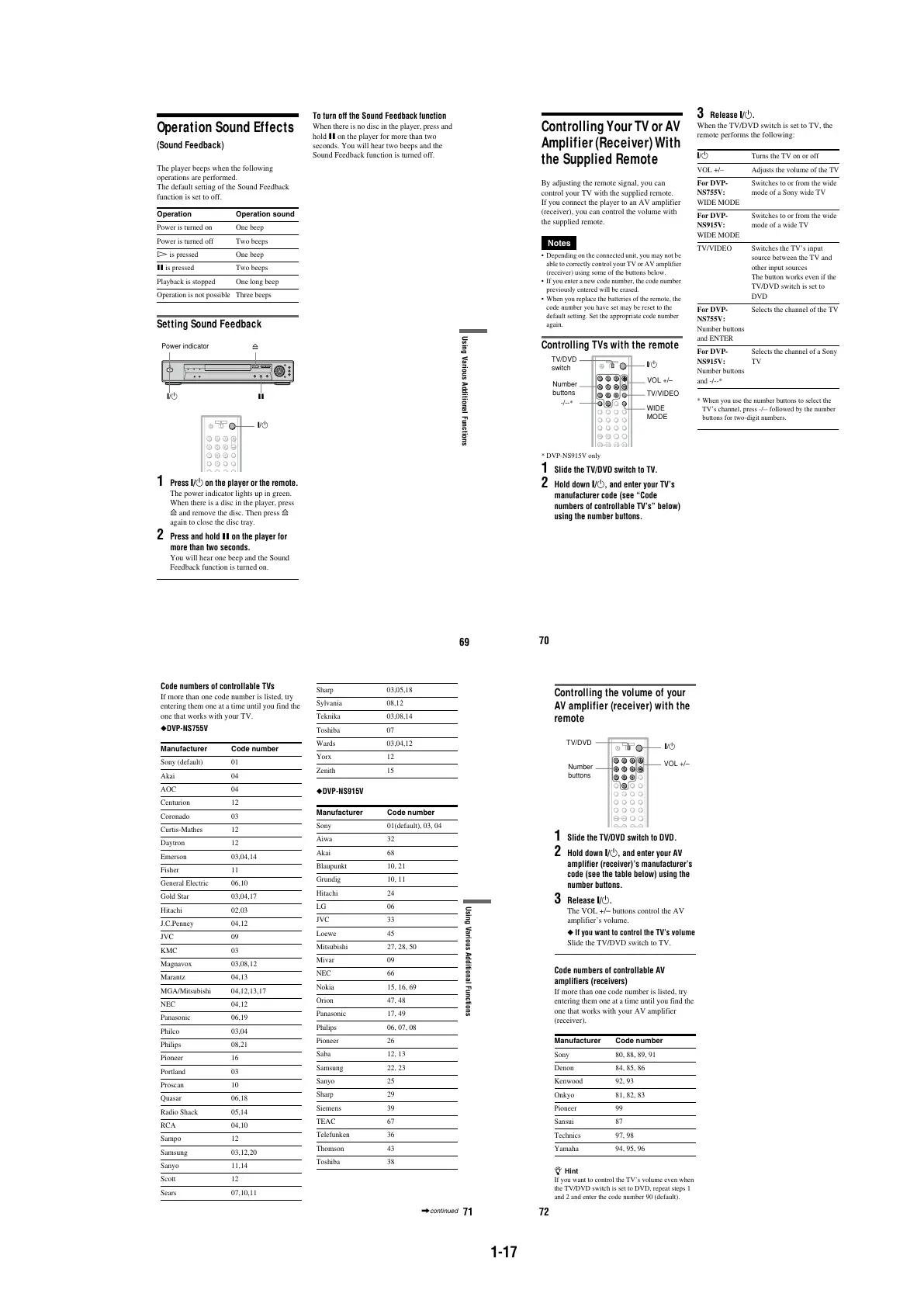
Operation Sound Effects
(Sound Feedback)
The player beeps when the following
operations are performed.
The default setting of the Sound Feedback
function is set to off.
Setting Sound Feedback
1
Press [/1 on the player or the remote.
The power indicator lights up in green.
When there is a disc in the player, press
A and remove the disc. Then press A
again to close the disc tray.
2
Press and hold X on the player for
more than two seconds.
You will hear one beep and the Sound
Feedback function is turned on.
To turn off the Sound Feedback function
When there is no disc in the player, press and
hold X on the player for more than two
seconds. You will hear two beeps and the
Sound Feedback function is turned off.
Operation Operation sound
Power is turned on One beep
Power is turned off Two beeps
H is pressed One beep
X is pressed Two beeps
Playback is stopped One long beep
Operation is not possible Three beeps
[/1
Power indicator
A
X
[/1
70
Controlling Your TV or AV
Amplifier (Receiver) With
the Supplied Remote
By adjusting the remote signal, you can
control your TV with the supplied remote.
If you connect the player to an AV amplifier
(receiver), you can control the volume with
the supplied remote.
Notes
•Depending on the connected unit, you may not be
able to correctly control your TV or AV amplifier
(receiver) using some of the buttons below.
• If you enter a new code number, the code number
previously entered will be erased.
•When you replace the batteries of the remote, the
code number you have set may be reset to the
default setting. Set the appropriate code number
again.
Controlling TVs with the remote
* DVP-NS915V only
1 Slide the TV/DVD switch to TV.
2 Hold down [/1, and enter your TV’s
manufacturer code (see “Code
numbers of controllable TV’s” below)
using the number buttons.
3 Release [/1.
When the TV/DVD switch is set to TV, the
remote performs the following:
*When you use the number buttons to select the
TV’s channel, press -/-- followed by the number
buttons for two-digit numbers.
[/1
VOL +/–
WIDE
MODE
TV/VIDEO
Number
buttons
TV/DVD
switch
-/--*
[/1 Turns the TV on or off
VOL +/– Adjusts the volume of the TV
For DVP-
NS755V:
WIDE MODE
Switches to or from the wide
mode of a Sony wide TV
For DVP-
NS915V:
WIDE MODE
Switches to or from the wide
mode of a wide TV
TV/VIDEO Switches the TV’s input
source between the TV and
other input sources
The button works even if the
TV/DVD switch is set to
DVD
For DVP-
NS755V:
Number buttons
and ENTER
Selects the channel of the TV
For DVP-
NS915V:
Number buttons
and -/--*
Selects the channel of a Sony
TV
71
Using Various Additional Functions
Code numbers of controllable TVs
If more than one code number is listed, try
entering them one at a time until you find the
one that works with your TV.
◆DVP-NS755V
◆DVP-NS915V
Manufacturer Code number
Sony (default) 01
Akai 04
AOC 04
Centurion 12
Coronado 03
Curtis-Mathes 12
Daytron 12
Emerson 03,04,14
Fisher 11
General Electric 06,10
Gold Star 03,04,17
Hitachi02,03
J.C.Penney 04,12
JVC 09
KMC 03
Magnavox 03,08,12
Marantz 04,13
MGA/Mitsubishi 04,12,13,17
NEC 04,12
Panasonic 06,19
Philco 03,04
Philips 08,21
Pioneer 16
Portland 03
Proscan 10
Quasar 06,18
Radio Shack 05,14
RCA 04,10
Sampo 12
Samsung 03,12,20
Sanyo 11,14
Scott 12
Sears 07,10,11
Sharp 03,05,18
Sylvania 08,12
Teknika 03,08,14
Toshiba 07
Wards 03,04,12
Yorx 12
Zenith 15
Manufacturer Code number
Sony 01(default), 03, 04
Aiwa 32
Akai 68
Blaupunkt 10, 21
Grundig 10, 11
Hitachi 24
LG 06
JVC 33
Loewe 45
Mitsubishi 27, 28, 50
Mivar 09
NEC 66
Nokia 15, 16, 69
Orion 47, 48
Panasonic 17, 49
Philips 06, 07, 08
Pioneer 26
Saba 12, 13
Samsung 22, 23
Sanyo 25
Sharp 29
Siemens 39
TEAC 67
Telefunken 36
Thomson 43
Toshiba 38
,continued
72
Controlling the volume of your
AV amplifier (receiver) with the
remote
1
Slide the TV/DVD switch to DVD.
2
Hold down [/1, and enter your AV
amplifier (receiver)’s manufacturer’s
code (see the table below) using the
number buttons.
3
Release [/1.
The VOL +/– buttons control the AV
amplifier’s volume.
◆ If you want to control the TV’s volume
Slide the TV/DVD switch to TV.
Code numbers of controllable AV
amplifiers (receivers)
If more than one code number is listed, try
entering them one at a time until you find the
one that works with your AV amplifier
(receiver).
z Hint
If you want to control the TV’s volume even when
the TV/DVD switch is set to DVD, repeat steps 1
and 2 and enter the code number 90 (default).
Manufacturer Code number
Sony 80, 88, 89, 91
Denon 84, 85, 86
Kenwood 92, 93
Onkyo 81, 82, 83
Pioneer 99
Sansui 87
Technics 97, 98
Yamaha 94, 95, 96
Number
buttons
[/1
VOL +/–
TV/DVD



 To Next Page