1-16
65
Using Various Additional Functions
Using Various Additional
Functions
Locking Discs (CUSTOM
PARENTAL CONTROL, PARENTAL
CONTROL)
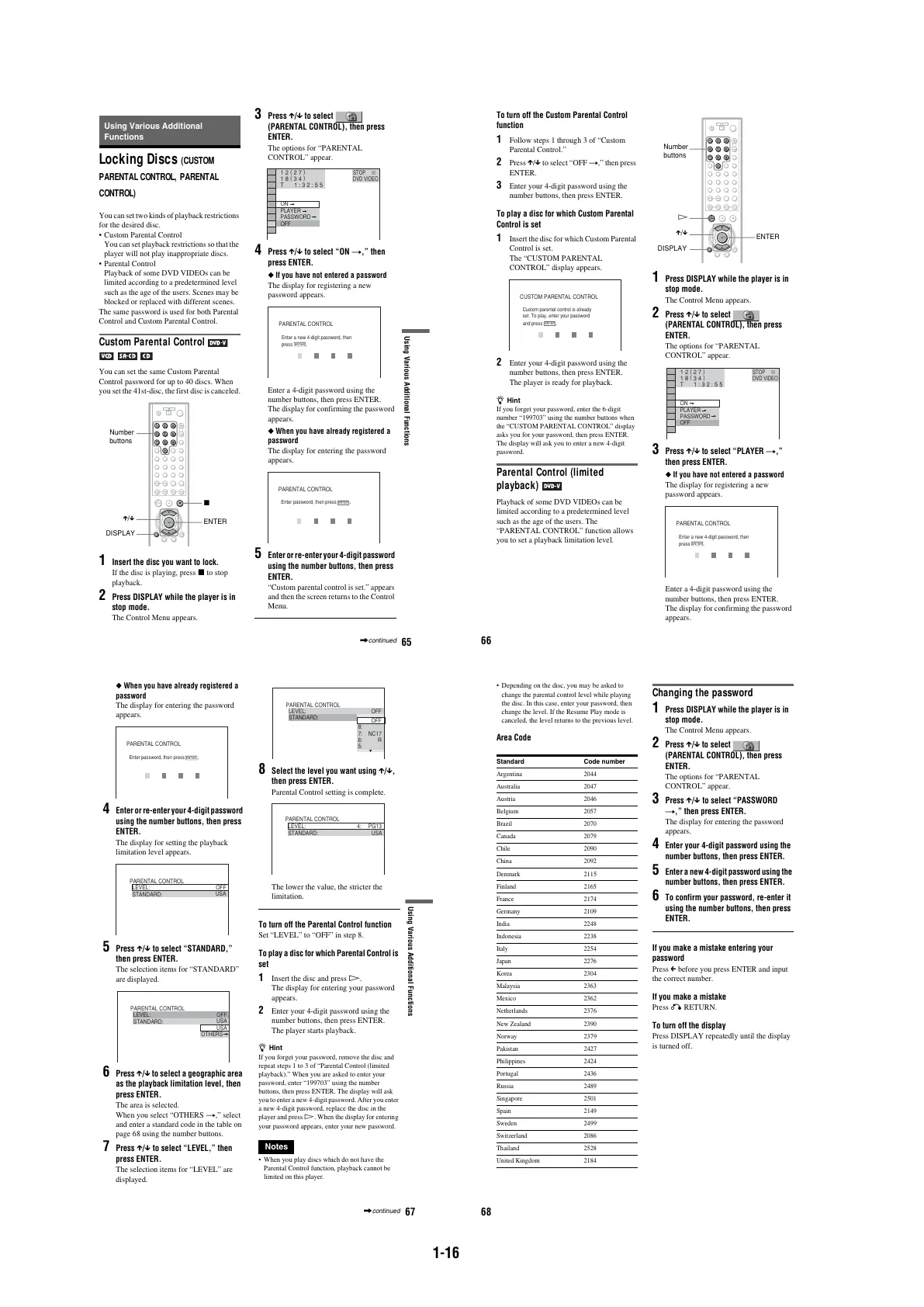
You can set two kinds of playback restrictions
for the desired disc.
•Custom Parental Control
You can set playback restrictions so that the
player will not play inappropriate discs.
•Parental Control
Playback of some DVD VIDEOs can be
limited according to a predetermined level
such as the age of the users. Scenes may be
blocked or replaced with different scenes.
The same password is used for both Parental
Control and Custom Parental Control.
Custom Parental Control
You can set the same Custom Parental
Control password for up to 40 discs. When
you set the 41st-disc, the first disc is canceled.
1 Insert the disc you want to lock.
If the disc is playing, press x to stop
playback.
2 Press DISPLAY while the player is in
stop mode.
The Control Menu appears.
3 Press X/x to select
(PARENTAL CONTROL), then press
ENTER.
The options for “PARENTAL
CONTROL” appear.
4 Press X/x to select “ON t,” then
press ENTER.
◆ If you have not entered a password
The display for registering a new
password appears.
Enter a 4-digit password using the
number buttons, then press ENTER.
The display for confirming the password
appears.
◆ When you have already registered a
password
The display for entering the password
appears.
5 Enter or re-enter your 4-digit password
using the number buttons, then press
ENTER.
“Custom parental control is set.” appears
and then the screen returns to the Control
Menu.
X/x
Number
buttons
ENTER
DISPLAY
x
OFF
PASSWORD
PLAYER
ON
DVD VIDEO
1 8
(
3 4
)
1 2
(
2 7
)
T
1 : 3 2 : 5 5
STOP
PARENTAL CONTROL
Enter a new 4-digit password, then
press
.
ENTER
PARENTAL CONTROL
Enter password, then press
.
ENTER
,continued
66
To turn off the Custom Parental Control
function
1 Follow steps 1 through 3 of “Custom
Parental Control.”
2 Press X/x to select “OFF t,” then press
ENTER.
3 Enter your 4-digit password using the
number buttons, then press ENTER.
To play a disc for which Custom Parental
Control is set
1 Insert the disc for which Custom Parental
Control is set.
The “CUSTOM PARENTAL
CONTROL” display appears.
2 Enter your 4-digit password using the
number buttons, then press ENTER.
The player is ready for playback.
z Hint
If you forget your password, enter the 6-digit
number “199703” using the number buttons when
the “CUSTOM PARENTAL CONTROL” display
asks you for your password, then press ENTER.
The display will ask you to enter a new 4-digit
password.
Parental Control (limited
playback)
Playback of some DVD VIDEOs can be
limited according to a predetermined level
such as the age of the users. The
“PARENTAL CONTROL” function allows
you to set a playback limitation level.
1
Press DISPLAY while the player is in
stop mode.
The Control Menu appears.
2
Press X/x to select
(PARENTAL CONTROL), then press
ENTER.
The options for “PARENTAL
CONTROL” appear.
3
Press X/x to select “PLAYER t,”
then press ENTER.
◆ If you have not entered a password
The display for registering a new
password appears.
Enter a 4-digit password using the
number buttons, then press ENTER.
The display for confirming the password
appears.
CUSTOM PARENTAL CONTROL
Custom parental control is already
set. To play, enter your password
and press
.
ENTER
Number
buttons
X/x
ENTER
DISPLAY
H
OFF
PASSWORD
PLAYER
ON
DVD VIDEO
STOP
1 8
(
3 4
)
1 2
(
2 7
)
T
1 : 3 2 : 5 5
PARENTAL CONTROL
Enter a new 4-digit password, then
press
.
ENTER
67
Using Various Additional Functions
◆ When you have already registered a
password
The display for entering the password
appears.
4 Enter or re-enter your 4-digit password
using the number buttons, then press
ENTER.
The display for setting the playback
limitation level appears.
5 Press X/x to select “STANDARD,”
then press ENTER.
The selection items for “STANDARD”
are displayed.
6 Press X/x to select a geographic area
as the playback limitation level, then
press ENTER.
The area is selected.
When you select “OTHERS t,” select
and enter a standard code in the table on
page 68 using the number buttons.
7 Press X/x to select “LEVEL,” then
press ENTER.
The selection items for “LEVEL” are
displayed.
8 Select the level you want using X/x,
then press ENTER.
Parental Control setting is complete.
The lower the value, the stricter the
limitation.
To turn off the Parental Control function
Set “LEVEL” to “OFF” in step 8.
To play a disc for which Parental Control is
set
1
Insert the disc and press H.
The display for entering your password
appears.
2
Enter your 4-digit password using the
number buttons, then press ENTER.
The player starts playback.
z Hint
If you forget your password, remove the disc and
repeat steps 1 to 3 of “Parental Control (limited
playback).” When you are asked to enter your
password, enter “199703” using the number
buttons, then press ENTER. The display will ask
you to enter a new 4-digit password. After you enter
a new 4-digit password, replace the disc in the
player and press H. When the display for entering
your password appears, enter your new password.
Notes
•When you play discs which do not have the
Parental Control function, playback cannot be
limited on this player.
PARENTAL CONTROL
Enter password, then press
.
ENTER
PARENTAL CONTROL
LEVEL: OFF
USA
STANDARD:
PARENTAL CONTROL
LEVEL: OFF
USA
STANDARD:
USA
OTHERS
PARENTAL CONTROL
LEVEL: OFF
OFF
STANDARD:
8:
7:
6:
5:
NC17
R
PARENTAL CONTROL
LEVEL:
STANDARD: USA
4: PG13
,continued
68
•Depending on the disc, you may be asked to
change the parental control level while playing
the disc. In this case, enter your password, then
change the level. If the Resume Play mode is
canceled, the level returns to the previous level.
Area Code
Changing the password
1 Press DISPLAY while the player is in
stop mode.
The Control Menu appears.
2 Press X/x to select
(PARENTAL CONTROL), then press
ENTER.
The options for “PARENTAL
CONTROL” appear.
3 Press X/x to select “PASSWORD
t,” then press ENTER.
The display for entering the password
appears.
4 Enter your 4-digit password using the
number buttons, then press ENTER.
5 Enter a new 4-digit password using the
number buttons, then press ENTER.
6 To confirm your password, re-enter it
using the number buttons, then press
ENTER.
If you make a mistake entering your
password
Press C before you press ENTER and input
the correct number.
If you make a mistake
Press O RETURN.
To turn off the display
Press DISPLAY repeatedly until the display
is turned off.
Standard Code number
Argentina 2044
Australia 2047
Austria 2046
Belgium 2057
Brazil 2070
Canada 2079
Chile 2090
China 2092
Denmark 2115
Finland 2165
France 2174
Germany 2109
India 2248
Indonesia 2238
Italy 2254
Japan 2276
Korea 2304
Malaysia 2363
Mexico 2362
Netherlands 2376
New Zealand 2390
Norway 2379
Pakistan 2427
Philippines 2424
Portugal 2436
Russia 2489
Singapore 2501
Spain 2149
Sweden 2499
Switzerland 2086
Thailand 2528
United Kingdom 2184



 To Next Page