HT-ST9
13
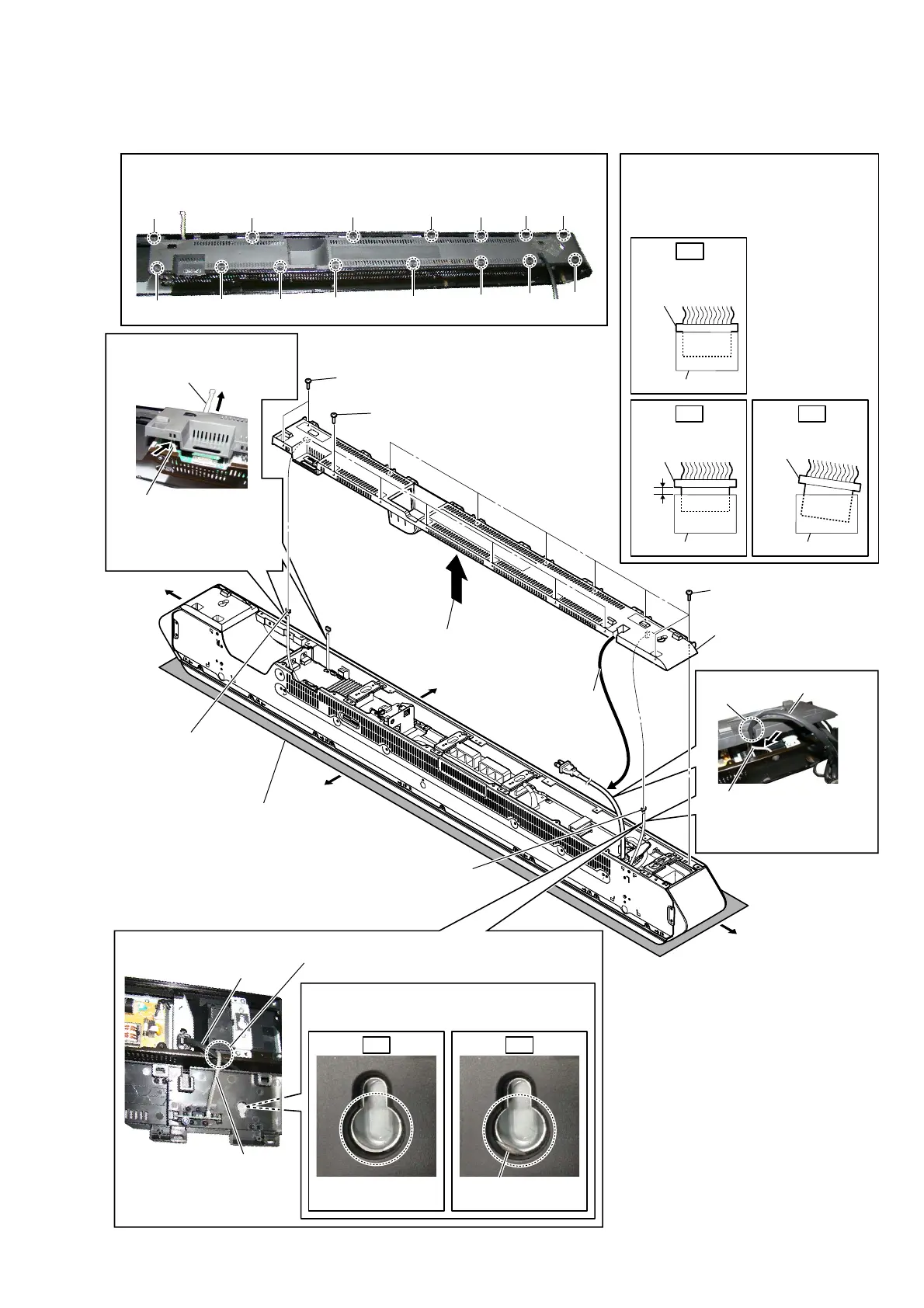
2-3. REAR PANEL (L) BLOCK
1 two step screws
(B3 u 6)
– Rear view –
:ire VeWWiQJ
:ire VeWWiQJ
Note 1:
Lay a soft piece of cloth
under the unit to avoid
damaging the grille assy.
3 Draw the power cord
out of the groove.
power cord
2
Lift up the rear panel (L) block
in the direction of the arrow.
1 six step screws
(B3 u 6)
1 seven step screws
(B3 u 6)
4 REPEATER_REP2 board
connector
(CN1651)
5 REPEATER_REP1 board
connector
(CN1601)
6
rear panel (L) block
Note 2:
Pass the REPEATER_REP2 board cable
over the top of the power cord.
– Top view –
REPEATER_REP2
board cable
power
cord
REPEATER_REP2
board cable
OK NG
Note 3:
When installing the rear panel (L) block,
be careful not to pinch the REPEATER_REP2
board cable.
Right side
Top side
Left side
Bottom side
Note 4:
When installing screws (B3 × 6), follow the installing procedure
in the numerical order given.
7
1
2
3
4 5
qg
qf qd
8
9
0
qa
qs
6
Insert only part way.
Insert straight into
the interior.
connector
Insert at a slant.
connector
connector
connector
connector connector
OK
NG NG
+ow Wo iQVWaOO WKe FoQQeFWor
Insert the connector straight into the interior.
There is a possibility that using this unit
without the connector correctly installed will
damage it.
:ire VeWWiQJ
groove
Note 5:
When installing the rear
panel (L) block, push
the REPEATER_REP2
board cable into the unit.
Note 5:
When installing the rear
panel (L) block, push
the REPEATER_REP1
board cable into the unit.
Note 6:
Draw out the KEY board
cable before installation.



 To Next Page