HT-ST9
36
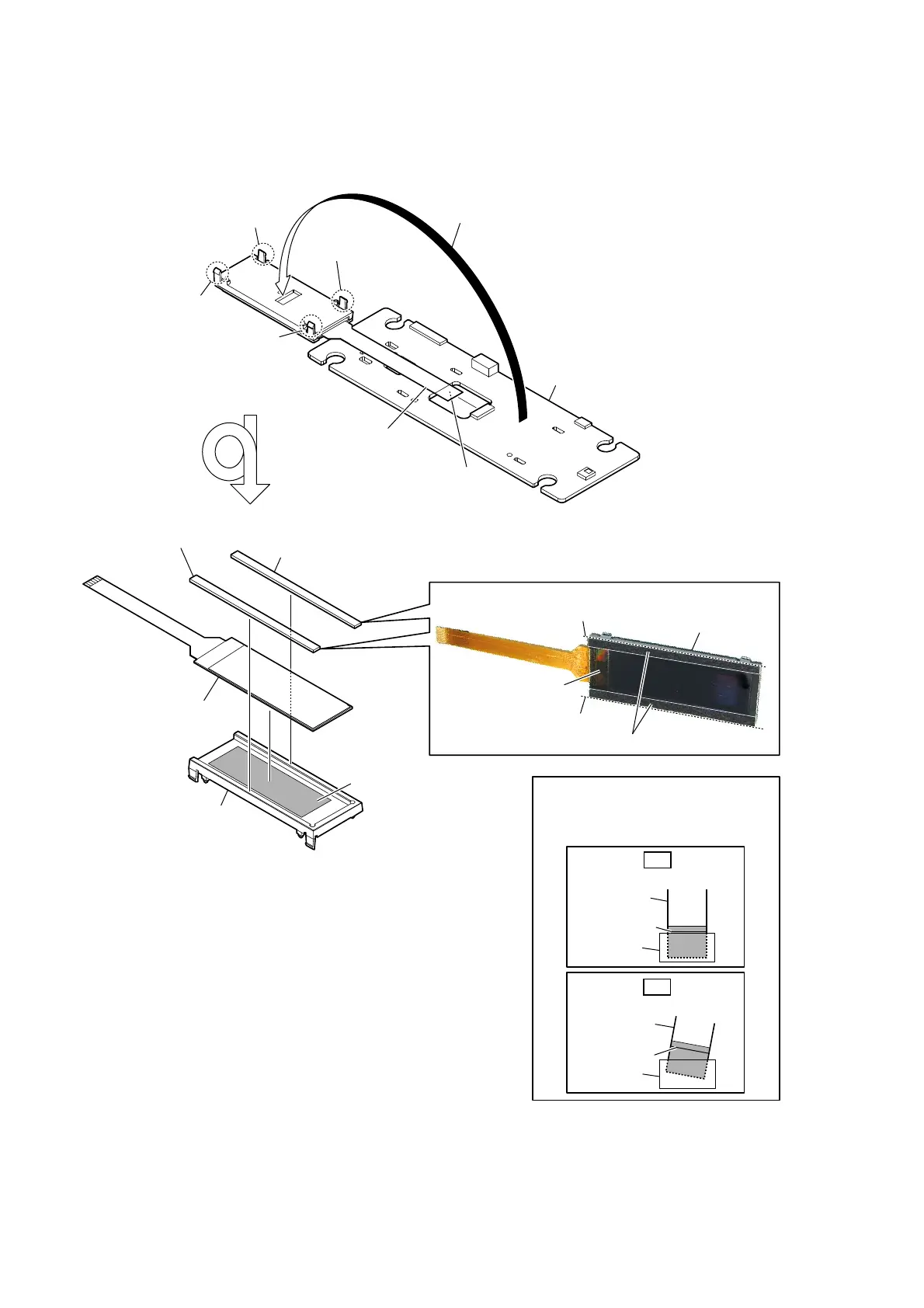
2-28. DISPLAY BOARD, OLED DISPLAY (OLED1)
colored line
Insert straight into the interior.
flexible board
connector
OK
colored line
Insert at a slant.
flexible board
connector
NG
How to install the flexible board
When installing the flexible board,
ensure that the colored line is parallel
to the connector after insertion.
1 claw
1 claw
1 claw
1 claw
2
Open the OLED display block
in the direction of the arrow.
3
OLED display
flexible board
(CN1306)
4 DISPLAY board
5 cushion (window)
two cushions (window)
8
OLED display (OLED1)
OLED display (OLED1)
7 holder (LED) block
holder (LED)
5 cushion (window)
6 Peel the OLED display off
of the tape (OLED).
– DISPLAY board block front bottom view –
– OLED display block front bottom view –
The lower side is
the terminal side.
PastinJ position of the cXshion window)
guide line
guide line



 To Next Page