HT-ST9
38
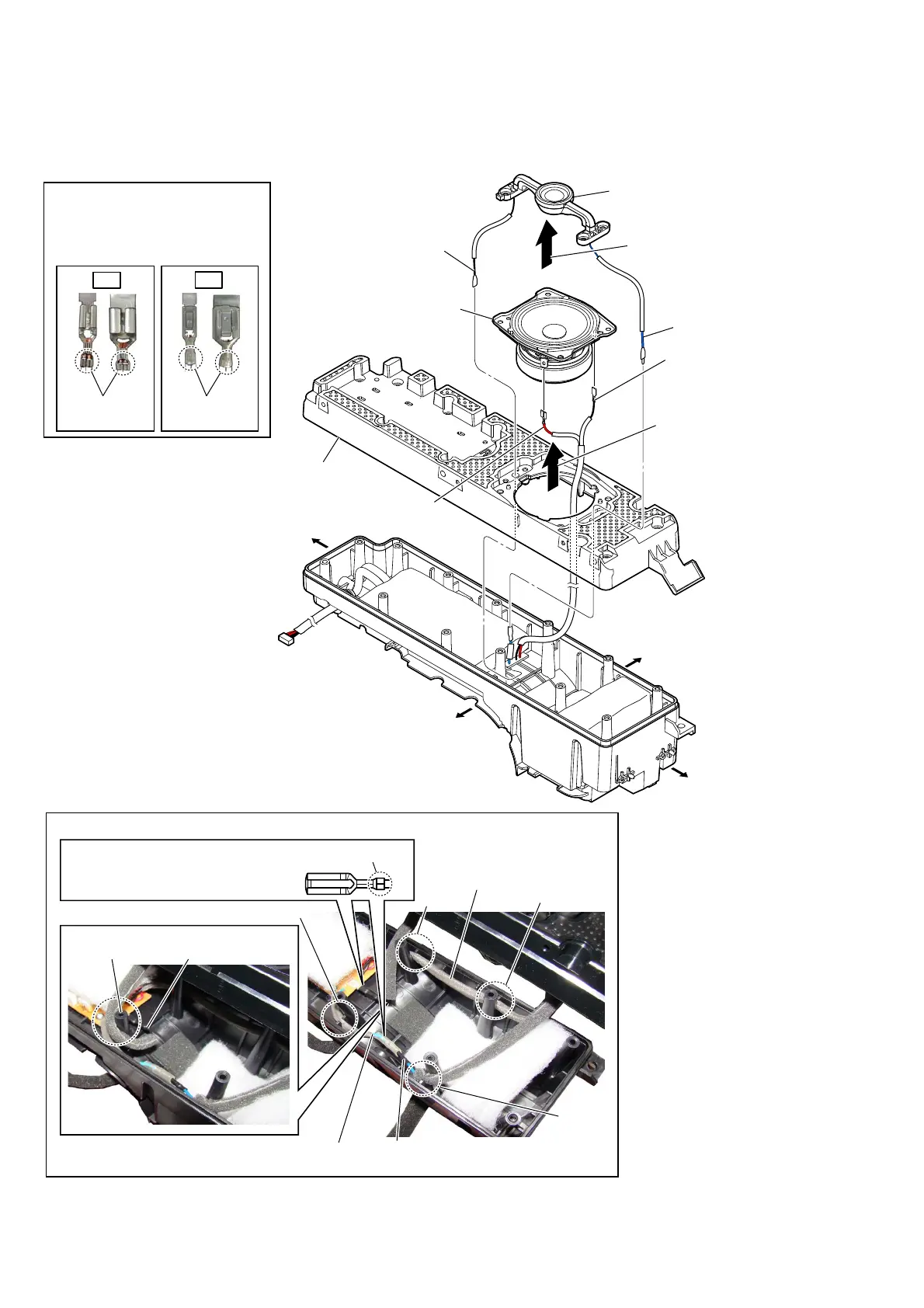
2-30. LOUDSPEAKER (SP3, SP4) (R-ch)-2
OK
NG
Note 1:
When installing the speaker wire,
make the position of caulking of
terminals is outside.
Caulking is
outside.
Caulking is
inside.
– Right speaker block front view –
groove
screw boss
terminal [blue]
(tweeter)
– Cabinet (R) block top view –
speaker wire
(woofer)
terminal [black]
(tweeter)
groove
groove
groove
4 loudspeaker (6.5 cm)
(woofer (front Rch))
(SP4)
3 terminal
(narrow side)
[black]
3 terminal
(wide side)
[red]
2
Lift up the loudspeaker
(SP4) in the direction
of the arrow.
1
Lift up the loudspeaker (SP3)
in the direction of the arrow.
5 baffle (R)
6 terminal
[black]
6 terminal [blue]
7 loudspeaker (18 mm)
(tweeter (front Rch))
(SP3)
Installation direction for
the woofer speaker wire
Right side
Top side
Left side
Bottom side
terminal [blue]
(MOUNTED board)
Note 2:
When installing the speaker wire,
make the position of caulking of
terminals is upside.
Caulking is upside.
+ow to install the speaker wire



 To Next Page