44
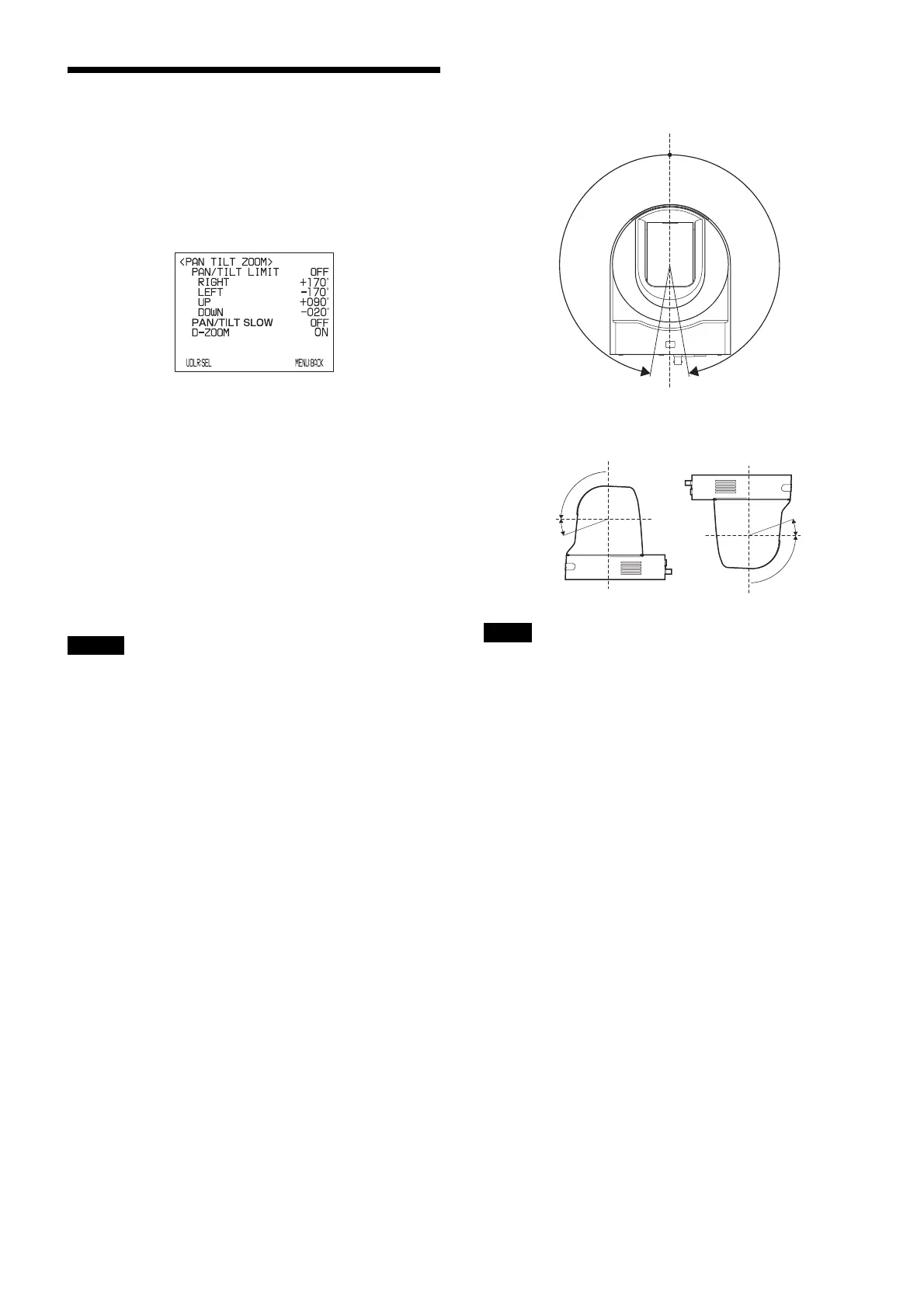
PAN TILT ZOOM Menu
The PAN TILT ZOOM menu is used to select the pan/tilt/
zoom mode.
You can also set via a Web browser.
See “PTZF control Tab” on page 63.
PAN/TILT LIMIT (pan/tilt limit)
Set PAN/TILT LIMIT to ON to limit the range of pan/tilt.
You can select the following values:
RIGHT: +170° to –169°, selectable in 1° steps.
LEFT: +169° to –170°, selectable in 1° steps.
UP: +90° to –29° (IMAGE FLIP: OFF)
+30° to –89° (IMAGE FLIP: ON)
Selectable in 1° steps.
DOWN: +89° to –30° (IMAGE FLIP: OFF)
+29° to –90° (IMAGE FLIP: ON)
Selectable in 1° steps.
• If you change PAN/TILT LIMIT to OFF, the set values
will be returned to the factory settings.
• If you set PAN/TILT LIMIT to OFF, the set values will
be returned to the factory settings.
• The set value displayed will be updated when you
release the joystick right/left operation. The display
does not change during the pan/tilt operation.
• The PAN/TILT LIMIT will be applied immediately
after it is set. If you want to reflect the status just before
the power is turned off when turning the camera on
again, set POSITION 1 to remember the setting.
Setting the range of the RIGHT/LEFT movement
Setting the range of the UP/DOWN movement
When you turn the camera to the right or left beyond the
100° with the camera pointed downward by 30°, the
camera may be caught on the lens, depending on the zoom
position of the lens.
PAN/TILT SLOW (Slow Pan Tilt mode)
When this function is set to ON, the active speed of PAN/
TILT LIMIT will be slow, making it easy to shoot slow-
moving objects.
D-ZOOM (digital zoom)
You can set digital zoom to ON or OFF. When set to OFF,
digital zoom does not operate, and only optical zoom is
available. When set to ON, digital zoom takes over after
optical zoom reaches MAX (×30). Up to maximum ×360
can be zoomed digitally.
Notes
Note
–170° +170°
CENTER (0°)
(Eflip: OFF)
+90°
–30°
0°
(Eflip: OFF)
+30°
0°
–90°
(Eflip: ON)



 To Next Page