Additional Connections
The following connections are for accessories
that will enhance your viewing options.
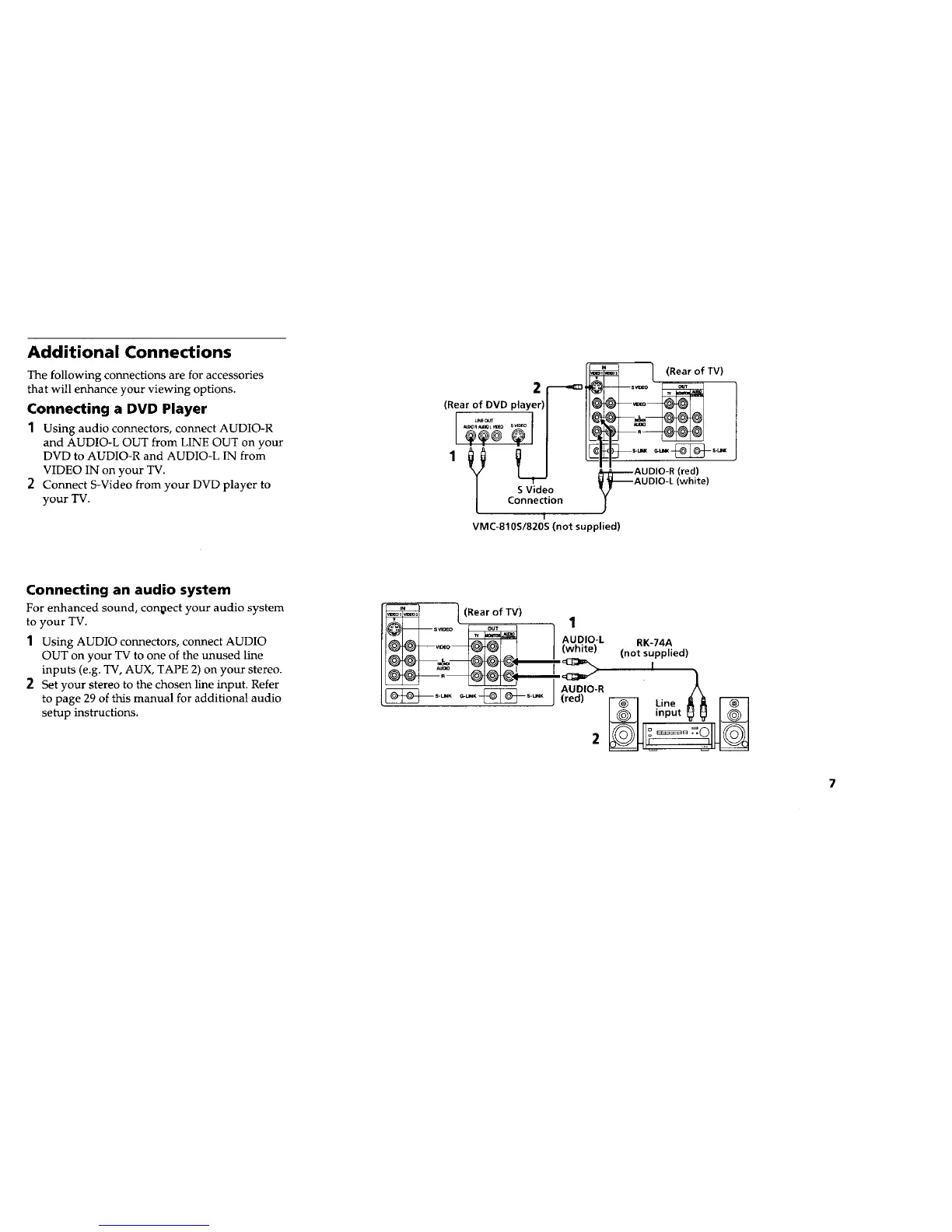
Connecting a DVD Player
1 Using audio connectors, connect AUDIO-R
and AUDIO-L OUT from LINE OUT on your
DVD to AUDIO-R and AUDIO-L IN from
VIDEO IN on your TV.
2 Connect S-Video from your DVD player to
your TV.
Connecting an audio system
For enhanced sound, connect your audio system
to your TV.
1 Using AUDIO connectors, connect AUDIO
OUT on your TV to one of the unused line
inputs (e.g. TV, AUX, TAPE 2) on your stereo.
2 Set your stereo to the chosen line input. Refer
to page 29 of this manual for additional audio
setup instructions.
(Rear of TV)
2
(Rear of DVD player)
1
Y SVideo
!
Connection
1
VMC-810S/820S (not supplied)
€_LI_ @ S*tm_
AUDIO-R (red)
AUDIO-L (white)
1 (Rear of TV)
1
I_--d[_ s_° _ AUDIO-L RK-74A
I_°_ °_d)l_ (white> (not supplied)
,_, ,_,1 _=_ _.I.Z_I_.I I > I
i
...._='-_- .... (_r_'°R_ _ino,_, r-_
I_J input_ I_@_-1
7










 To Next Page