VCR Connections
You must connect the IR Blaster in order to operate your
cable box with the GUIDE Plus+ feature.
Connecting an antennalcable TV
system with a VCR
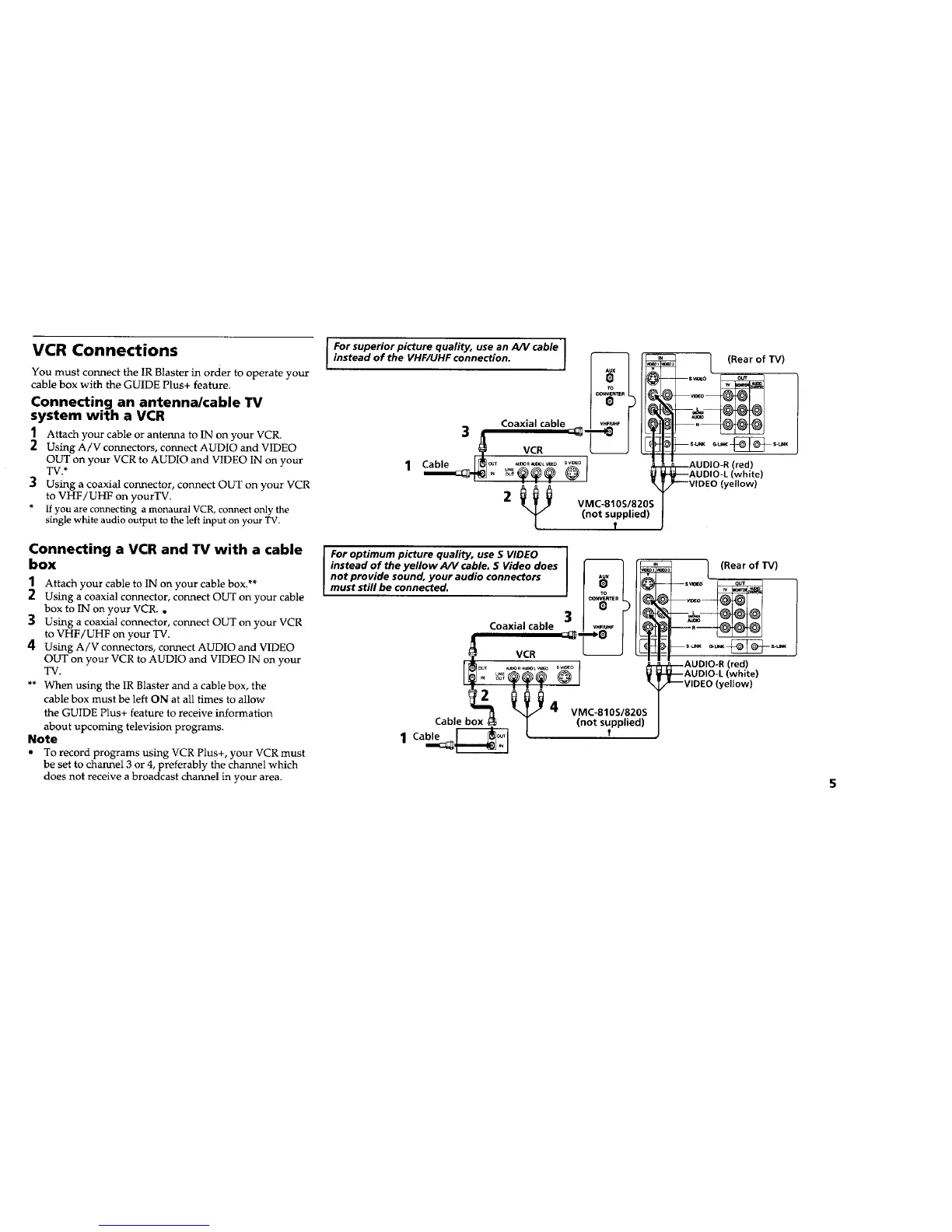
1 Attach your cable or antenna to IN on your VCR.
2 Using A/V connectors, connect AUDIO and VIDEO
OUT on your VCR to AUDIO and VIDEO IN on your
TV.*
] Using a coaxial connector, connect OUT on your VCR
to VHF/UHF on yourTV.
* If you are connecting a monaural VCR, connect only the
single white audio output to the left input on your TV.
I Forsuperiorpicture quality, use an AlVcable I
instead of the VHF/UHF connection.
3 Coaxial cable 4" _"'_"_r" 1
Cable_ VCR
1 _ _.._._ _°
2 _N_ VMC-810S/820S
(not supplied)
(Rear of TV)
(red)
Iwhite)
(yellow)
Connecting a VCR and TV with a cable
box
1 Attach your cable to IN on your cable box.**
2 Using a coaxial connector, connect OUT on your cable
box to IN on your VCR. o
3 Using a coaxial connector, connect OUT on your VCR
to VHF/UHF on your TV.
4 Using A/V connectors, connect AUDIO and VIDEO
OUT on your VCR to AUDIO and VIDEO IN on your
TV.
** When using the IR Blaster and a cable box, the
cable box must be left ON at all times to allow
the GUIDE Plus+ feature to receive information
about upcoming television programs.
Note
• To record programs using VCR Plus+, your VCR must
be set to channel 3 or 4, preferably the channel which
does not receive a broadcast channel in your area.
For optimum picture quality, use S VIDEO
instead of the yellow AIV cable. S Video does _ (Rear of W)
not provide sound, your audio connectors I _x I
must still be connected_ _ out
Coaxial cable 3 J_it
sv,_o J _---AUDIO-R (red)
,_'_'_ (_ V _L_ AUDIO-L (white)
I_ "_.'_ _ _ I _T/_--VIDEO (yellow)
Cable box _ l (not supplied)/
1 Cable [_'_[ ! J
5










 To Next Page