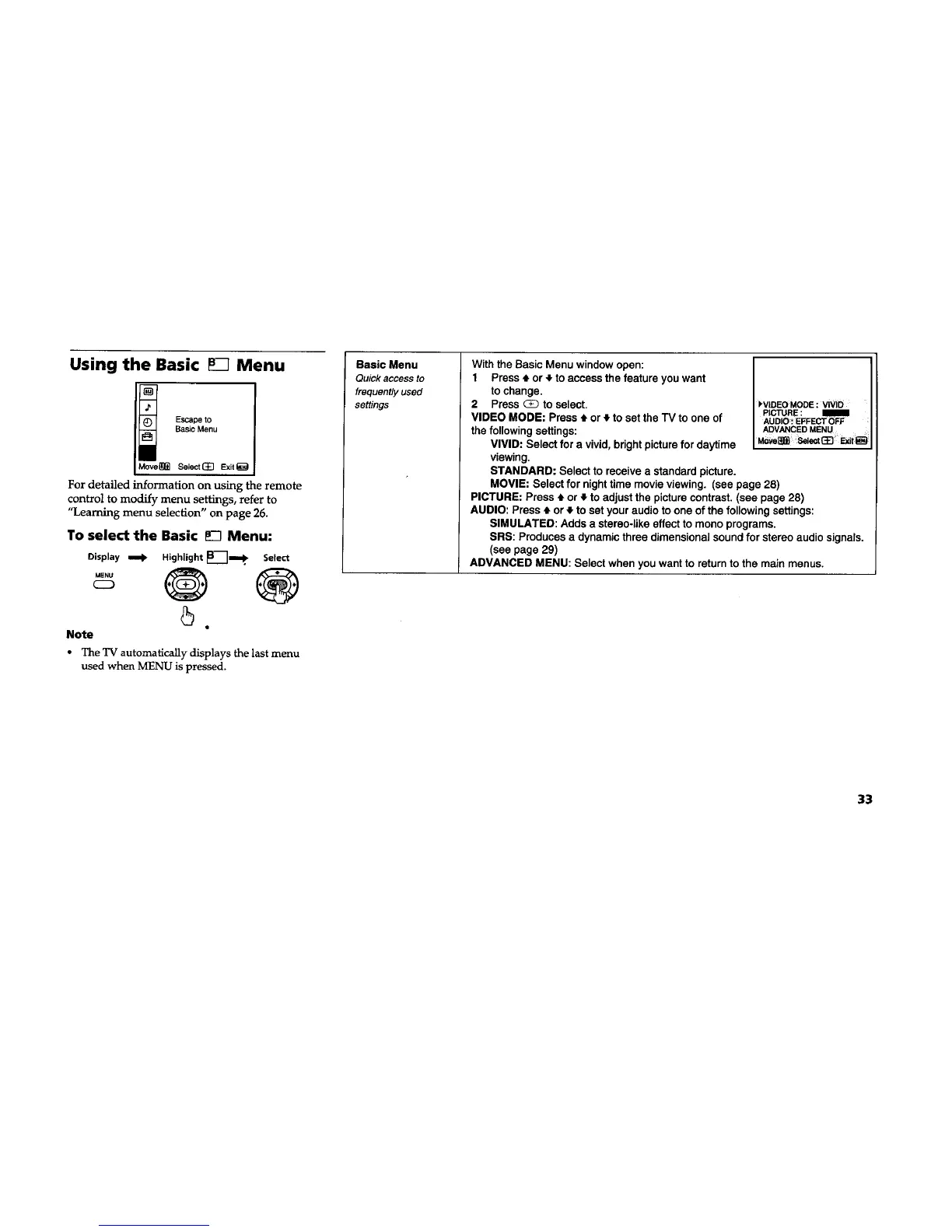
Using the Basic Menu
Escape to
Basic Menu
iMove_]_ Select(_ Exit_
For detailed information on using the remote
control to modify menu settings, refer to
"Learning menu selection" on page 26.
To select the Basic _-I Menu:
Display tomb Highlight _B_]m_, Select
++ 0 ®
5
Note
The TV automatically displays the last menu
used when MENU is pressed.
Basic Menu
Quick access to
frequently used
settings
With the Basic Menu window open:
1 Press * or + to access the feature you want
to change.
2 Press _ to select.
VIDEO MODE: Press # or 4 to set the TV to one of
the following settings:
VIVID: Select for a vivid, bright picturefor daytime
viewing.
STANDARD: Select to receive a standard picture,
MOVIE: Select for night time movie viewing. (see page 28)
PICTURE: Press t or ,I,to adjust the picturecontrast. (see page 28)
AUDIO: Press • or • to set your audio to one of the following settings:
SIMULATED: Adds a stereo-like effect to mono programs.
SRS: Produces a dynamic three dimensional sound for stereo audio signals.
(see page 29)
ADVANCED MENU: Select when you want to return to the main menus.
kVlDEO MODE : vIViD
PICTURE : m
AUDIO. EFFECT OFF
ADVANCEDMENU
33





 To Next Page