Im Using Your Menus (continued)
CHANNEL
BLOCK
Prevent child access
to certain channels
FAVORRE
CHANNEL
Quickaccess_
_vorite _anne_
VIDEO LABEL
Label connected
equipment for
easy recognition
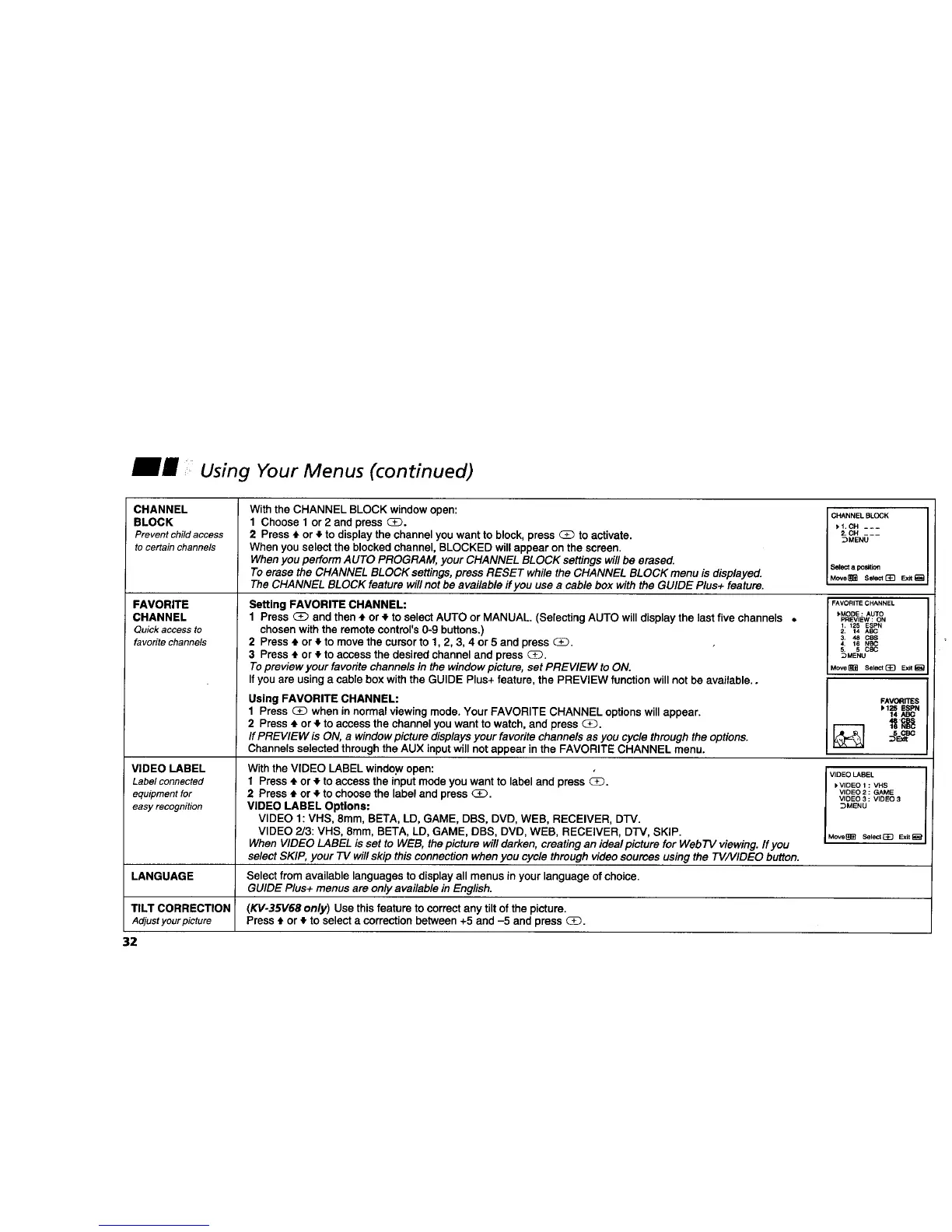
With the CHANNEL BLOCK window open:
1 Choose 1 or 2 and press _.
2 Press tl. or • to display the channel you want to block, press _ to activate.
When you select the blocked channel, BLOCKED will appear on the screen.
Whenyou perform AUTO PROGRAM, your CHANNEL BLOCK settings willbe erased.
To erase the CHANNEL BLOCK settings,press RESET while the CHANNEL BLOCK menu is displayed.
The CHANNEL BLOCK feature willnot be available ff you use a cable box with the GUIDE Plus+ feature.
Setting FAVORITE CHANNEL:
1 Press (_ and then • or _.to select AUTO or MANUAL. (Selecting AUTO will display the last five channels •
chosen with the remote control's 0-9 buttons.)
2 Press ,J or 4 to move the cursorto 1, 2, 3, 4 or 5 and press (_.
3 Press • or • to access the desired channel and press _.
Topreview your favoritechannels in the windowpicture, set PREVIEW to ON.
If you are using a cable box with the GUIDE Plus+ feature, the PREVIEW functionwill not be available..
Using FAVORITE CHANNEL:
1 Press _ when in normal viewing mode. Your FAVORITE CHANNEL options will appear.
2 Press ,t or ,_ to access the channel you want to watch, and press _.
If PREVIEW is ON, a window picture displaysyour favorite channels as you cycle through the options.
Channels selected through the AUX input willnot appear in the FAVORITE CHANNEL menu.
With the VIDEO LABEL windo.wopen:
1 Press ,I, or • to access the input mode you want to label and press _.
2 Press ,_ or • to choose the label and press _.
VIDEO LABEL Options:
VIDEO 1: VHS, 8mm, BETA, LD, GAME, DBS, DVD, WEB, RECEIVER, D'IV.
VIDEO 2/3: VHS, 8mm, BETA, LD, GAME, DBS, DVD, WEB, RECEIVER, DFV, SKIP.
When VIDEO LABEL is set to WEB, the picture will darken, creating an ideal picture for WebTV viewing. If you
select SKIP, your TV willskip thisconnection whenyou cycle through video sources using the TV/VIDEO button.
CHANNELBLOCK
_I. CH ---
2.CH ___
_MENU
Select a position
Move_ Seklc_ ExJt_
FAVORITE CHANNEL
)MODE : AUTO
PREVIEW : ON
1, 125 ESPN
2. 14 ABC
3. 48 CBS
4. 16 NBC
5. 5 CBC
_MENU
Move_ Select(_] Exit_
FAVORITES
1.125 ESPN
14
VIDEO LABEL
)VIDEO 1 : VHS
VIDEO2 : GAME
VIDEO 3 ; VIDEO 3
_MENU
Move_ Select_ Exit_
LANGUAGE Select from available languages to display all menus in your language of choice.
GUIDE Plus+ menus are only available in English.
TILT CORRECTION (KV-35V68 only) Use thisfeature to correct any tilt of the picture.
Adjustyourpicture Press t or _, to select a correction between +5 and -5 and press _.
32










 To Next Page