Troubleshooting
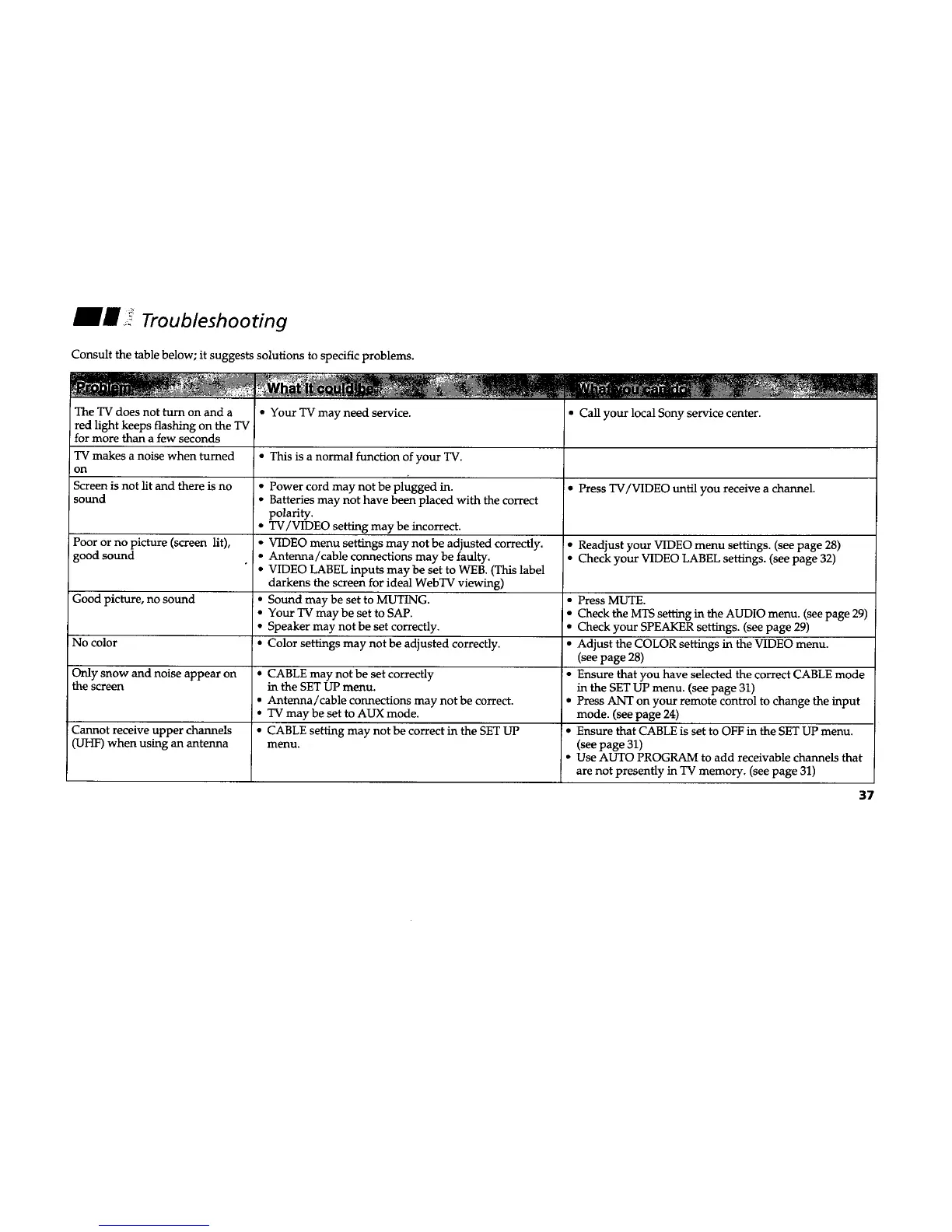
Consult the table below; it suggests solutions to specific problems.
The TV does not turn on and a
red light keeps flashing on the TV
for more than a few seconds
TV makes a noise when turned
on
Screen is not lit and there is no
sound
Poor or no picture (screen lit),
good sound
Good picture, no sound
No color
Only snow and noise appear on
the screen
Cannot receive upper channels
(UHF) when using an antenna
• Your TV may need service.
• This is a normal function of your TV.
• Power cord may not be plugged in.
• Batteries may not have been placed with the correct
polarity,
• TV/VIDEO setting may be incorrect.
• VIDEO menu settings may not be adjusted correctly.
• Antenna/cable connections maybe faulty.
• VIDEO LABEL inputs may be set to WEB. (This label
darkens the screen for ideal WebTV viewing)
I • Sound may be set to MUTING.
• Your TV may be set to SAP.
• Speaker may not be set correctly.
• Color settings may not be adjusted correctly.
• CABLE may not be set correctly
in the SET LIP menu.
• Antenna/cable connections may not be correct.
• TV may be set to AUX mode.
• CABLE setting may not be correct in the SET UP
menu.
• Call your local Sony service center.
• Press TV/VIDEO until you receive a channel.
• Readjust your VIDEO menu settings. (see page 28)
• Check your VIDEO LABEL settings. (see page 32)
• Press MUTE.
• Check the MTS setting in the AUDIO menu. (see page 29)
• Check your SPEAKER settings. (see page 29)
• Adjust the COLOR settings in the VIDEO menu.
(see page 28)
• Ensure that you have selected the correct CABLE mode
in the SET UP menu. (see page 31)
• Press ANT on your remote control to change the input
mode. (see page 24)
• Ensure that CABLE is set to OFF in the SET UP menu.
(see page 31)
• Use AUTO PROGRAM to add receivable channels that
are not presently in TV memory. (see page 31)
37










 To Next Page