Jm Using Your Menus
Learning menu selection
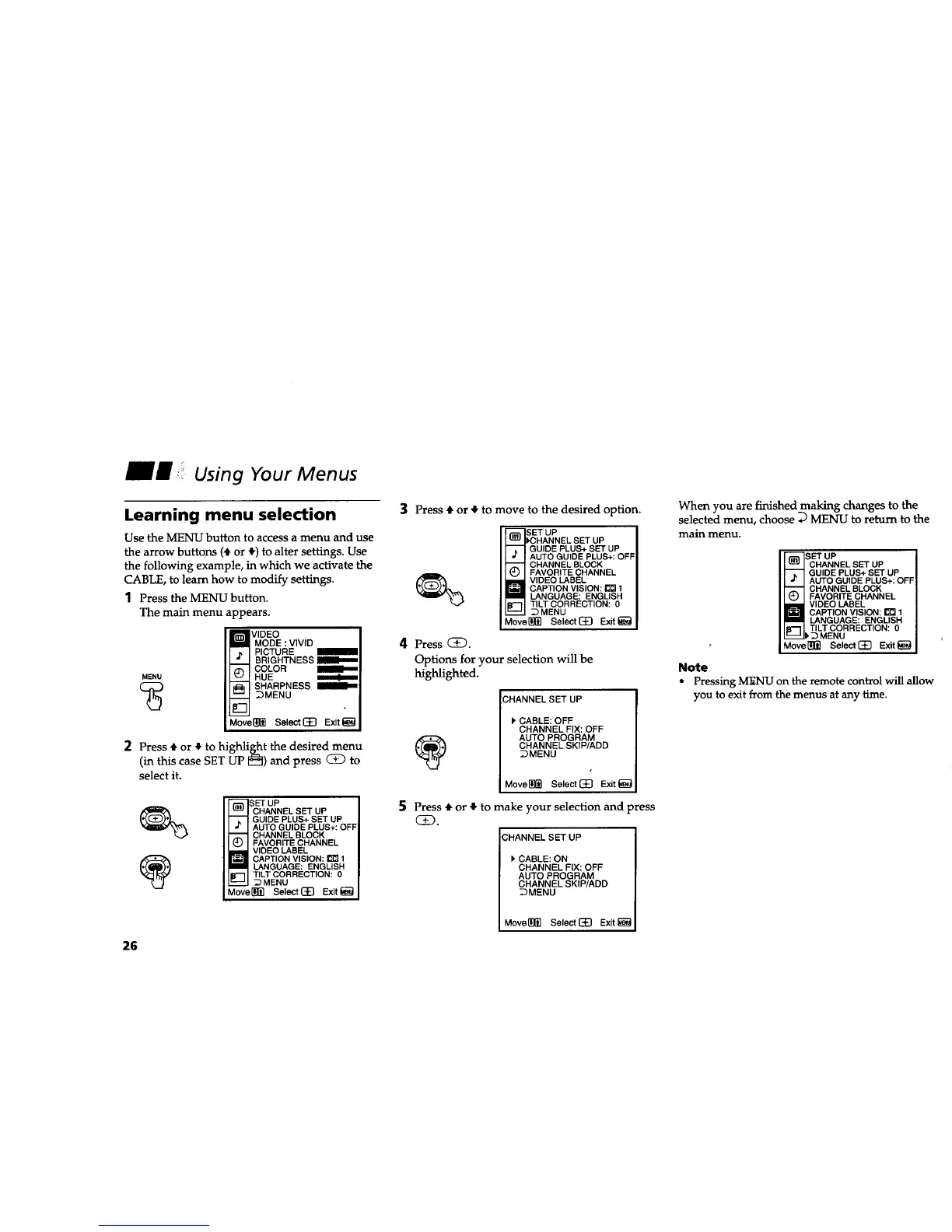
Use the MENU button to access a menu and use
the arrow buttons (4"or _) to alter settings. Use
the following example, in which we activate the
CABLE, to learn how to modify settings.
1 Press the MENU button.
The main menu appears.
MENU
m VIDEO
MODE : VIVID
PICTURE
-- I BRIGHTNESS
(_ I COLOR
HUE m
_-iSHARPNESS
__ _MENU
r
m
Move[_]_ SelectC_] Exit_
2 Press 4, or _, to highlight the desired menu
(in this case SET UP I_) and press CD to
select it.
_- BET UP
CHANNEL SET UP
-- GUIDE PLUS+ SET UP
"_ AUTO GUIDE PLUS+: OFF
-- CHANNEL BLOCK
(_ FAVORITE CHANNEL
] VIDEO LABEL
CAPTION VISION: _ 1
LANGUAGE: ENGLISH
TILT CORRECTION: 0
__ _MENU
Move_]_ Select(_E] Exit_
3 Press • or • to move to the desired option.
SET UP
N !K_HANNEL SET UP
-- i GUIDE PLUS+ SET UP
AUTO GUIDE PLUS+: OFF
_" CHANNEL BLOCK
FAVORITE CHANNEL
_ VIDEO LABEL
CAPTION VISION: _ 1
LANGUAGE: ENGLISH
TILT CORRECTION: 0
__ _MENU
Move[_ Select(_) Exit_
4 Press CE3.
Options for your selection will be
highlighted.
CHANNEL SET UP
[PCABLE: OFF
CHANNEL FIX: OFF
AUTO PROGRAM
CHANNEL SKIP/ADD
_MENU
Move[!_ Select(_ Exit_
5 Press 4"or • to make your selection and press
QD.
CHANNEL SET UP
CABLE: ON
CHANNEL FIX: OFF
AUTO PROGRAM
CHANNEL SKIP/ADD
_MENU
Move_(_ Select(_E) Exit_
When you are finished making changes to the
selected menu, choose _ MENU to return to the
main menu.
_ET UP
CHANNEL SET UP
--_- GUIDE PLUS+ SET UP
AUTO GUIDE PLUS+: OFF
-- CHANNEL BLOCK
C) FAVORITE CHANNEL
i VIDEO LABEL
CAPTION VISION: _ 1
LANGUAGE: ENGLISH
TILT CORRECTION: 0
__ _ MENU
MoverS] SelectC]_] Exit_
Note
• Pressing MENU on the remote control will allow
you to exit from the menus at any time.
26










 To Next Page