Connecting and Installing the TV (continued)
Cable Box Connections
You must connect the IR Blaster in order to operate your
cable box with the GUIDE Plus+ feature. (see
"Connecting the IR Blaster" on page 9)
Some pay cable TV systems use scrambled or encoded
signals that require a cable box to view all channels.
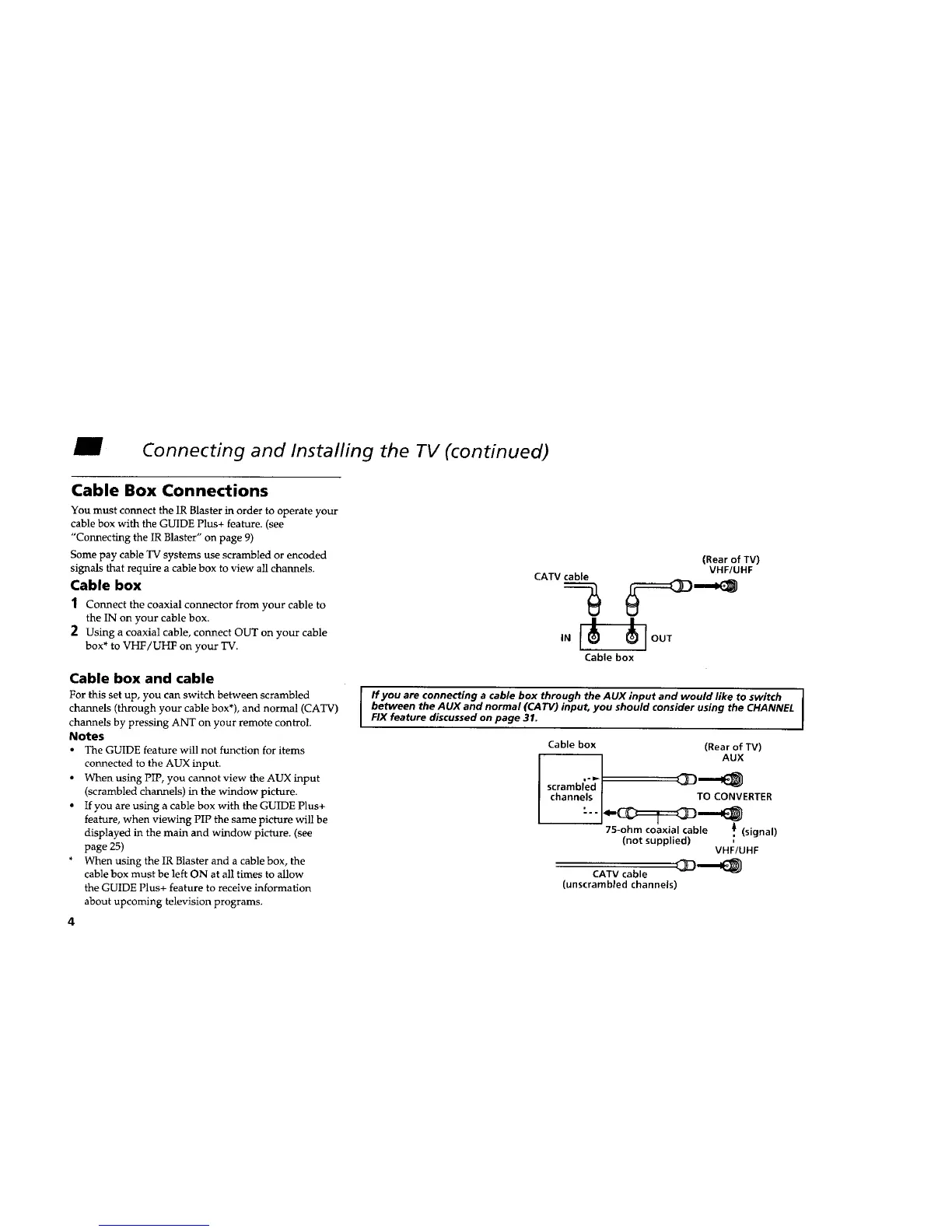
Cable box
1 Connect the coaxial connector from your cable to
the IN on your cable box.
2 Using a coaxial cable, connect OUT on your cable
box* to VHF/UHF on your TV.
Cable box and cable
For this set up, you can switch between scrambled
channels (through your cable box*), and normal (CATV)
channels by pressing ANT on your remote control.
Notes
• The GUIDE feature will not function for items
connected to the AUX input.
• When using PIP, you cannot view the AUX input
(scrambled channels) in the window picture.
• If you are using a cable box with the GUIDE Plus+
feature, when viewing PIP the same picture will be
displayed in the main and window picture. (see
page 25)
• When using the IR Blaster and a cable box, the
cable box must be left ON at all times to allow
the GUIDE Plus+ feature to receive information
about upcoming television programs.
4
(Rear of TV)
VHF/UHF
CATV cable
| I
JOOT
Cable box
I fyouareconnectingacableboxthroughtheAUXinputandwouldliketoswitch
between the AUX and normal (CATV) input, you should consider using the CHANNEL
FIX feature discussed on page 31.
Cable box (Rear of TV)
AUX
scramb,;_f _==='==_
channels / TO CONVERTER
75-ohm coaxial cable ,) (signal)
(not supplied)
VHF/UHF
CATV cable _I1_
(unscrambled channels)










 To Next Page