Remote Control
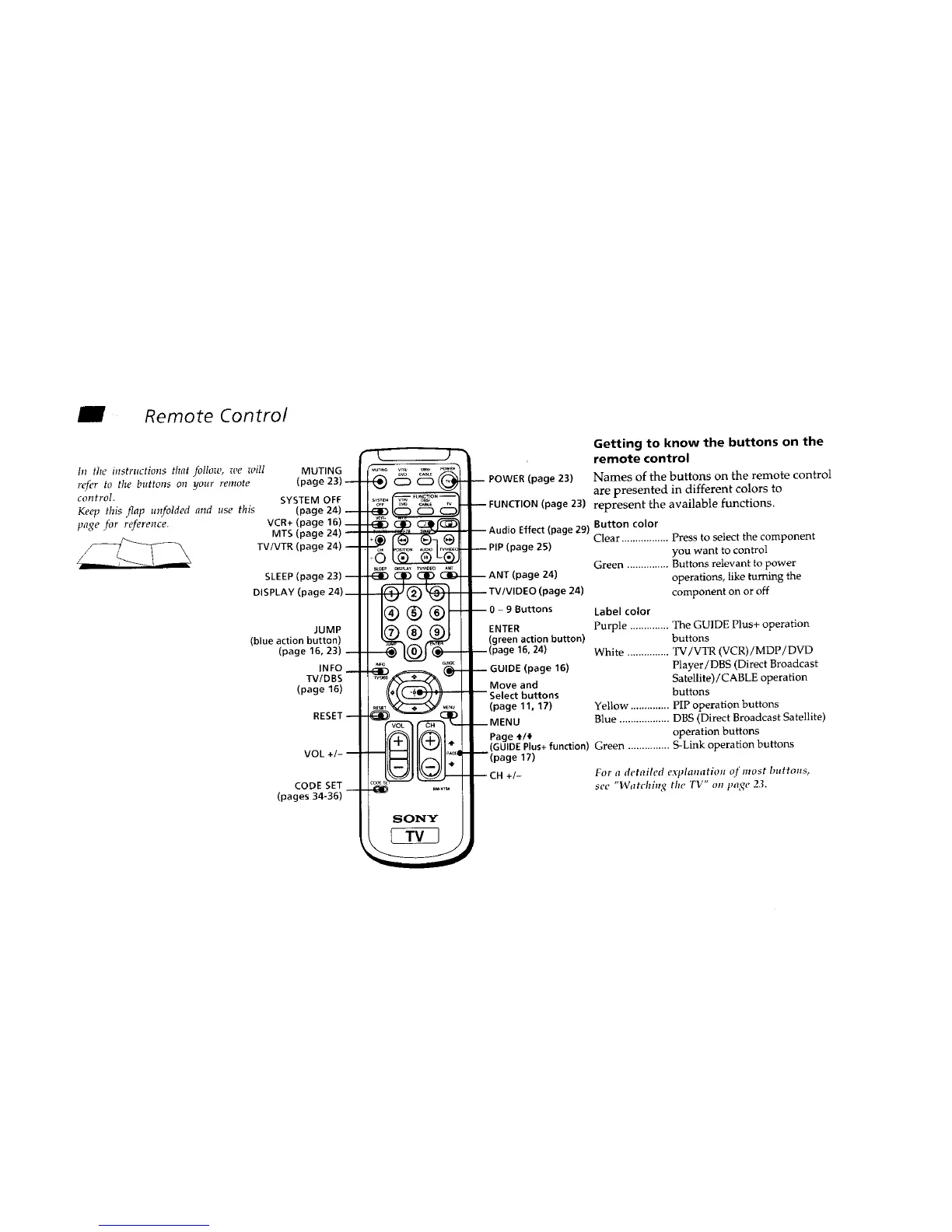
hi tire instructions that follow, we will MUTING
refer to the buttons on your remote (page 23)--
control. SYSTEM OFF
Keep this flap unfolded and use this (page 24) --
page for reference. VCR+ (page 16) __
MTS (page 24) --
TV/VTR (page 24) --
SLEEP (page 23) --
DISPLAY (page 24)__
JUMP
(blue action button)
(page 16, 23) --
INFO__
TV/DBS
(page 16)
RESET--
VOL +/- --
CODE SET
(pages 34-36)
_u+l._ v_ ¸ _e_, _¢_
sl_fP _s_¥ IVNIDEO A_
SONY
Getting to know the buttons on the
remote control
-- POWER (page 23) Names of the buttons on the remote control
are presented in different colors to
-- FUNCTION(page 23) represent the available functions.
.... Button color
-- Audio ETTect_page 291 Clear ................. Press to select the component
-- PIP (page 25) you want to control
Green ............... Buttons relevant to power
-- ANT (page 24) operations, like turning the
-- TV/VIDEO (page 24) component on or off
-- 0- 9 Buttons
ENTER
(green action button)
--(page 16, 24)
-- GUIDE (page 16)
Label color
Purple .............. The GUIDE Plus+ operation
buttons
White ............... TV/VTR (VCR)/MDP/DVD
Player/DBS (Direct Broadcast
Move and Satellite)/CABLE operation
Select buttons buttons
(page 11, 17) Yellow .............. PIP operation buttons
Blue .................. DBS (Direct Broadcast Satellite)
Page _/4 operation buttons
--MENU
(GUIDEPlus+ function) Green ............... S-Link operation buttons
--(page 17)
--CH +/- For a detailed explanation of must buttons,
see "Watching the TV" on page 2,3.










 To Next Page