EasyManua.ls Logo

Soredex DIGORA Optime - Page 10

Soredex DIGORA Optime
66 pages
Print Icon
To Next Page IconTo Next Page
To Previous Page IconTo Previous Page
Loading...
1 Introduction
4 SOREDEX 208396 rev 2
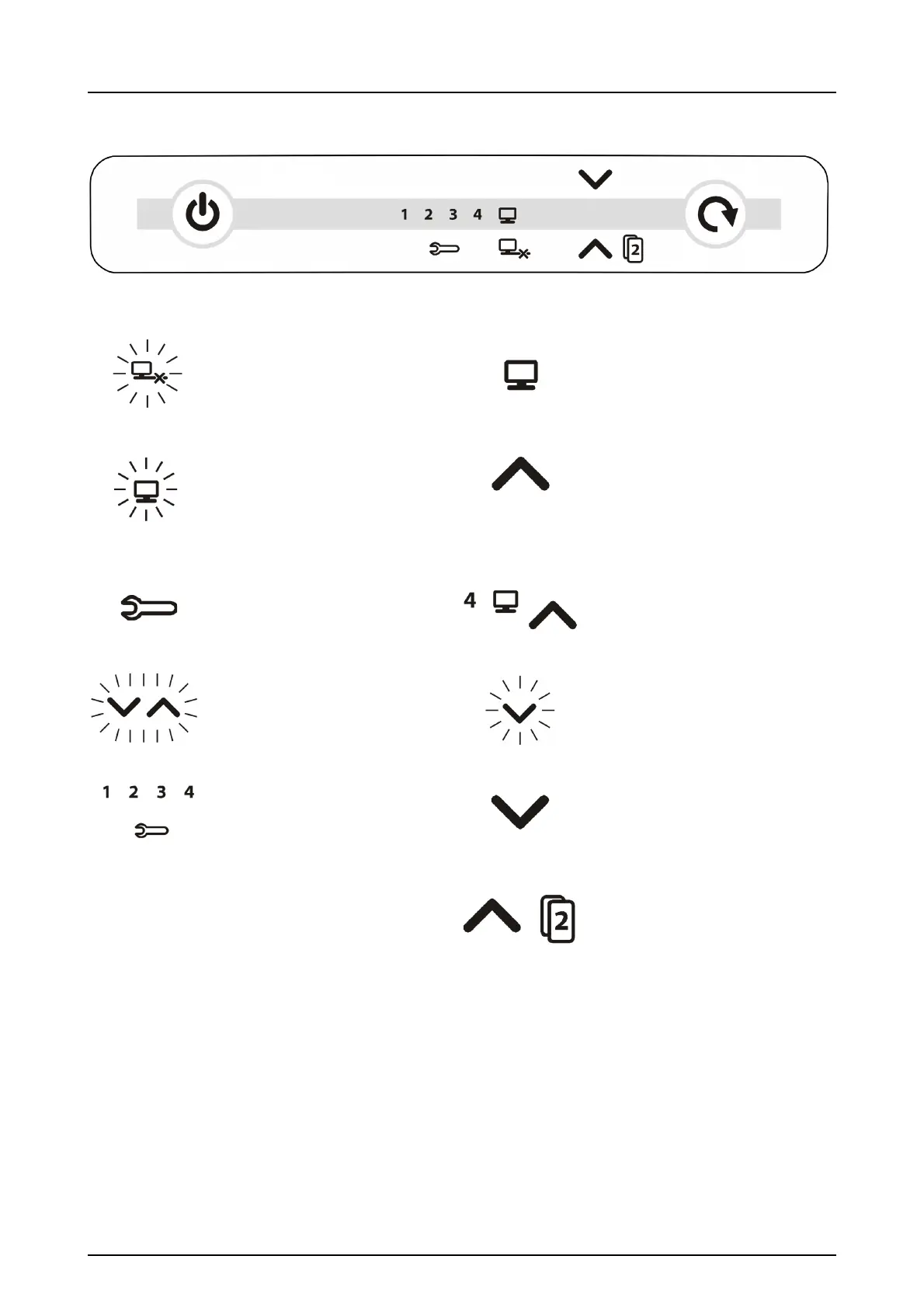
No connection
Connected to imaging
application sw.
Not ready for processing
Open imaging software
- Check workstation
- Image memory full or
plate detected without
patient selected
Ready to process
(Insert imaging plate)
Unit in setup mode
(See chapter Advanced use)
Ready to Process
Image goes to workstation 4
(Insert imaging plate)
Blinking in sequence:
- Imaging plate wrong way
round
Remove protective cover
Error number
Manual plate removal
selected (Remove plate)
Waiting for 2nd size 3 plate
to make Comfort Occlusal™
4C image (Insert 2nd size 3
OR press START to cancel)

Table of Contents

Other manuals for Soredex DIGORA Optime

Related product manuals