37SPEKTRUM NX7e • TRANSMITTER INSTRUCTION MANUAL
EN
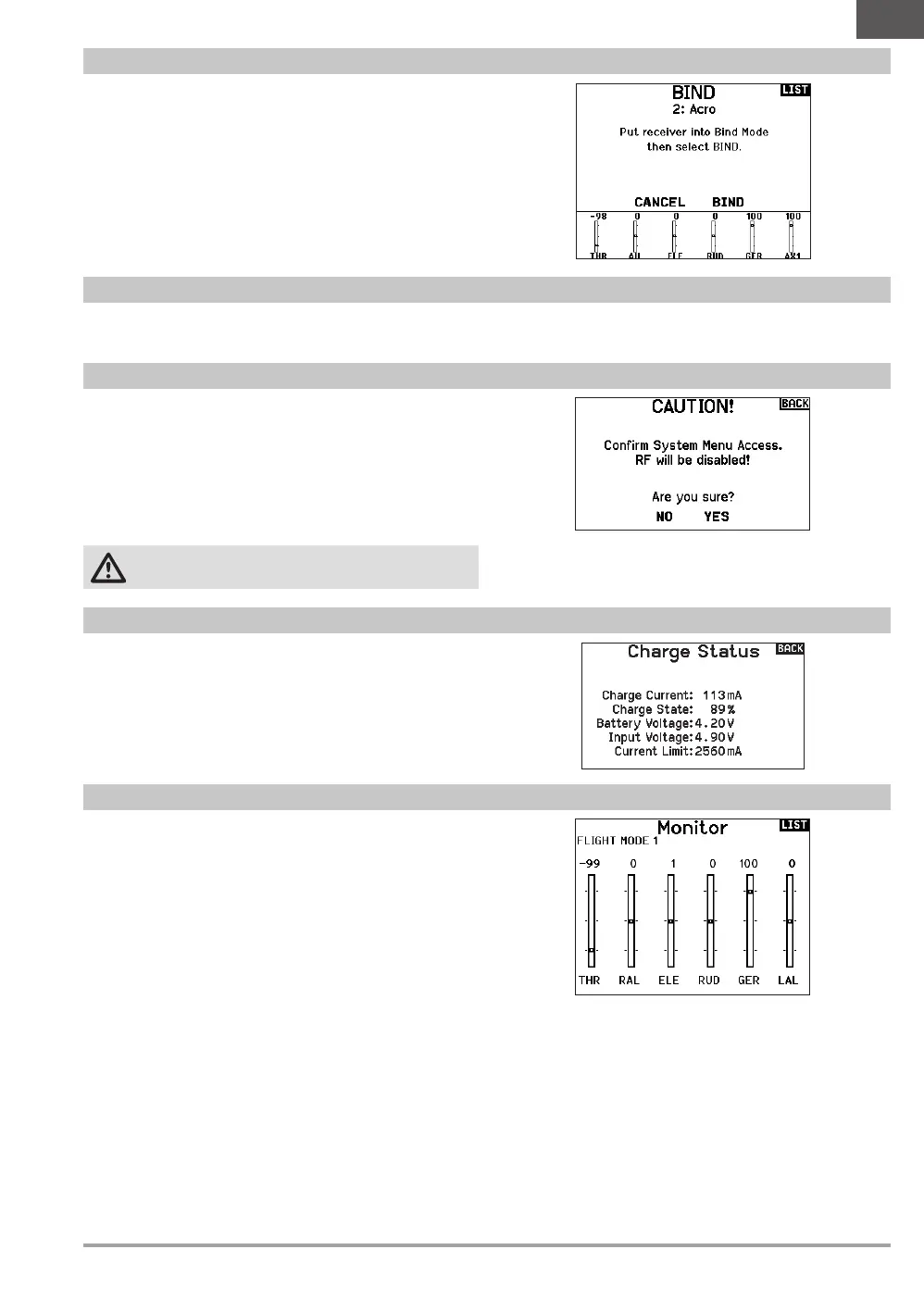
Use System Setup to enter the System List from the Function list
without turning the transmitter off. A caution screen will appear
that warns that RF will be disabled (the transmitter will no longer
transmit). Press YES if you are sure and want to access the System
List. If you are not sure, press NO to exit to the main screen and
continue operation.
If you do not press YES or NO, the system will exit to the main
screen and continue operation within approximately 10 seconds.
WARNING: Do not press YES unless the model is turned
off or the model is secured.
System Setup
Bind
The Monitor screen displays the servo positions for each channel
graphically and numerically. This is useful to verify programming
functions, trim settings, mix directions, etc. The numeric value
is directly relative to the travel adjust and mix values (e.g. 100%
travel adjust equals 100% value in the Monitor).
Monitor
View this page to see the status of the battery including the
percentage of charge. When the transmitter is connected to a USB
power supply this page will also show the charge current and input
voltage.
IMPORTANT: When you are charging the radio during
operation, you will see a charge status indicator on the right
side of the LCD, in all screens.
Charge Status
The Bind menu allows access to the bind screen from the Function
List. After selecting Bind, a caution screen appears warning the
transmitter RF will be disabled. Press YES to continue to the bind
screen or NO to return to the Function List.
The Bind menu enables you to bind a transmitter and receiver
without powering off the transmitter. This menu is helpful if you are
programming a model and need to bind the receiver for failsafe
positions.
See “Programming Failsafe Positions” for more information.
The Start Trainer menu allows you to put the transmitter in either
instructor or student mode from the Function List.
Start Trainer


 To Next Page