STEMCELL TECHNOLOGIES INC.’S QUALITY MANAGEMENT SYSTEM IS CERTIFIED TO ISO 13485 MEDICAL DEVICE STANDARDS.
FOR RESEARCH USE ONLY. NOT INTENDED FOR HUMAN OR ANIMAL DIAGNOSTIC OR THERAPEUTIC USES.
TOLL-FREE PHONE 1 800 667 0322
PHONE +1 604 877 0713 VERSION 02
INFO@STEMCELL.COM
TECHSUPPORT@STEMCELL.COM
FOR GLOBAL CONTACT DETAILS VISIT WWW.STEMCELL.COM DOCUMENT #10000005578
19
4.2.2 Removing Protocols from a User Profile
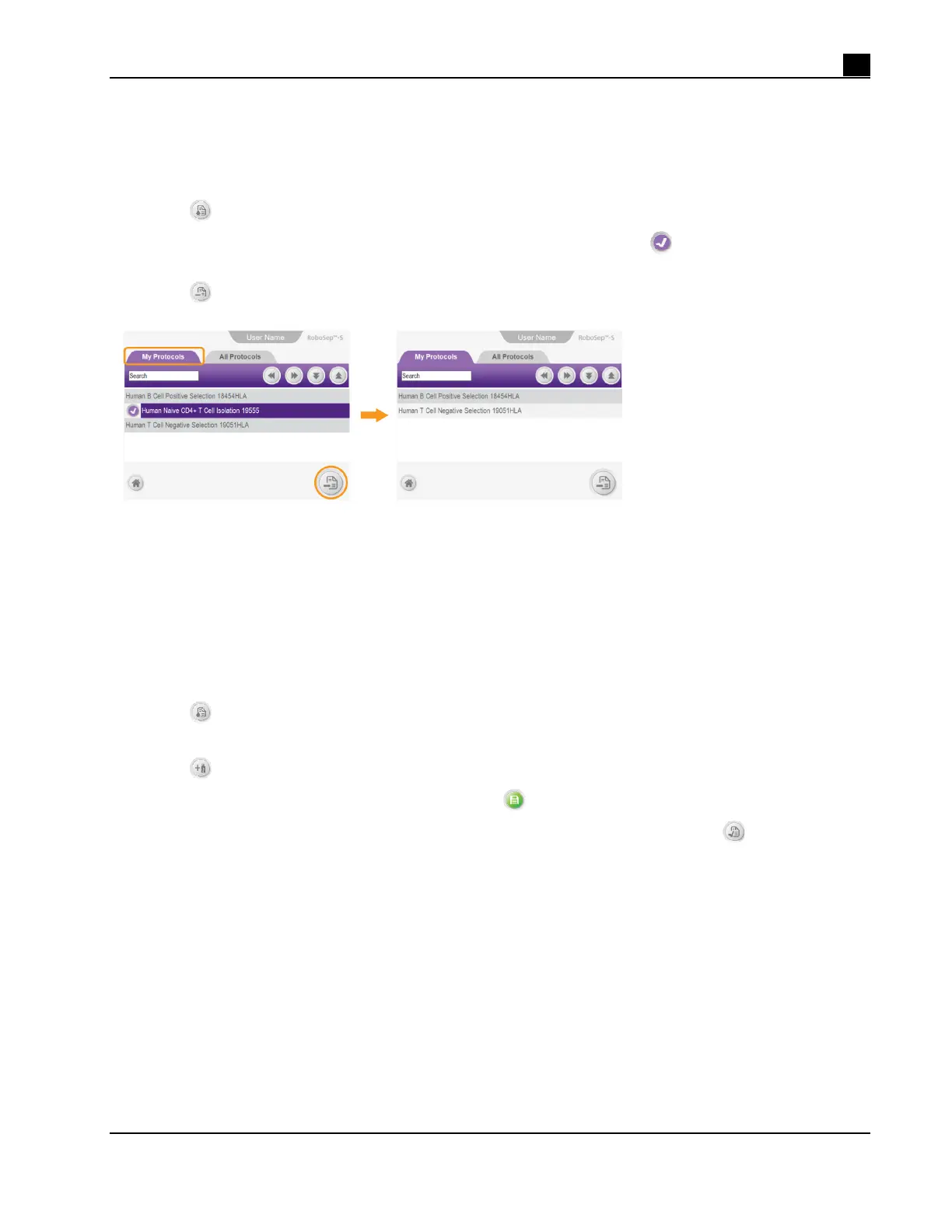
Note: Figure 18 represents an overall schematic of the detailed instructions described below.
1. Select a user profile (section 4.1).
2. Select
[Protocols] on the Home Screen. The Protocols screen will appear (Figure 16).
3. Select the desired protocols to be removed under the My Protocols tab. A
[Select] will appear to the
left of the selected protocol names.
4. Select
[Remove protocol]. The selected protocols will be removed from the My Protocols tab.
Figure 18. Removing a Protocol from a User Profile
4.2.3 Adding New Protocols to RoboSep™-S
New RoboSep™ protocols can be added to RoboSep™-S simply by using a USB drive. Contact STEMCELL
Technologies at techsupport@stemcell.com for more information on how to customize existing protocols or
add new protocols to RoboSep™-S.
Once you have a new RoboSep™ protocol, transfer it onto a USB drive and use the following set of
instructions to add it onto RoboSep™-S:
1. Select
[Protocols] on the Home screen. Ensure the All Protocols tab is selected.
2. Insert a USB drive into one of the USB ports of RoboSep™-S (Figure 1).
3. Select
[Add USB] and navigate to the location of the new protocol on the USB drive.
4. Select the new RoboSep™ protocol and then select
[Save].
5. Confirm that the new separation protocol is listed under the All Protocols tab has the
icon next to it
and then remove the USB drive.
Note: Refer to section 4.2.1 for instructions on how to add protocols to the My Protocols tab.
Note: Only handle (e.g. open, download, or forward) RoboSep™ protocols using a Windows device. If
protocols are handled on Apple devices (e.g. Macbook, iPhone, etc.), the Apple software may alter the
protocols, rendering them unreadable by the RoboSep™-S software.



 To Next Page