STEMCELL TECHNOLOGIES INC.’S QUALITY MANAGEMENT SYSTEM IS CERTIFIED TO ISO 13485 MEDICAL DEVICE STANDARDS.
FOR RESEARCH USE ONLY. NOT INTENDED FOR HUMAN OR ANIMAL DIAGNOSTIC OR THERAPEUTIC USES.
TOLL-FREE PHONE 1 800 667 0322
PHONE +1 604 877 0713 VERSION 02
INFO@STEMCELL.COM
TECHSUPPORT@STEMCELL.COM
FOR GLOBAL CONTACT DETAILS VISIT WWW.STEMCELL.COM DOCUMENT #10000005578
20
4.3 Setting Up a Run
RoboSep™-S is designed to avoid any cross-contamination of the samples and reagents manipulated during
experiments. RoboSep™-S can be operated within a biohazard safety cabinet to maintain sample and
reagent sterility. When using RoboSep™-S, it is essential to observe good laboratory practices as described
by your institution.
4.3.1 Selecting a Cell Separation Protocol
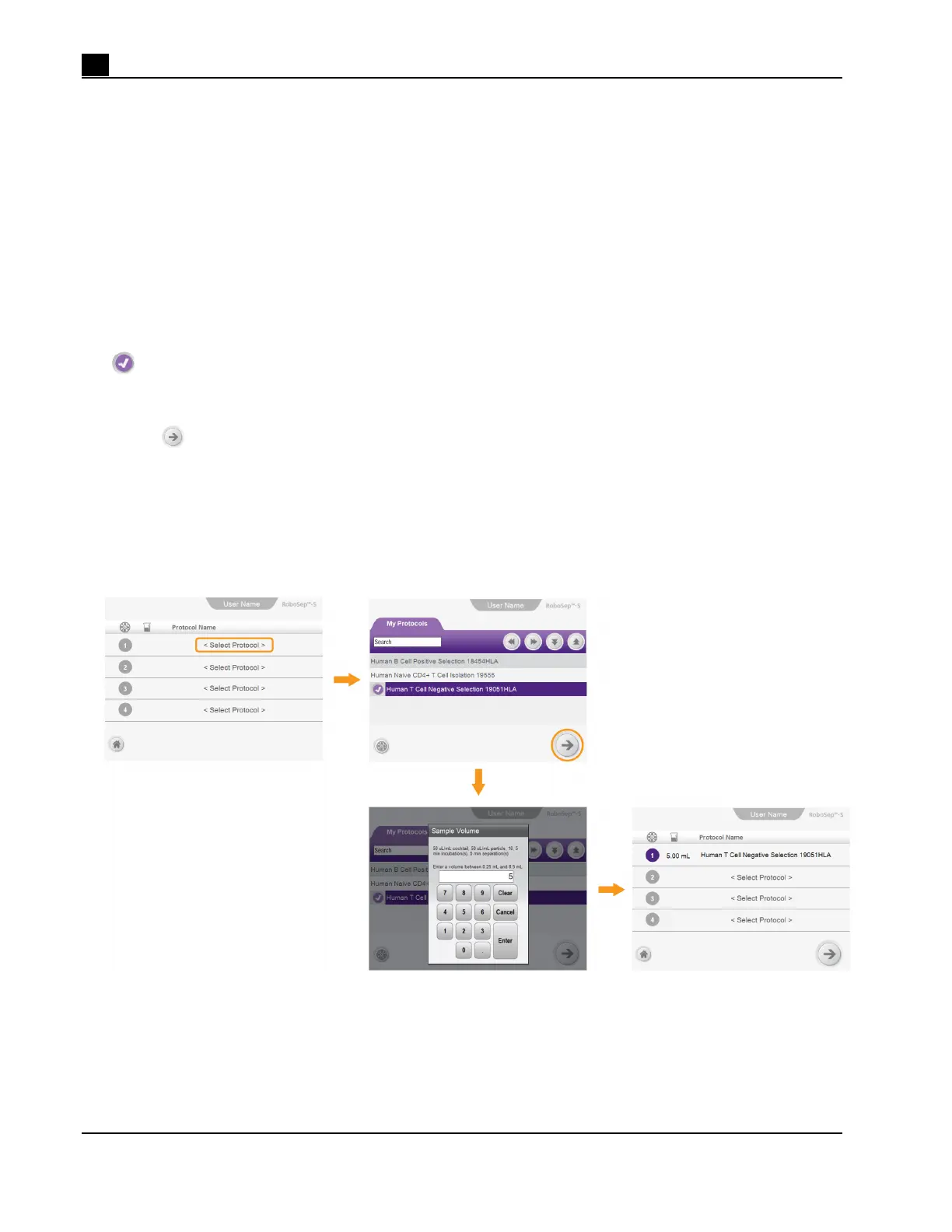
Note: Figure 19 represents an overall schematic of the detailed instructions described below.
1. Select a user profile (section 4.1).
2. Select <Select Protocol> and choose the desired RoboSep™ protocol from the My Protocols tab. A
[Select] will appear next to the selected protocol.
Note: Only protocols listed under the My Protocols tab can be assigned to a quadrant. Refer to
section 4.2.1 for instructions on how to add protocols to the My Protocols tab.
3. Select
[Next], type the start sample volume (in mL) and then select Enter. The Sample Volume dialog
box will list a volume range possible for each protocol.
Note: The quadrant number to be used for that protocol will be highlighted in purple in the Run Samples
screen. If more than one quadrant is needed for a protocol, adjacent quadrants will automatically be
highlighted. The start volume for each protocol will also be noted on the Run Samples screen.
4. Optional: Repeat steps 2 - 3 to run additional protocols. Up to four RoboSep™ protocols can be selected.
Figure 19. Selecting a Protocol and Assigning it to a Quadrant



 To Next Page