www.stryker.com 1079-009-005 REV E 1-13
Return To Table of Contents
English
Operation Guide
APPLYING THE BRAKE SYSTEM
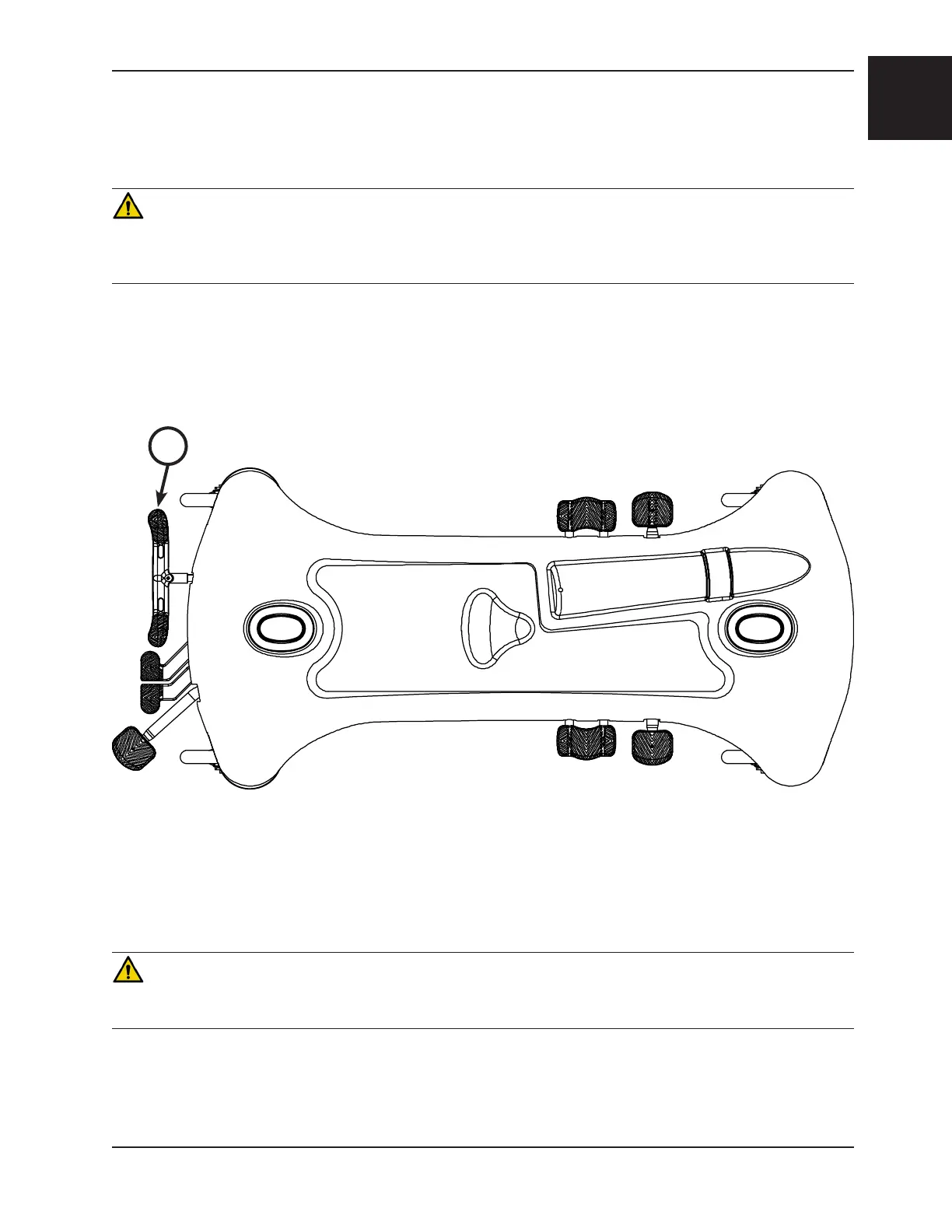
Note: For user convenience, a brake/steer control pedal is located on both ends of the stretcher.
WARNING
Always apply the caster brakes when a patient is getting on or off the stretcher. Push on the stretcher to ensure that
the brakes are securely locked. Always engage the brakes unless the stretcher is being moved. Injury could result if the
stretcher moves while a patient is getting on or off the stretcher.
To engage the brakes on the head end, push fully down on the left side of pedal (A) as shown in Figure 3.
Note: Your stretcher may be equipped with optional side control brake and steer functions in addition to the standard
head and foot end controls. The side control brakes operate the same as the head and foot end versions.
OPERATING THE FIFTH WHEEL OPTION
WARNING
Make sure that the brakes are completely released before attempting to move the unit. Attempting to move the unit with
the brakes actuated could result in injury to the user and/or patient.
The fifth wheel guides the stretcher along a straight line during transport and pivots the stretcher around corners.
To operate the fifth wheel, push the side of any brake/steer pedal marked STEER to the full down position.
Figure 3: Brake System
A


 To Next Page