28 2131-209-001 REV A www.stryker.com
Return To Table of Contents
Footboard Operation Guide
MAIN MENU: PATIENT INFORMATION
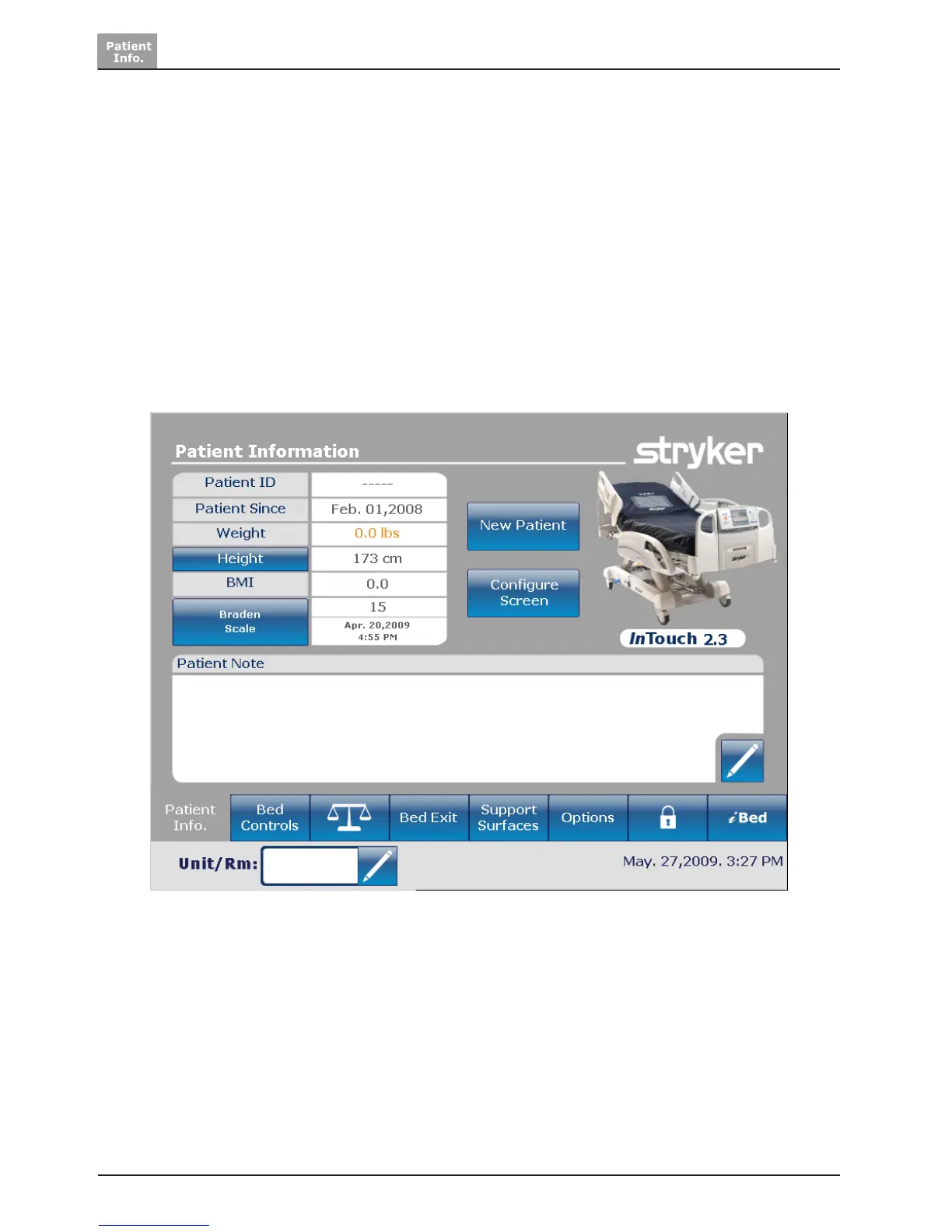
When the “Main” button is pressed, Figure 3.0 will be displayed. The following features are available to the operator
to configure.
• New Patient: pressing on the “New Patient” button displays Figure 3.1 and patient information may be entered.
• Configure Screen: pressing “Configure Screen” displays Figure 3.2 and the additional patient information may be
configured.
• Height: pressing on the “Height” button allows the operator to enter the patient’s height
• Braden Scale: pressing the “Braden Scale” button takes the operator directly to the Braden scale main menu.
• Patient Note: pressing on the pencil tool icon in the bottom right of the Patient Note window allows the operator to
enter a patient note if necessary.
• Unit/Room : pressing on the pencil tool icon in the bottom left of the Patient Information screen allows the operator
to enter the unit and room number that the patient is in.
Figure 3.0













 To Next Page