34 2131-209-001 REV A www.stryker.com
Return To Table of Contents
MAIN MENU: SCALE (CONTINUED)
Weight History Button
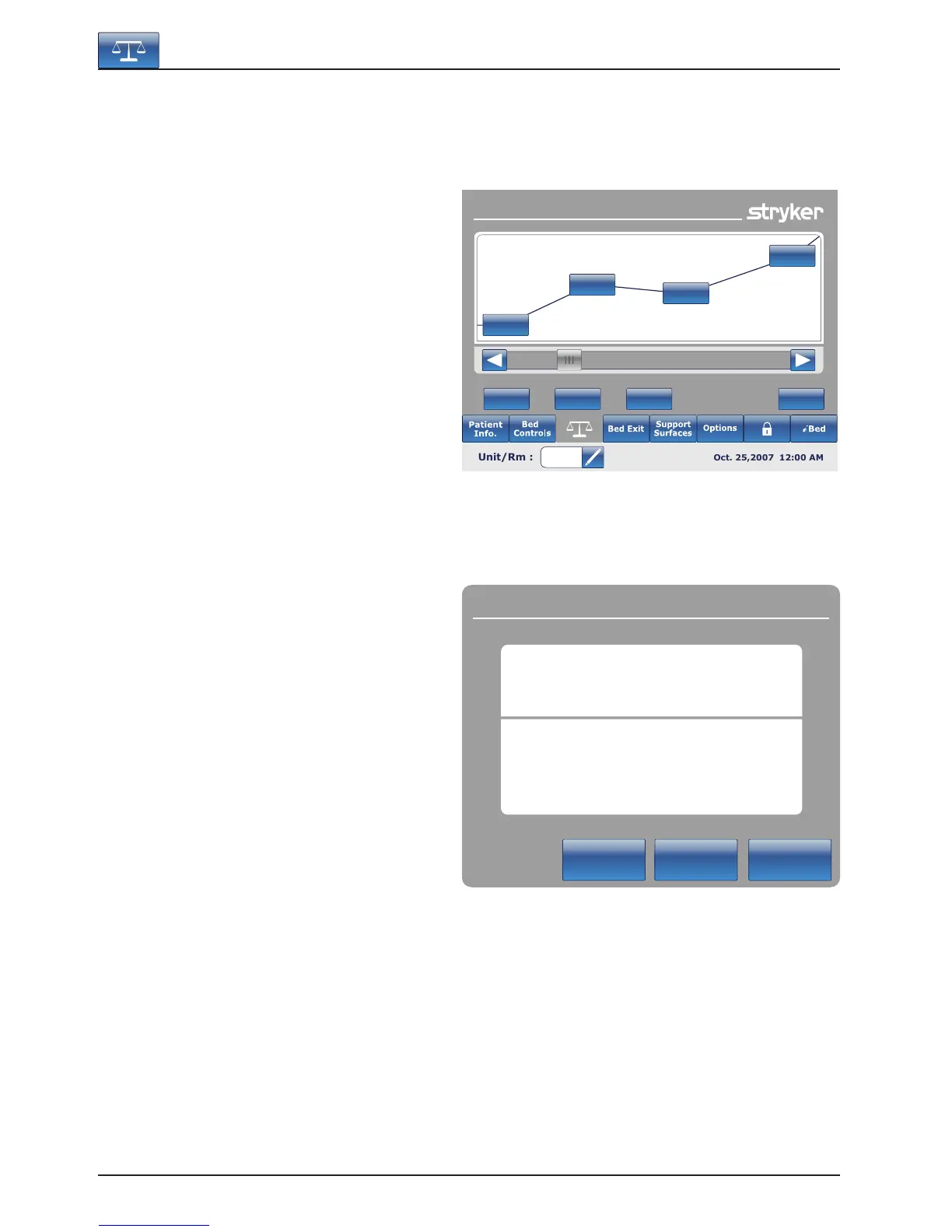
When the “Weight History” button is pressed on the
Scale screen, Figure 5.6 will be displayed.
Each value indicates the time and date that the
weight was taken as well as the weight measured.
The cursor allows the user to go further on each
side to see the values not visible. The arrows only
move by one value at a time.
The “Lb/Kg” button allows the user to change the
measuring value.
The “Store” button allows the user to store the
reading that has just been done.
The “Close” button will bring the user back to the
Scale main screen.
Figure 5.7 appears when the user presses on one
of the weights displayed on the graphic in Figure
5.6. It shows the weight, the date and the time when
this weight was taken.
You can choose to go back to the previous one
by pressing on “Prev” or to go to the next one by
pressing on “Next”.
Note
The system can keep a maximum of fifty (50)
entries in memory. Any new value added after the
50
th
entry will have the first value deleted following
the “First In, First Out” rule.
Footboard Operation Guide
Weight History
CloseStoreResetLbs/Kg
320 lbs
350 lbs
340 lbs
375 lbs
340 lbs
Cancel
Next
Previous
Weight History
JUL. 22, 2008
09:22 AM
118.4 lbs
Figure 5.6
Figure 5.7













 To Next Page