www.stryker.com 2131-209-001 REV A 31
Return To Table of Contents
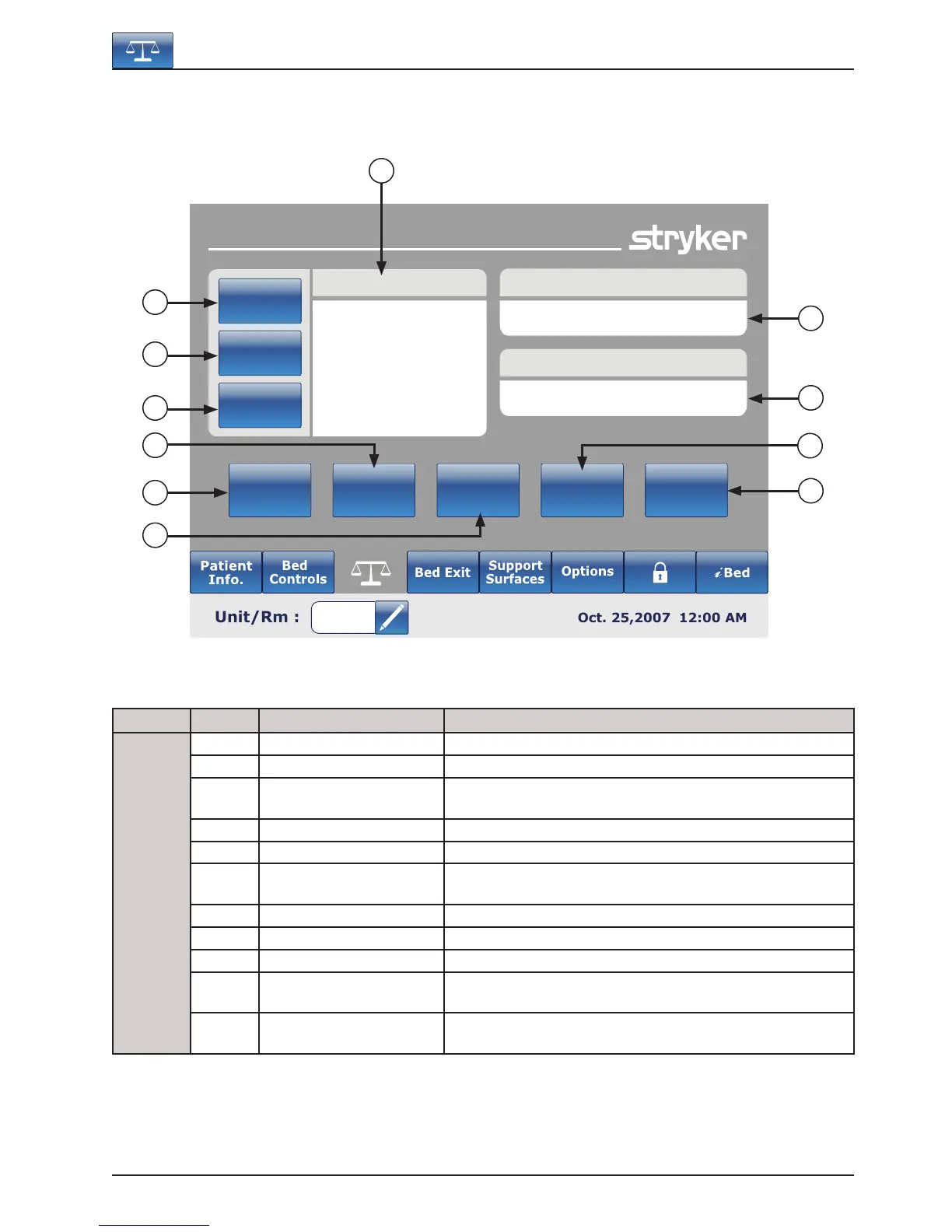
MAIN MENU: SCALE
Button Name Function
Functions
A Current Patient Weight Shows the current weight of the patient.
B Patient Since This will give information about the new patient.
C Scale Last Zero
This will give information about the date and time of the last
zero of the scale.
D Change Patient Weight Press this button to change the weight of a patient.
E Gain or Loss Press this button to start the Gain or Loss reading.
F Change Equipment
Press this button to change the equipment on the bed without
disturbing the scale’s settings.
G Zero Press this button to zero the scale settings.
H Weight History Press this button to access the History of the patient’s weight.
I Store Press this button to store the patient’s weight.
J Lbs/Kg
Press this button to select the measure wanted (pounds or
kilograms).
K Delayed Weight
Press on this button to start the Delayed Weight. This will give
the user the time to add or remove accessories.
Footboard Operation Guide
G
H
I
Scale
Current Patient Weight
352 lbs
Delayed
Weight
Lbs/Kg
Store
Weight
History
Zero
Change
Equipment
Change
Patient
Weight
Gain
Or Loss
Patient Since
01-31-2007 5:13 PM
Scale Last Zero
01-31-2007 5:13 PM
C
A
B
D
E
J
K
F













 To Next Page