30 2131-209-001 REV A www.stryker.com
Return To Table of Contents
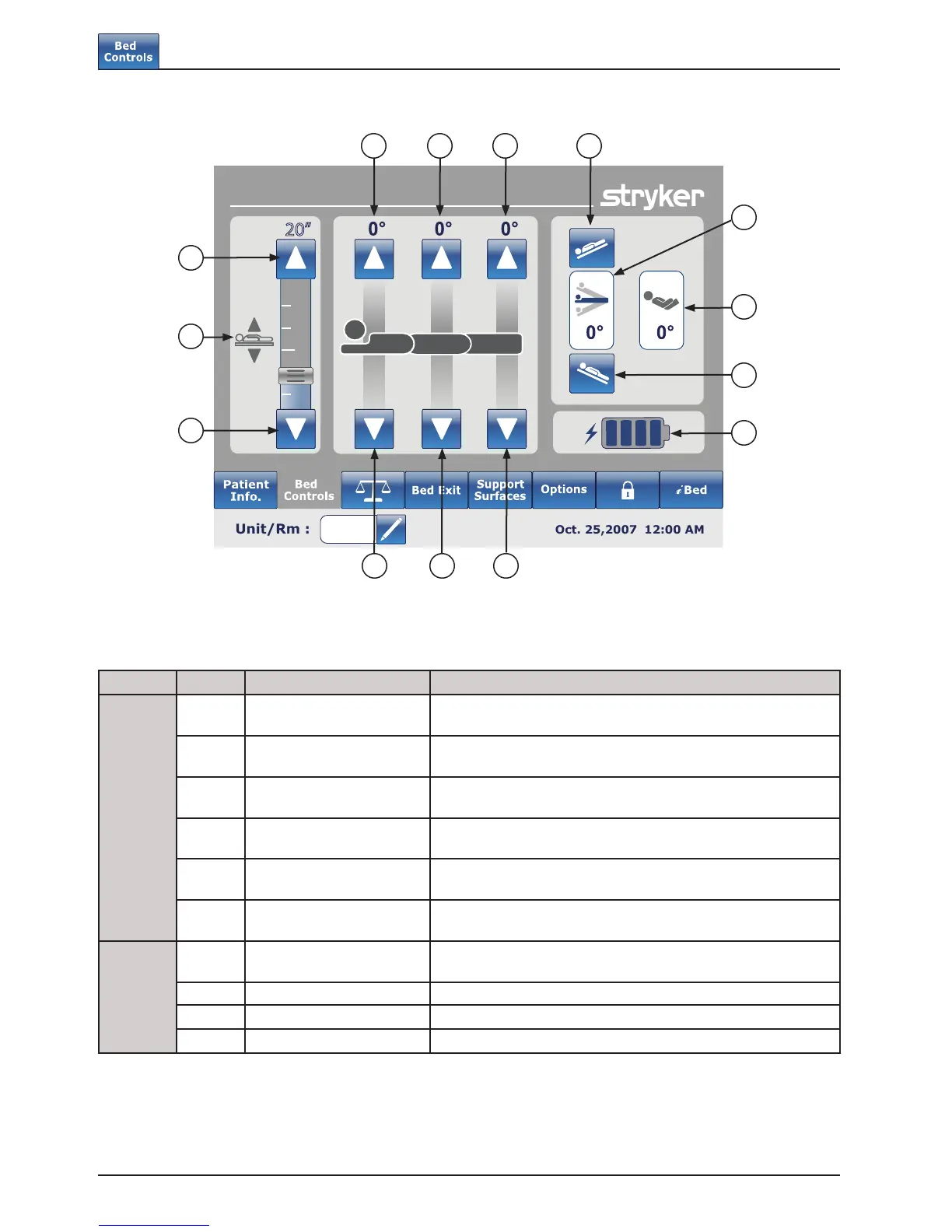
MAIN MENU: BED CONTROLS
Button Name Function
Bed Controls
A
Bed Height Up/Down Press the Up arrow to raise the height of the bed or on the
Down arrow to lower it.
B
Fowler Up/Down Press the Up arrow to raise the Fowler section to the desired
angle and on the Down arrow to lower it to the desired angle.
C
Gatch Up/Down Press the Up arrow to raise the Gatch section to the desired
angle and on the Down arrow to lower it to the desired angle.
D
Foot Up/Down Press the Up arrow to raise the Foot section to the desired
angle and on the Down arrow to lower it to the desired angle.
E
Trendelenburg Press this button to place the bed in the Reverse Trendelenburg
position (Head Down / Foot Up).
F
Reverse Trendelenburg Press this button to place the bed in the Trendelenburg position
(Head Up / Foot Down).
Indicators
G
Angle Indicator This indicator shows the angle of Trendelenburg or Reverse
Trendelenburg.
H HOB Angle Indicator This indicator shows the angle of HOB.
I
Battery Power Indicator This indicator shows the power left in the battery.
J
Bed Height Indicator This indicator shows the actual height of the bed.
Note
• When pressed the buttons turn grey.
• The bed height is actually the distance between the floor and the bed support mattress.
Footboard Operation Guide
Bed Controls
20”
B
G
F
EDC
H
J
I
A
A
B DC













 To Next Page