www.stryker.com 2131-209-001 REV A 49
Return To Table of Contents
MAIN MENU: LOCKOUTS
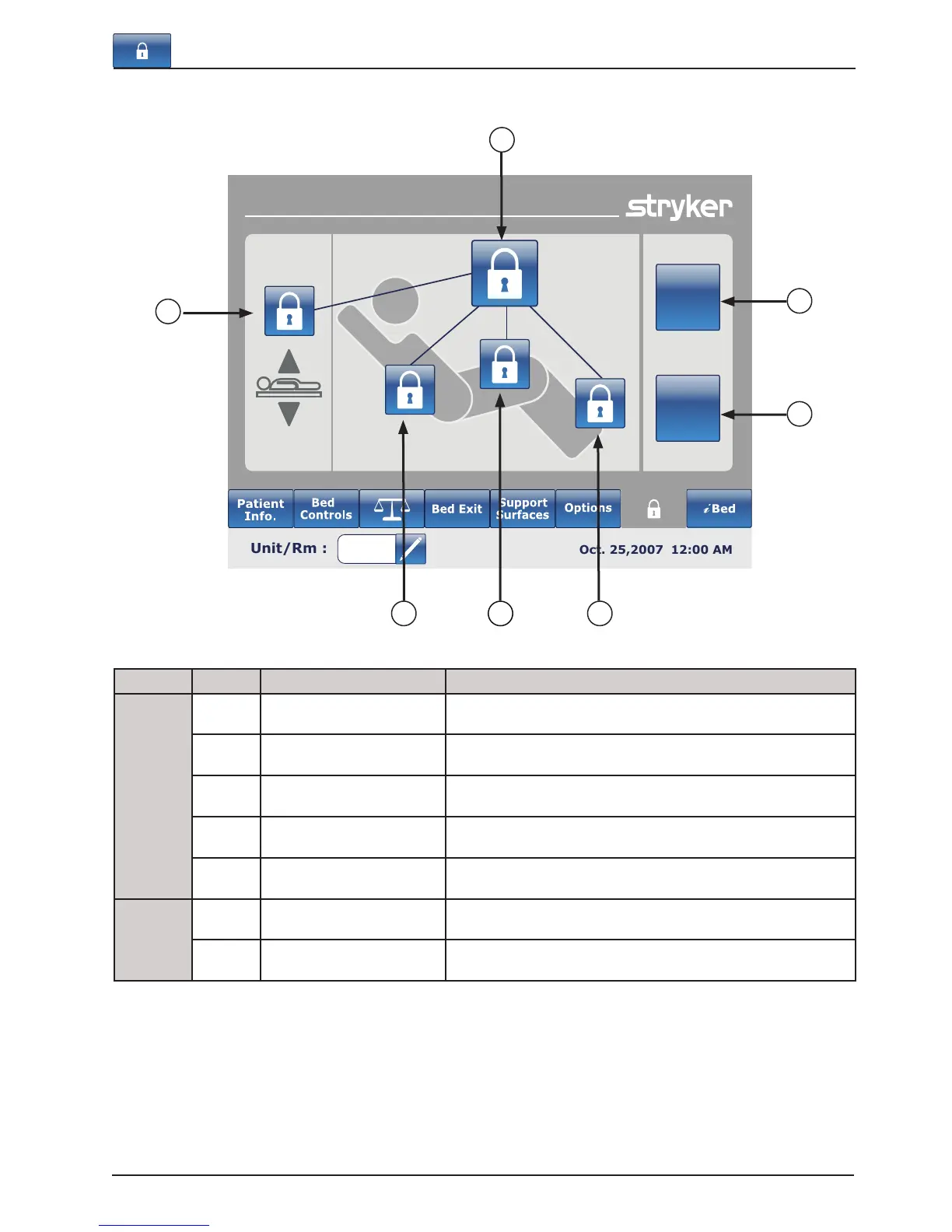
Button Name Function
Locks Position
A
All bed controls Press on this button to activate or deactivate the complete lock
of the bed.
B
Bed Height Lock Press on this button to activate or deactivate the lock for the
bed height.
C
Fowler Lock Press on this button to activate or deactivate the lock of the
Fowler.
D
Gatch Lock Press on this button to activate or deactivate the lock of the
Gatch.
E
Foot Lock Press on this button to activate or deactivate the lock of the
Foot.
Controls
F
All bed controls Select this when you want to restrain any change in the lock
activation on every bed controls.
G
Patient controls only Select this when you want to restrain any change in the lock
activation on the patient controls only.
Note
• If the bed is in Trendelenburg or Reverse Trendelenburg the bed will be locked in this position.
• When one of the locks is enabled, the indicator on the footboard will turn on so the user is aware that some motion
may not be activated.
Footboard Operation Guide
Lockouts
All bed
controls
Patient
control
only
A
B
C
G
F
E
D













 To Next Page