68 2131-209-001 REV A www.stryker.com
Return To Table of Contents
The Optional Monitor Tray is designed to hold a monitor at the foot end of the bed.
WARNING
The Weigh system as well as the Bed Exit system must be adjusted if this accessory is added when either system is
in function. Refer to the “Add/Remove Equipment” from the bed procedure on page 35.
INSTALLATION
Required Tools: None
Procedure
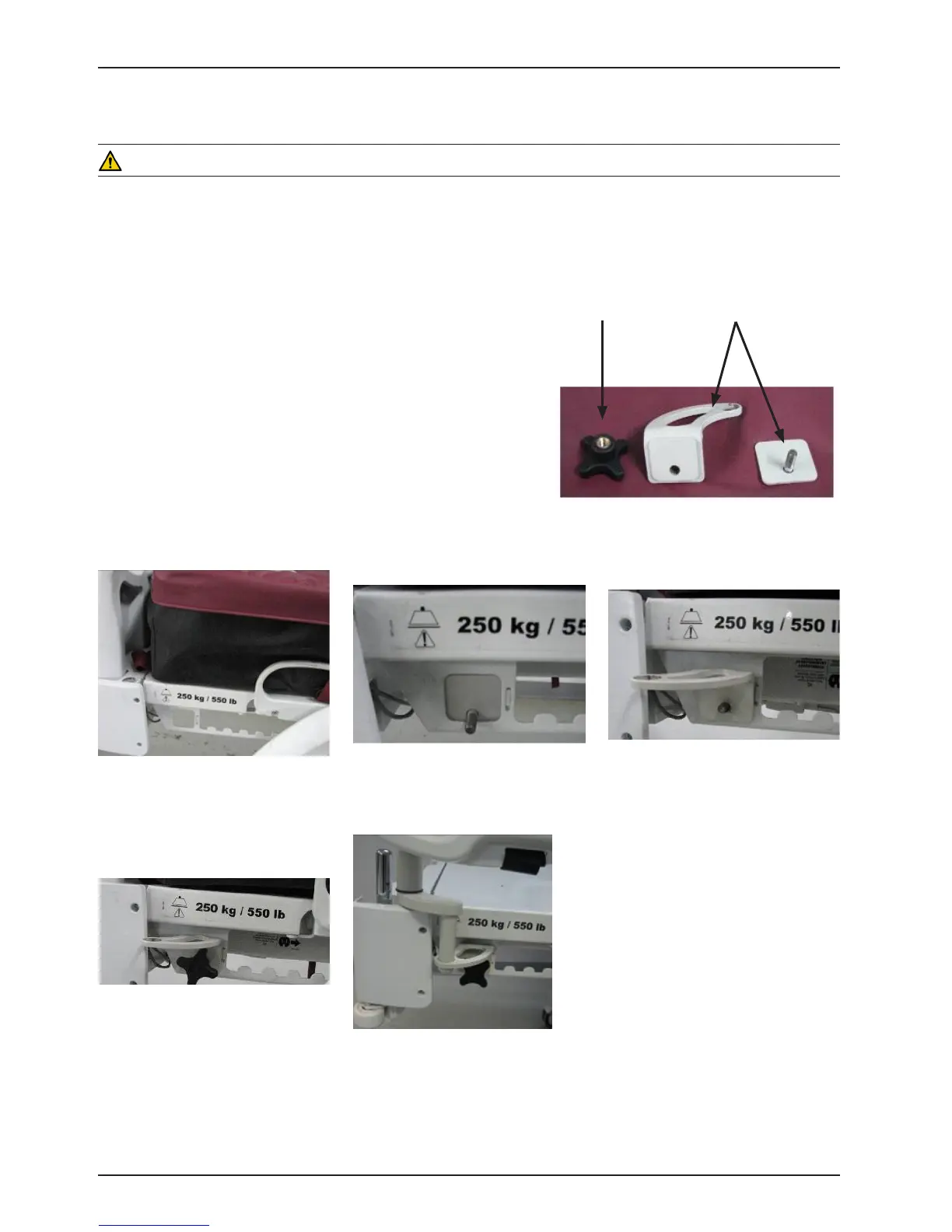
1. Install the bracket (A) at the left side of the foot end. (see
Figures B, C, D, and E).
2. Install the transport tray (see Figure F) into the bracket just
secured in step 1 and into the the IV socket (not shown).
Note: Ensure that the tray support is correctly anchored
in the hole of the bracket installed in step 1 (see Figure F).
Figure B - foot end
Figure D - bracket mounted (front)Figure C - bracket mounted (back)
Figure E - secure bracket
with screw knob
Figure F - install tray
BracketScrew Knob
Figure A
Monitor Tray - FA64214













 To Next Page