40 2131-209-001 REV A www.stryker.com
Return To Table of Contents
MAIN MENU: BED EXIT (CONTINUED)
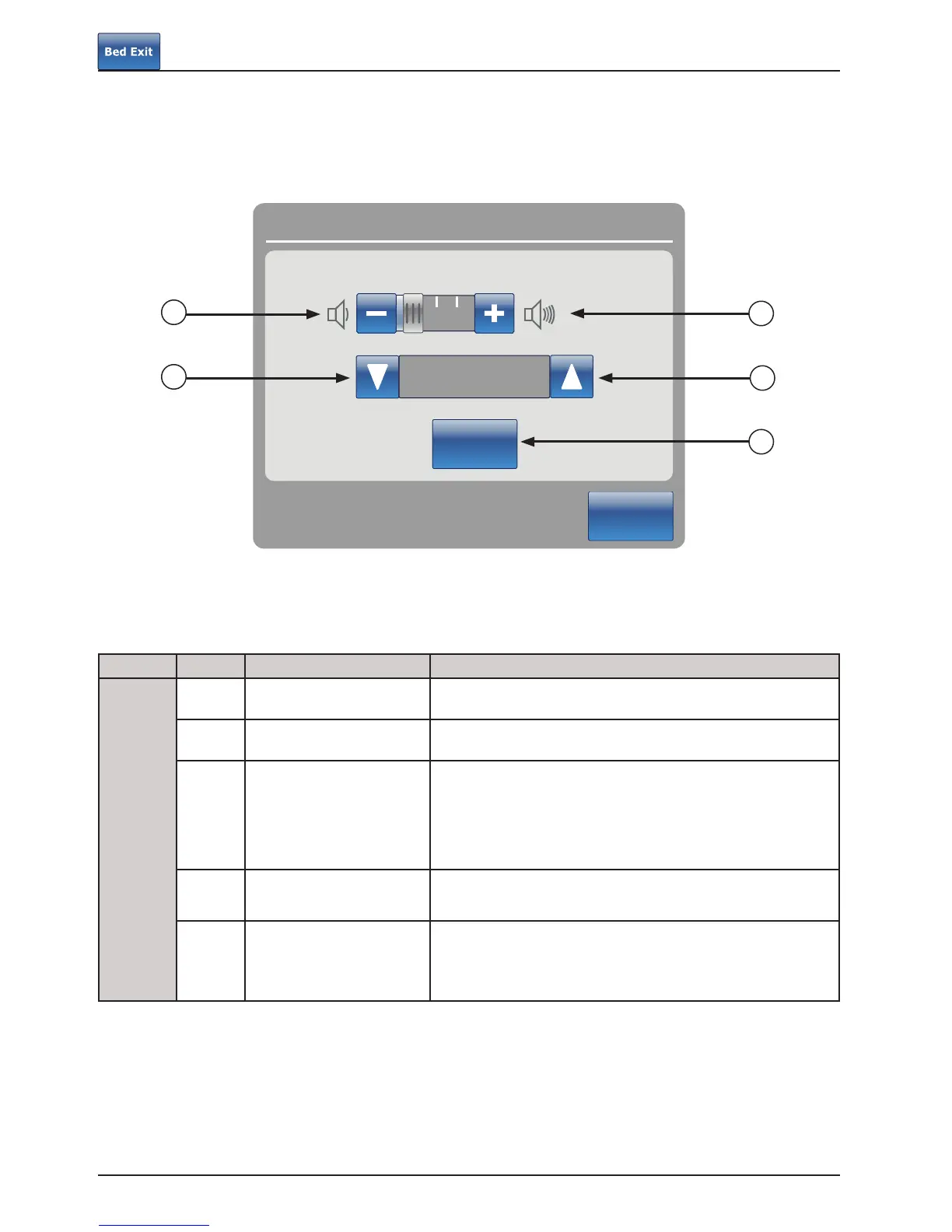
The Volume button allows the user to set an alarm reminder. The alarm has different tones that can be chosen by the
user.
Button Name Function
Volume / Tone
A Volume Down Press this button to decrease the volume.
B Volume Up Press this button to increase the volume.
C Change Tone
There are 10 tones to choose from, and they are labeled 1
through 10. Press this button to change the tone sound to a
lower number than what it is currently set at.
If the bed is equipped with the iAudio feature, then the last
available tones will be voices.
D Change Tone
Press this button to change the tone sound to a higher number
than what it is currently set at.
E Test Volume / Tone
Press this button to test the current volume or tone setting.
When the volume or tone is changed from its current setting,
you may press the test button to hear the new tone setting or
the new volume adjustment.
Footboard Operation Guide
Alarm settings
Close
Tone 1
Test
Volume
B
A
C
E
D














 To Next Page