www.stryker.com 2131-209-001 REV A 43
Return To Table of Contents
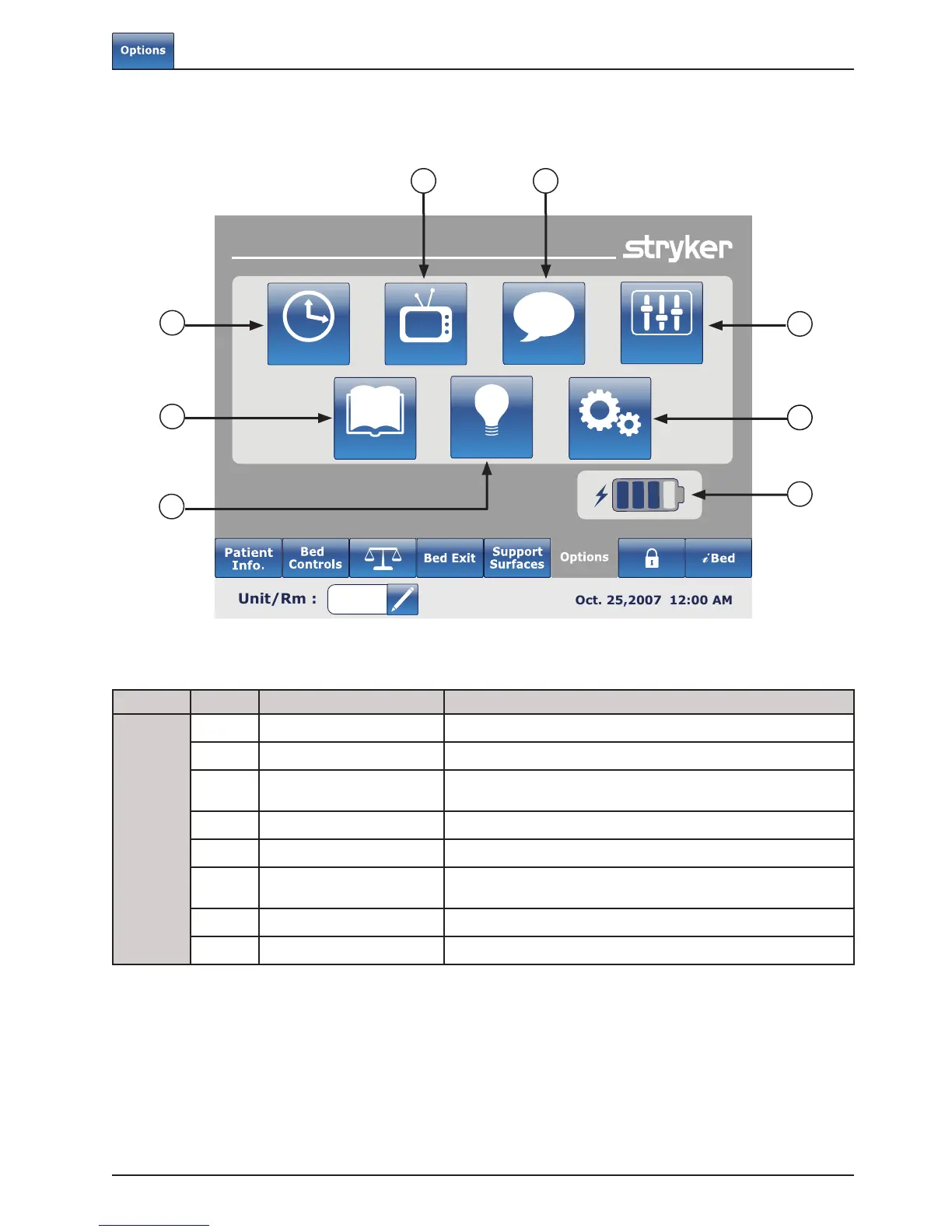
MAIN MENU: OPTIONS
Button Name Function
Options
A Time Setup Press this button to setup the time and date on the bed.
B Smart TV Press this button to access the Smart TV menu.
C Language
Press this button to access the Language menu and select the
language of the touch screen.
D Advanced Options Press this button to access the Advanced Options menu.
E Maintenance Press this button to access the Maintenance menu.
F Battery
This shows the percentage of power left in the battery.
Each battery block indicates 25 percent of the power.
G Backlight Press this button to access the Backlight menu.
H History Press this button to access the History menu.
Footboard Operation Guide
Options
Time Setup
Language
History
Nurse Control
Backlight
Maintenance
Smart TV
Advanced
Options
A
B
D
H
G
F
E
C













 To Next Page