14
This displays the pre-fader level of the signal, so regardless the setting of the fader, signal
will be shown here if present.
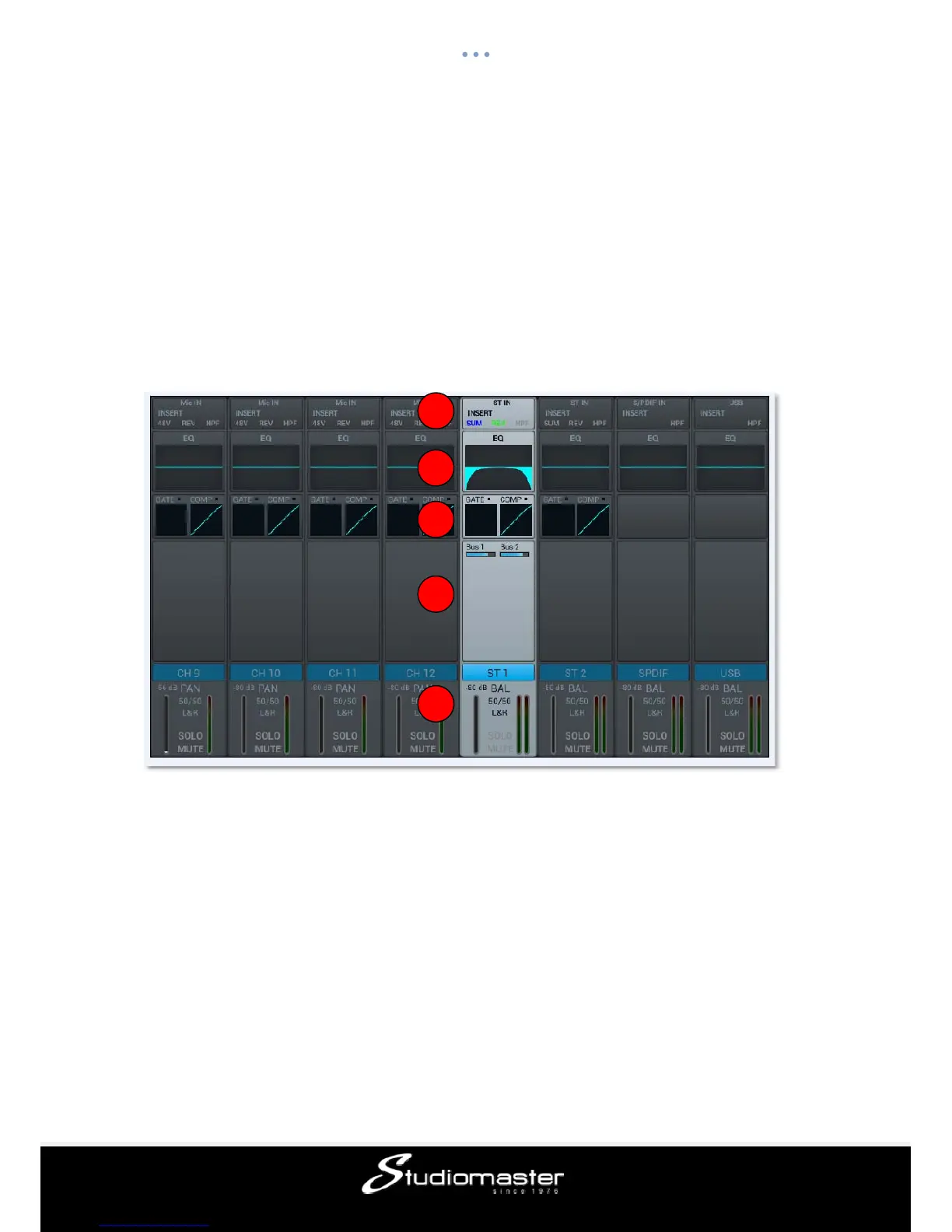
Stereo Channel
Like the MIC channels, the two stereo inputs also include five modules: Input, EQ,
Dynamics, Bus Send and Output. Single clicking a module will bring up a sub-page with
further options. The sub-pages can be closed through the red “close” button in the upper
right corner.
① Input Stage
Shows status of SUM, phase, delay, HPF (High-Pass Filter) and effect insert.
② EQ
Shows parametric EQ graph.
③ Dynamics
Shows gate and compressor graph.
④ Bus Send
Shows send status: the busses being sent to along with its level and Pan value.
⑤ Output Stage
Displays the name, Pan value, Solo, Mute, fader and meter level information. Double click
the name section to edit it through an on-screen soft keyboard that will pop-up.
1
2
3
4
5














 To Next Page