30
Debugging mode, not recommended to non-professional users.
④ Android Home Screen Debugging mode, not recommended to non-professional users.
⑤ Import Settings Debugging mode, not recommended to non-professional users.
⑥ Export Settings Debugging mode, not recommended to non-professional users.
⑦ Calibrate Screen - Disabled on certain software versions
Touch screen calibration function. Single press“Calibrate Screen” button, a dialog pops
up“this will start a calibration software for your touch screen. Please touch the white
crosses. If the calibrations messes up, you will have to connect a mouse to the evice and
repeat it”, press“Calibrate” and calibrate your screen following the tip information.
Please pay attention that the calibration will later on affect your operation, please always
stand right in front of your console during the screen calibration, or to repeat this step
should it not be calibrated correctly.
⑧ Save Log
Debugging mode, not recommended to non-professional users.
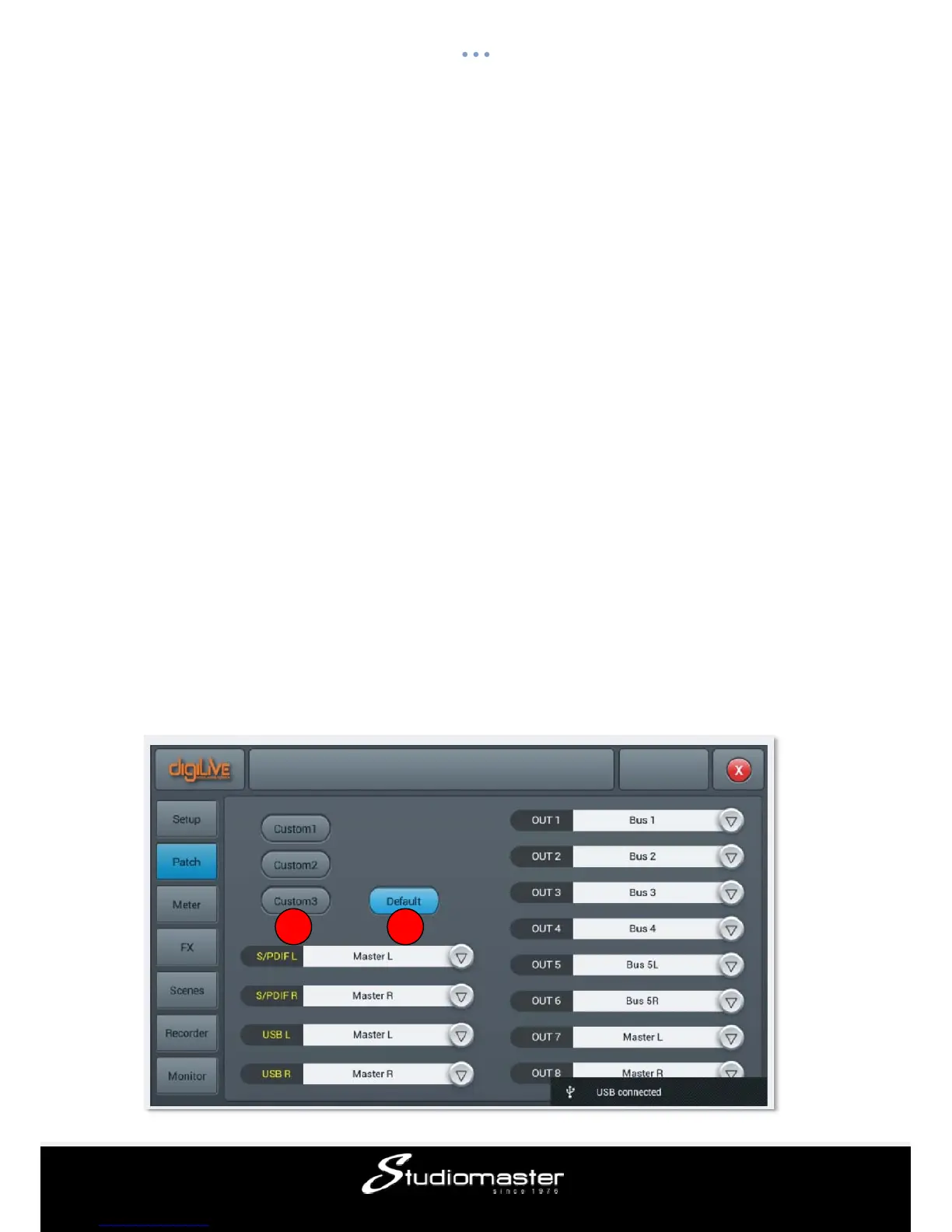
Patch page
This page is mainly for selecting busses to be assigned to the 8 analogue outputs, S/PDIF
output and USB output. The console has 4 mono busses (Bus 1~Bus 4), 4 stereo busses
(Bus 5L~Bus 8R) and master output busses Master L and Master R.
12














 To Next Page