5
Input Channel
The digiLiVE 16 features 12 mono input channels, two analogue stereo inputs, one stereo
S/PDIF and one stereo USB input for playback. The front panel buttons INPUT 1-8 and
INPUT 9-12 ST-USB select the corresponding input section. When pressing INPUT 1-8, the
MIC input channels CH1~CH8 will be shown while pressing INPUT 9-12 ST-USB brings up
MIC inputs CH9~CH12, the two analogue stereo inputs along with stereo S/PDIF and stereo
USB playback. The layer can be changed at any time by pressing INPUT1-8 or INPUT9-12
ST-USB on the front panel or by sliding left/right on the touch-screen while in the main
menu.
MIC Channel
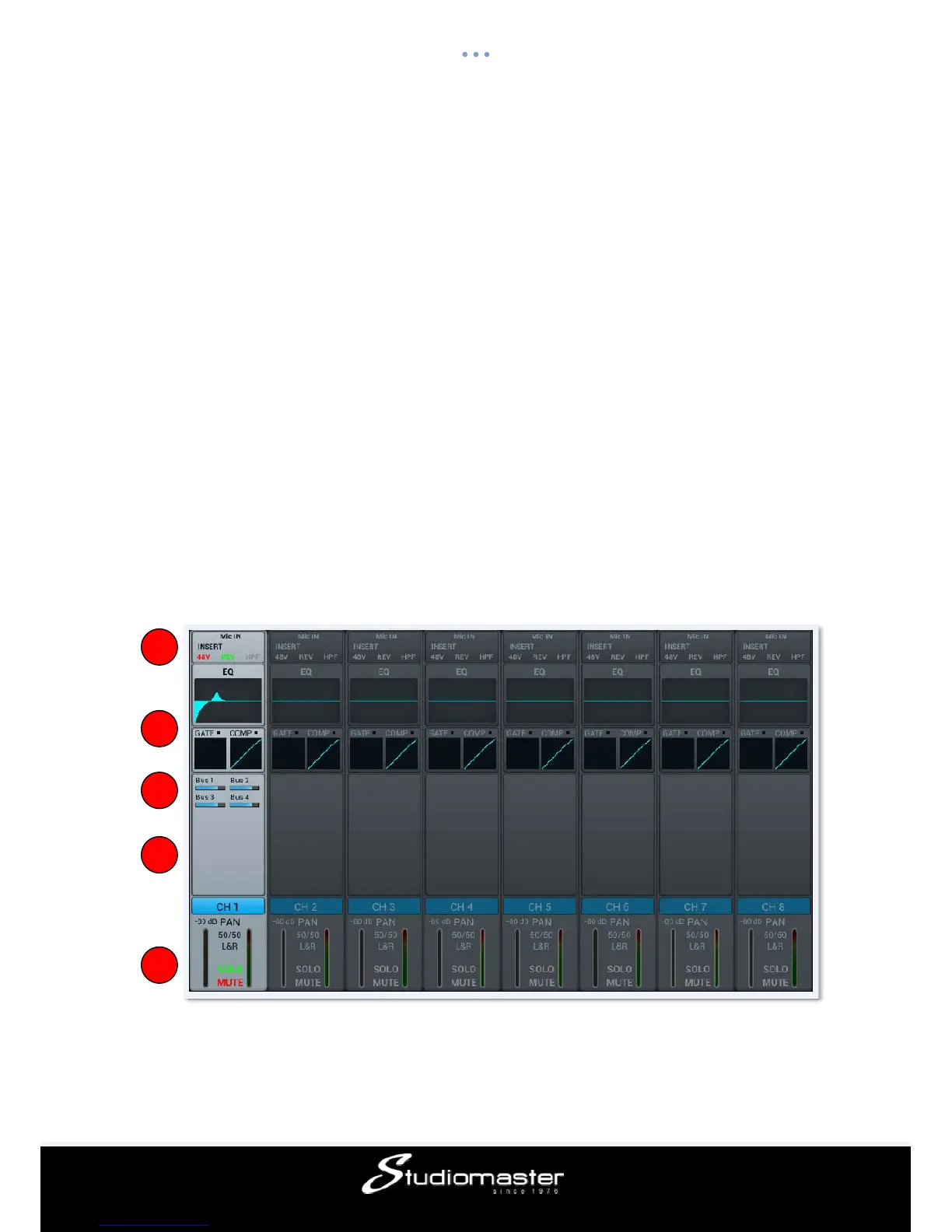
The MIC input channel section contains five individual modules: Input Stage, EQ, Dynamics,
Bus-Send and Output Stage. Single clicking a module will bring up a sub-page with further
options. The sub-pages can be closed through the red “close” button in the upper right
corner.
① Input Stage
Shows status of 48V phantom power, phase, delay, HPF (High-Pass Filter) and effect insert.
1
2
3
4
5














 To Next Page