18
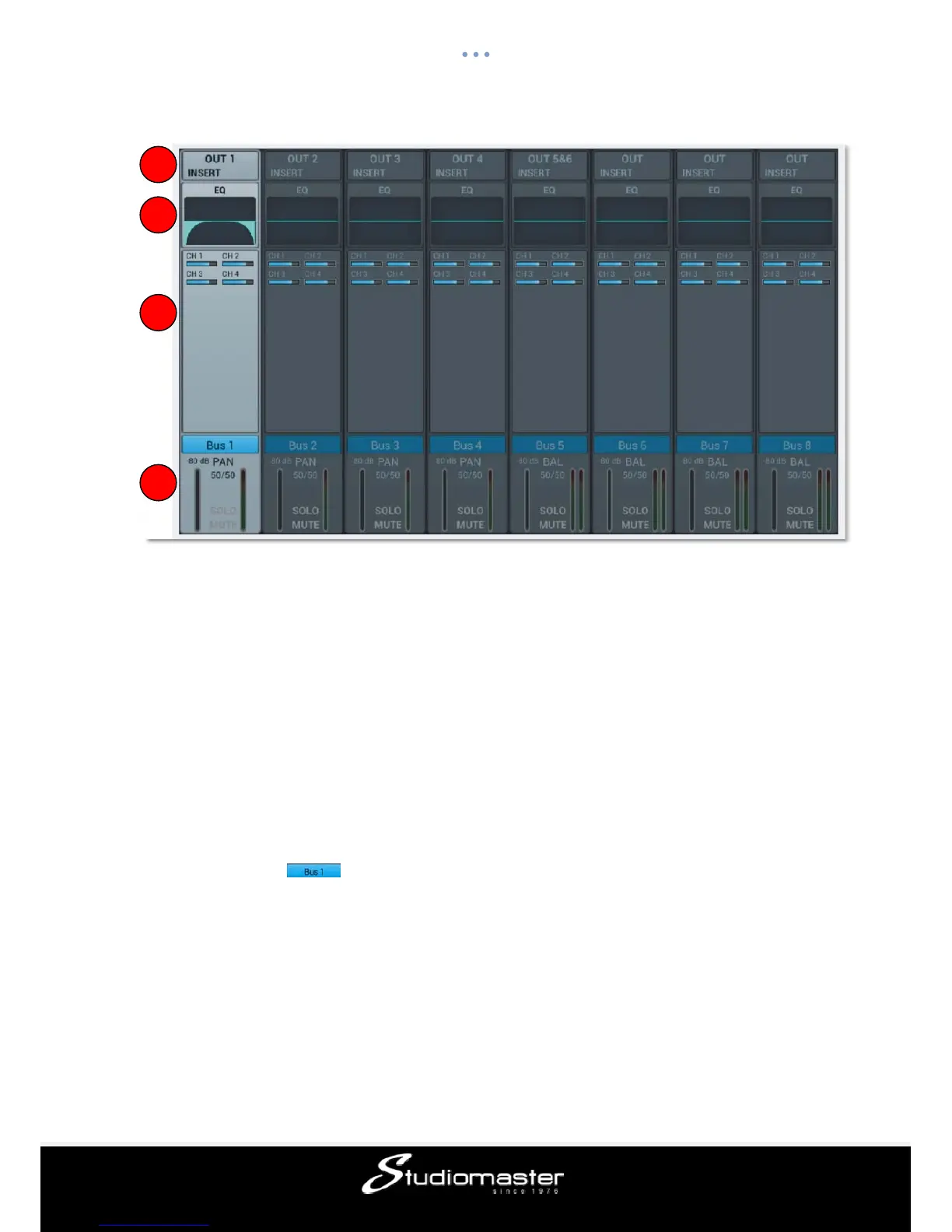
① Input Stage
Shows the physical output assigned to each bus as well as the insert status of effect inserts.
② EQ
Shows a parametric EQ graph representing the EQ settings.
③ Input Source
Displays the send status and level from each channel as a bar-graph. For clarity, only
channels with an enabled send to a given bus are shown here.
④ Output Stage
Displays the name, Pan/BAL value, Solo, Mute, delay, fader- and meter level information.
Double click , e.g., to edit the name of the selected channel through an on-screen
soft keyboard that will pop-up.
Input Stage Subpage
For the mono busses 1-4 this page allows to setup send level, panning and type (Pre-/Post-
Fader) to the stereo busses 5-8. As stereo busses cannot send to themselves, these (as well
as the mono busses) allow only for send enable/disable to Master L/R.
1
2
3
4














 To Next Page