21
Parametric EQ Subpage
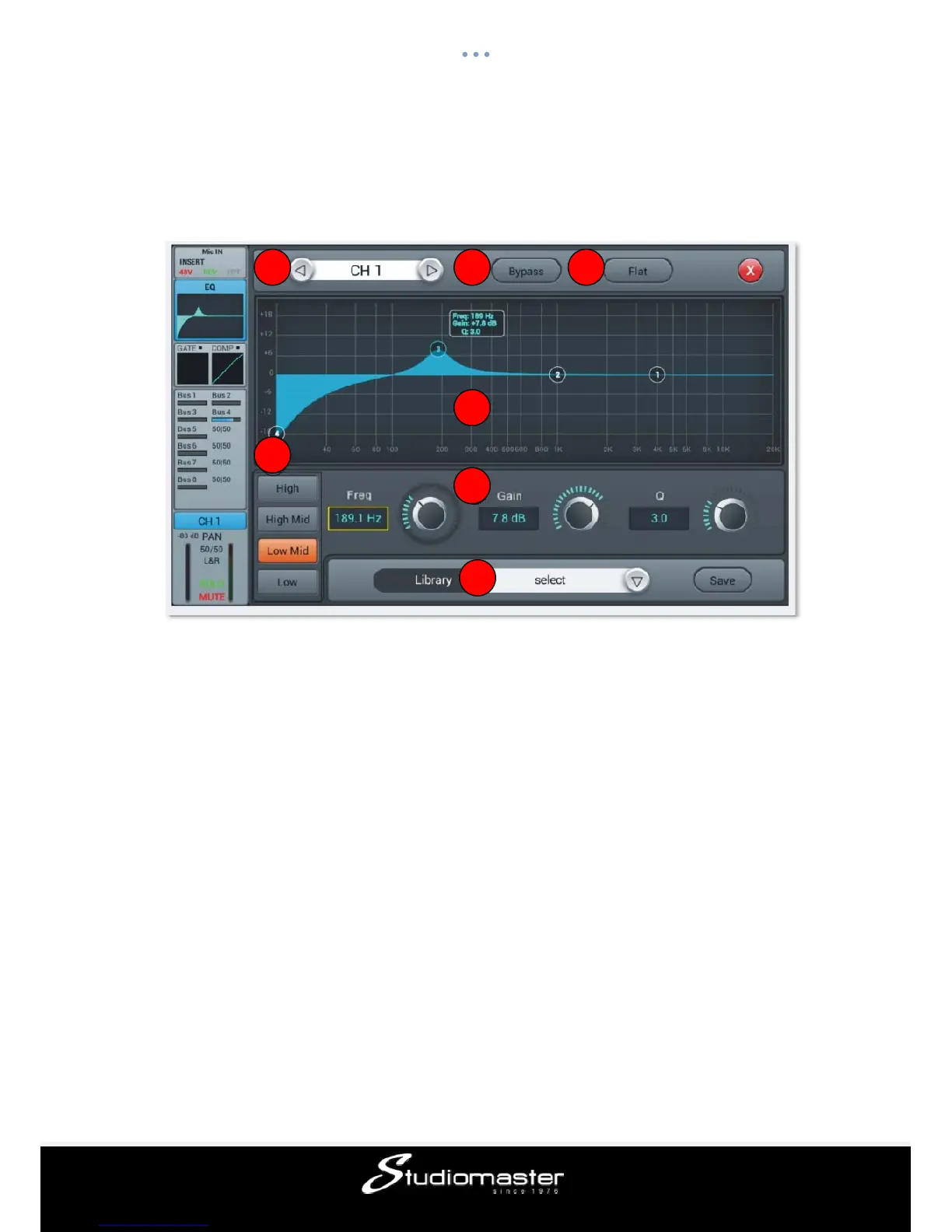
The EQ features a 4-band full parametric EQ that can easily be set up on screen via touch.
① Switch Channels
Press the arrow-buttons, to choose the previous or next channel within the same layer
② Bypass
Single press for EQ Bypass, press again to switch EQ back on. Default is no Bypass
③ Flat
Single press to flatten all EQ bands; this cannot be reverted.
④ 4-band EQ graph
The four numbered points on the EQ-curve indicate the position of the four EQ-bands. Each
band can be selected by taping on the corresponding point or through the select buttons ⑤.
Adjustment of the selected band can be done on screen from 20 Hz to 20 kHz and +/- 18
dB by dragging the selected point or through the soft encoder ⑥. The bands parameter
(gain, frequency and Q) is shown beside the selected band’s number.
⑤ Select Buttons of 4-band EQ filter
Single-tap the “High”, High-Mid”, “Low-Mid” or “Low” button to select the corresponding
band, which will then also be highlighted in the graph.
⑥ Parameter Settings
1 2 3
4
5
6
7














 To Next Page