9
Dynamics Subpage
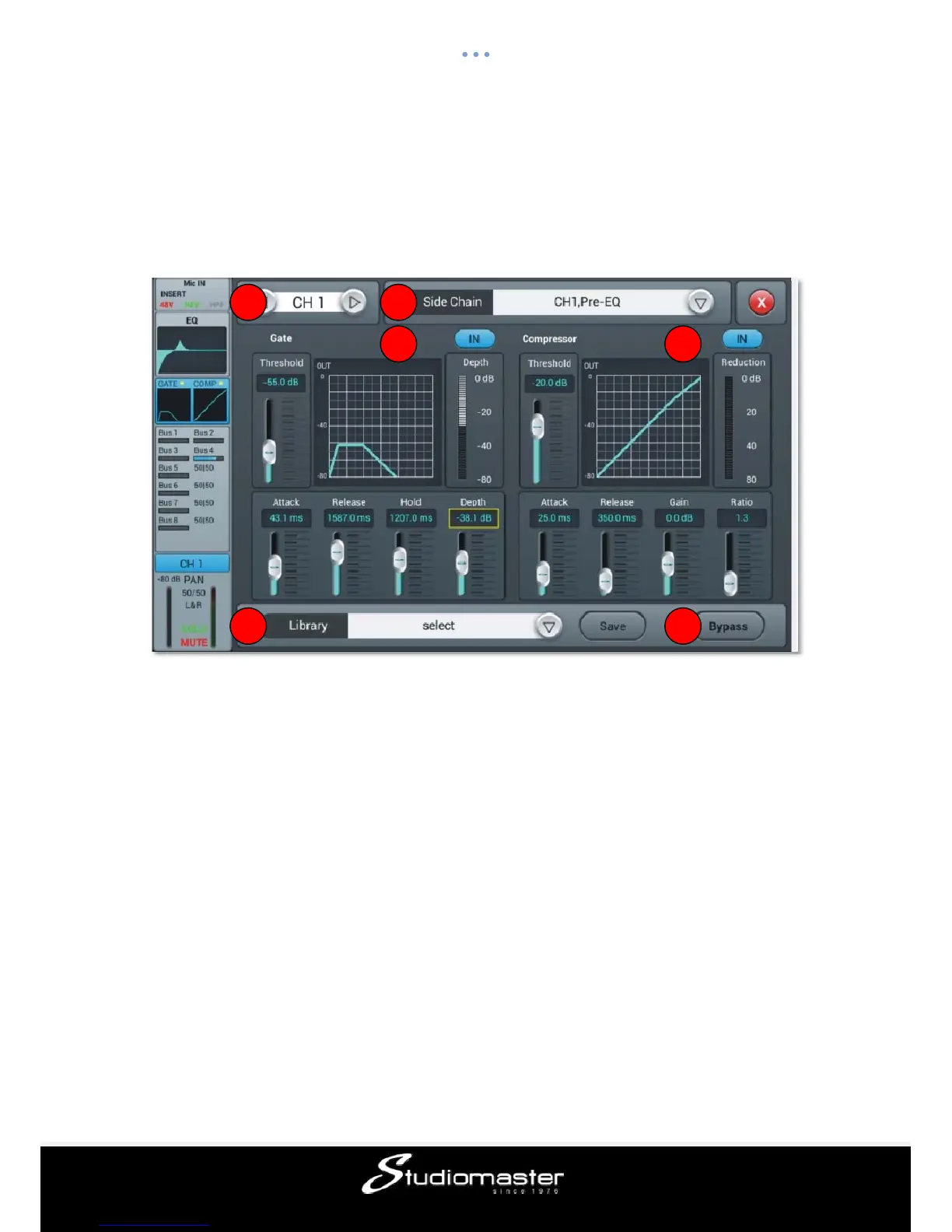
The dynamics consist of a gate and compressor which can be setup independent from each
other.
① Switch Channels
Press the arrow-buttons, to choose the previous or next channel within the same layer
② Library
The library allows to save and load user settings for the Dynamics. Tap the dropdown button
and select a library entry from the list to load its settings. Tap the “Save” button and select
the desired library slot (1 – 16) from the list to save the current dynamics settings. A soft
keyboard will pop-up on screen to enter a name for the setting. Finally press “confirm” to
save the setting or “cancel” to abandon.
③ Gate
IN: Single press to enable the Gate, press again to disable it. Default is disabled.
Gate curve: The curve is split into 3 parts – Attack (left), Hold (middle) and Release (right).
The threshold is shown on the Y-axis while the X-axis indicates the relative time for each
section.
Parameter Adjustment: Adjust the Gate’s parameter on-screen by selecting and dragging
the corresponding slider or use the blue-lit main encoder on the front-panel. Pressing and
holding down the main encoder allows for fine-tuning the selected parameter.
1
2
3 4
5
6














 To Next Page