39
GEQ Subpage
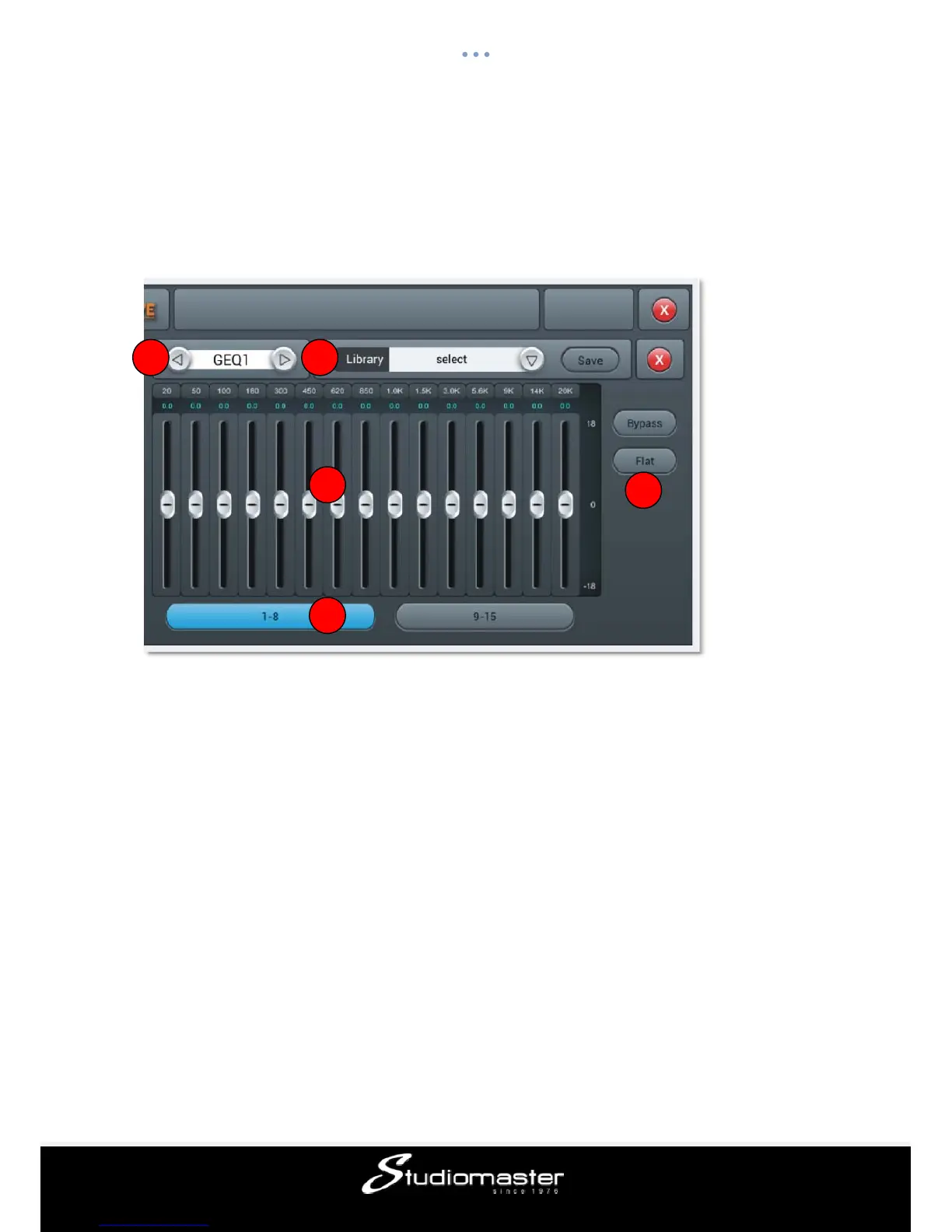
Single press “GEQ1 or 2” button in the FX Subpage to access the GEQ (Graphic Equaliser)
parameter Subpage shown below.
① Module Selection
Single press the left right selection button, to choose FX module:(Modul1-Modul2-Delay1-
Delay2-Reverb1-
Reverb2-GEQ1-GEQ2)。
② Library
Save or load user’s EQ settings. Single press the dropdown button and select a library file
from a pop-up list, in order to load the EQ setting. Single press the “Save” button after you
have adjusted EQ settings, then select the library file (there are 16 libraries, Preset
1~Preset16) which can be edited through the soft-keyboard. Lastly, press “confirm” or
“cancel” to save file name or not.
③ GEQ Chart
The right side shows the Gain coordinate(+18, 0,-18 dB), The top side shows the
Frequency coordinate (20Hz, 50Hz, 100Hz, 180Hz, 300Hz, 450Hz, 620Hz, 850Hz, 1KHz,
1.5KHz, 3KHz, 5.6KHz, 9KHz, 14KHz, 20K Hz) and gain value (default@0dB) of
corresponding frequency point. Drag the slider up and down to adjust gain of that frequency
point, or use the corresponding physical faders to do it.
1 2
3
4
5














 To Next Page