25
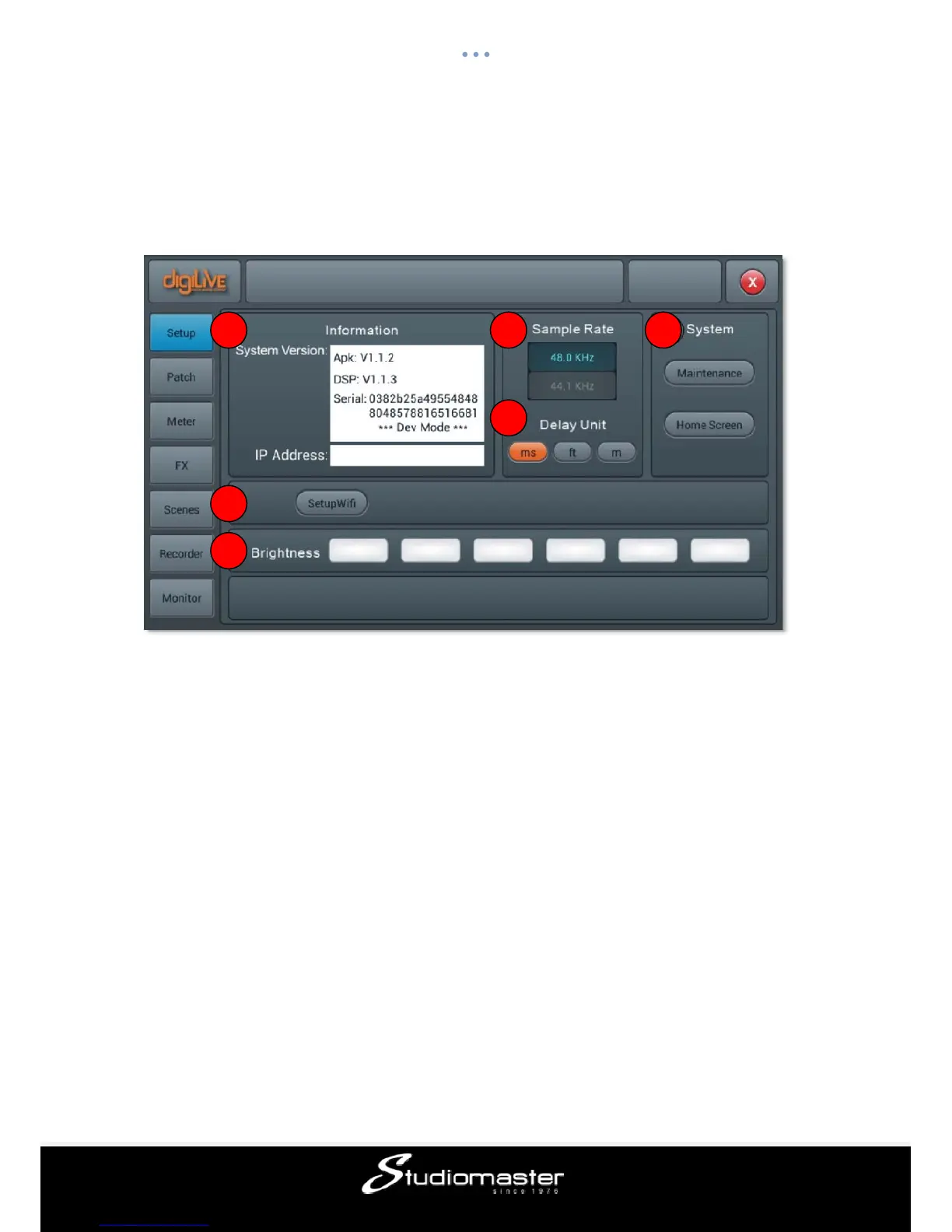
Setup page
The page contains Information, Sample Rate, Delay Unit, System, WiFi, Remote and
Brightness.
① Information
System Version shows the version of APK, DSP and other software on this console. IP
Address shows the IP address of the console.
② Sample Rate
The default setting is 48.0 KHz. When single press 44.1 KHz, a window pops up “The
Sample Rate of 44.1 KHz is only used for Digital Outputs.”, then the 44.1 KHz light on, and
the 48 KHz light off. The default is always 48.0 KHz after rebooting the system
③ Delay Unit
Single press any one among three“ms”,“ft” and “m” buttons to choose the
measurement unit of the delay time. The default is“ms”. After rebooting the system, the
unit of delay time is always what you set before you had powered off the console last time.
④ System
Contains Maintenance and Home Screen options, please refer to the Maintenance Subpage
for details.
⑤ Setup Wifi
This button leads to the setup of WIFI, in order to connect to a compatible iPad.
1 2
3
4
5
6














 To Next Page