23
Output Stage Subpage
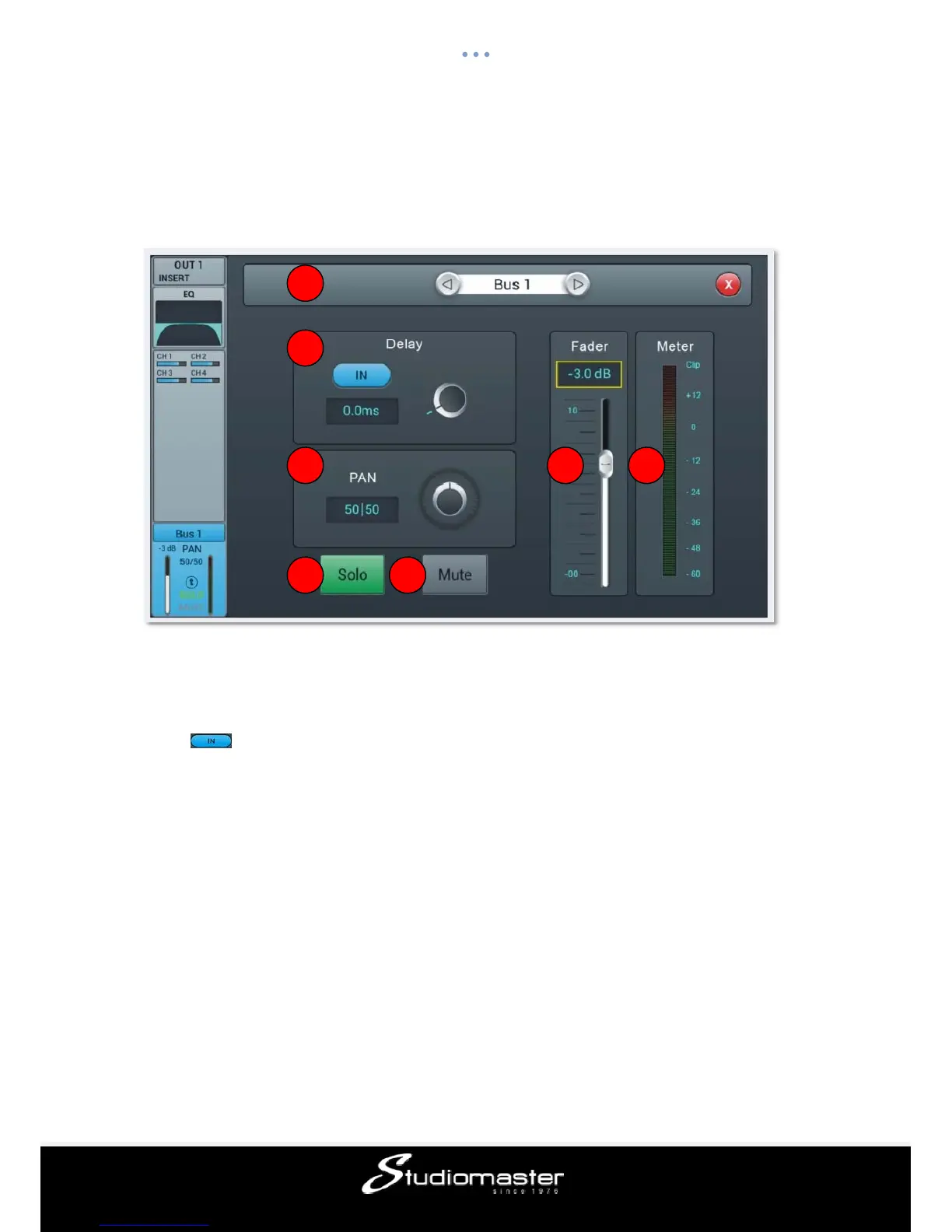
Delay, Panning / Balance and level into master as well as Solo / Mute can be set here.
① Switch Channel
Press the arrow-buttons, to choose previous or next channel within the same layer
② Delay
Press to enable the delay, default is disabled. Adjust the delay time using the main
encoder on the control panel or by the soft-encoder on the touch screen (fine tuning can be
activated by pressing and holding down the main encoder). The delay can be adjusted from
0 ms to 200 ms, default is 0ms.
③ PAN / BAL control
Controls the panning into master L/R. Default is 50|50 (middle). The PAN value can be
changed through the on-screen encoder or by turning the main encoder on the control
panel. Double-tap the numeric parameter control to reset the parameter to its default value.
For the stereo busses 5-8 this control is implemented as a balance control: center (50|50) of
BAL will send the left and right parts of the stereo bus to the corresponding left and right
parts of Master L/R. Any other setting will attenuate one side of the stereo send with, e.g.,
(100|0) only sending the left part of the stereo bus to Master L and the right part being
muted.
④ Solo
1
2
3
4 5
6 7














 To Next Page