19
The text label of the bus indicates the physical output socket it is assigned to – e.g. OUT 1
being socket 1 on the back of the console etc.. The assignment can be setup in
SETUP→PATCH.
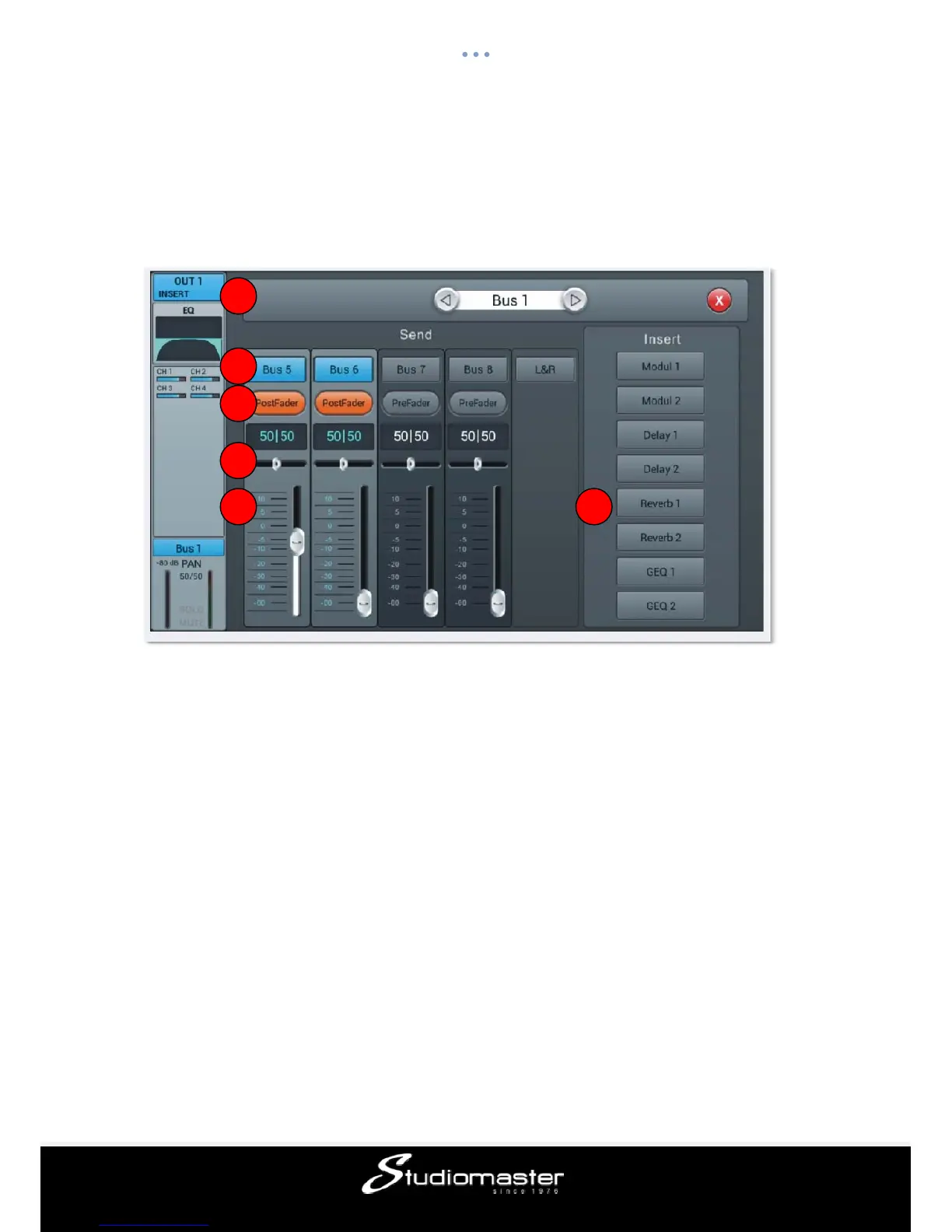
① Switch Channel
Press the arrow-buttons to choose the previous or next bus within the same layer
② Bus send enable
Single press a bus button, to send channel signal to the bus, press again to disable.
③ PreFader/PostFader swtch
Switches between pre- and post-fader send to a bus. Pre-fader does not include the fader
gain value, which can be useful for effect sends or monitoring. Default is pre-fader.
④ PAN control
Controls the panning into a stereo bus. Default is 50|50 (middle). The PAN value can be
changed by dragging the slider or by turning the main encoder on the control panel. Double-
tap the numeric parameter control to reset the parameter to its default value.
⑤ Send level control
Controls the sent-level of the signal to the selected bus. This can be changed by moving
the on-screen slider up and down.
⑥ Insert
1
2
3
4
5 6














 To Next Page