4-14 Sun Fire V20z and Sun Fire V40z Servers—User Guide • March 2005
4.5.1.2 Adding or Replacing a PCI Card
The following procedures describe how to add or replace a PCI card. The seven PCI
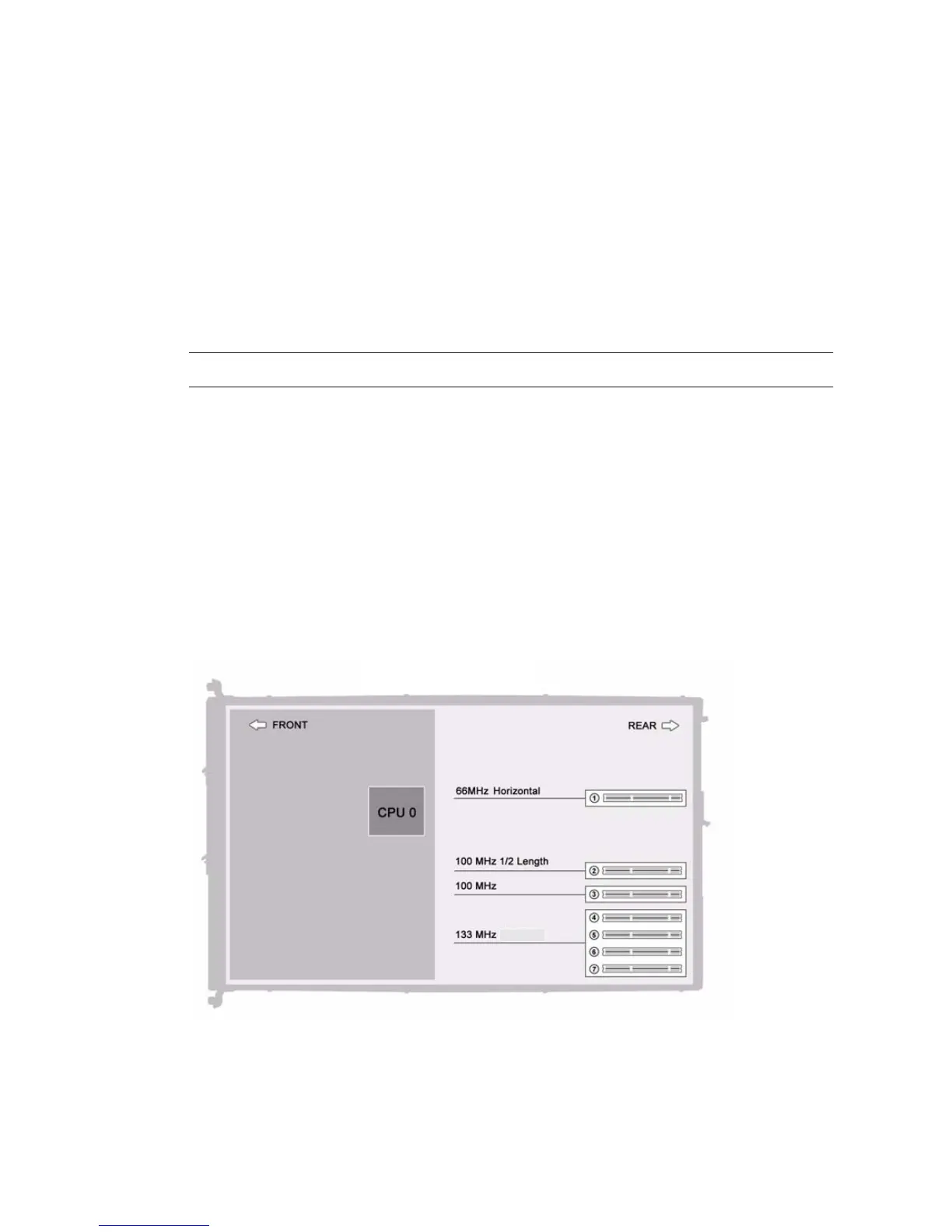
card slots are comprised of four different types of slots on the Sun Fire V40z server
(see
FIGURE 4-5):
■ Four full-length, 133 MHz/64-bit, vertical slots
■ One full-length, 100 MHz/64-bit, vertical slot
■ One half-length, 100 MHz/64-bit, vertical slot
■ One half-length, 66MHz/64-bit, horizontal slot (with PCI riser)
Note – Each slot is capable of providing 25 watts maximum power.
On the updated release (chassis PN 380-1206) of the Sun Fire V40z server, a plastic
air-baffle cage has been added around the vertical PCI slots and is attached to the
motherboard by four screws. When adding or removing a PCI card, you do not need
to remove the air-baffle cage.
The air-baffle cage replaces the individual plastic air-baffle inserts that are found in
the original release (chassis PN 380-1010) of the server.
4.5.1.3 Sun Fire V40z Server PCI Card Slot Locations
FIGURE 4-5 Locations of the PCI Card Slots in the Sun Fire V40z Server












 To Next Page