Chapter 3 Maintaining the Sun Fire V20z Server 3-23
Caution – Move the assembly by grasping it by its sides. Do not to push on the
CD-ROM/DVD-ROM tray.
5. Lift the rear of the assembly slightly and withdraw it from the chassis.
6. Disconnect the ribbon cables from the rear of the asssembly.
You will re-use these ribbon cables when you install a new assembly.
7. Installation is the reverse of this procedure.
8. Before re-installing the cover on the server, check the routing of all cables for
obstructions.
3.5.6 Operator-Panel Board and LCD Display
The following procedure describes how to replace the operator-panel board and
liquid crystal display (LCD). The operator-panel board is located beneath the
CD-ROM/DVD/diskette drive assembly.
1. Power off the system and remove the cover as described in “Powering Off the
Server and Removing the Cover” on page 3-2.
2. Remove the CD-ROM/DVD/diskette drive assembly (see
“CD-ROM/DVD-ROM/Diskette Drive Assembly” on page 3-21).
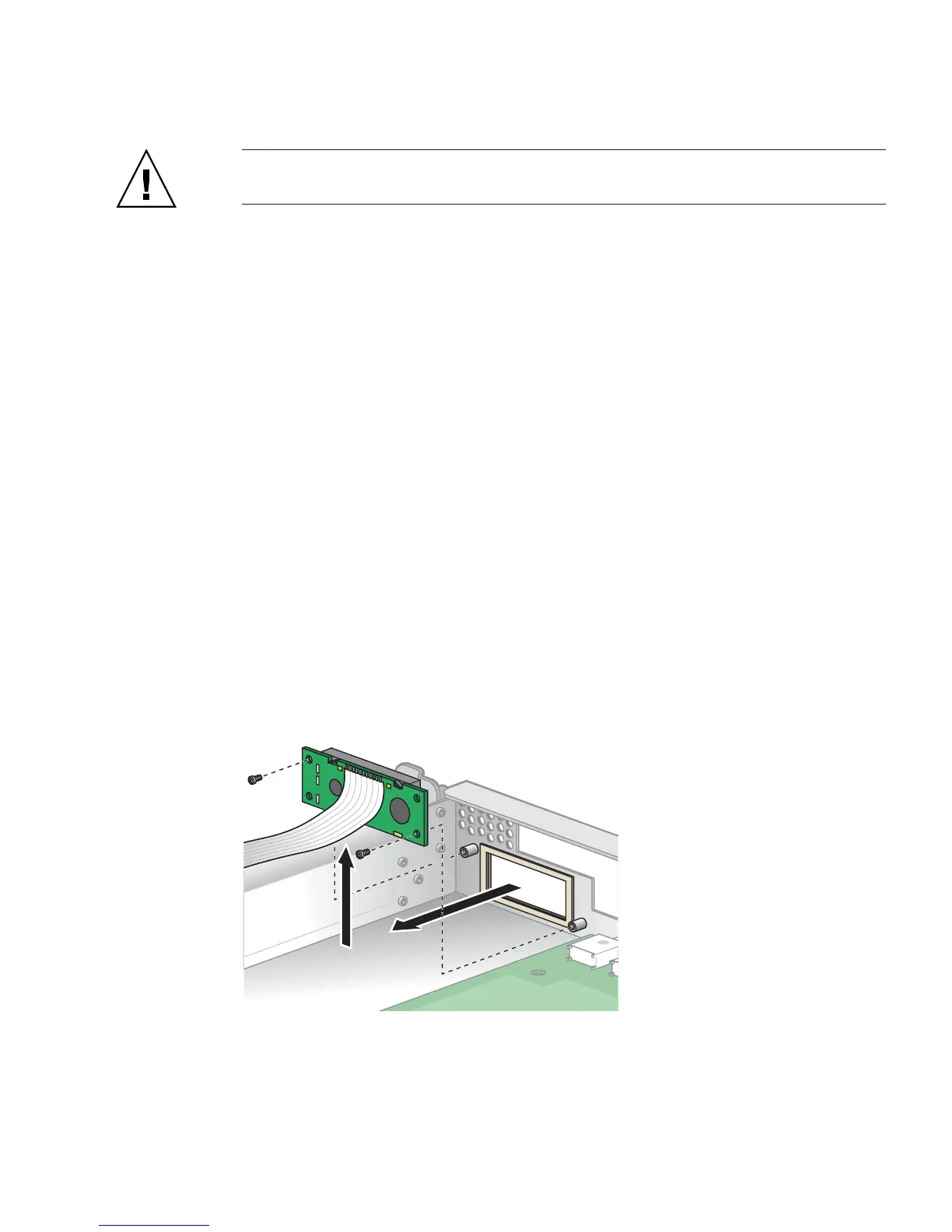
3. Remove the two screws securing the LCD to the front panel (see
FIGURE 3-17).
FIGURE 3-17 Removing the LCD











 To Next Page