Chapter 4 Maintaining the Sun Fire V40z Server 4-35
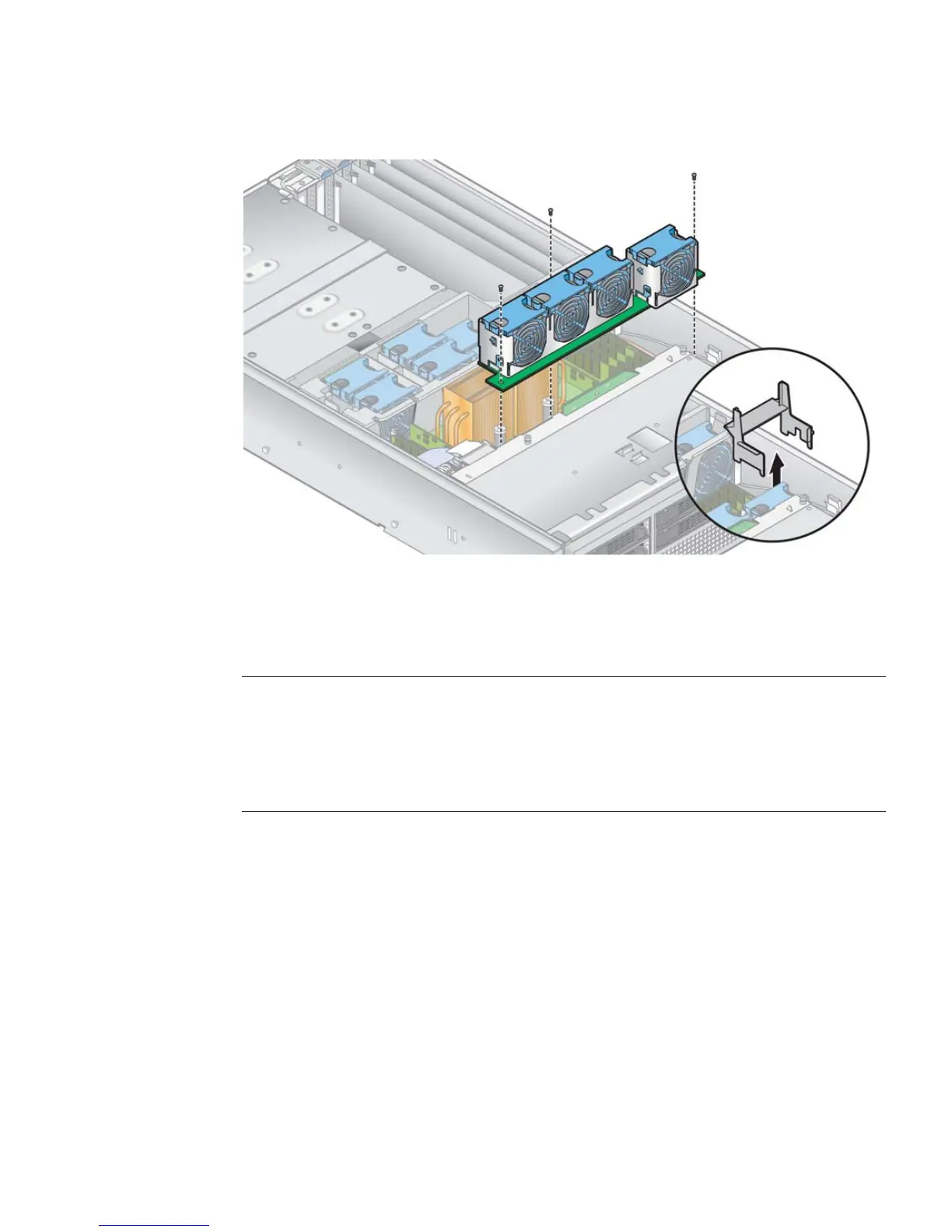
FIGURE 4-24 Removing the Front Fan-Cage Assembly
4.5.7.4 Replacing the Rear Fan-Cage Assembly
Note – On the updated release of the Sun Fire V40z server (chassis PN 380-1206), if
you remove the front or rear fan-cage assembly from the motherboard while the
server is powered on and running, the server will automatically perform a hard
power-off.
We recommend that you power off the server before servicing any components.
The rear fan-cage assembly holds fans 1 through 8 (numbering is indicated on the
top of the rear fan cage).
1. Power off the server, including any attached peripherals, and disconnect the
server from the electrical outlet. If your server includes two power supplies,
ensure that both power cords are disconnected from the electrical outlet.
Refer to “Powering Off the Server and Removing the Cover” on page 4-2.
2. Remove the main air baffle (see
FIGURE 4-20).
Lift the rear edge of the baffle, then move it toward the rear of the server to
disengage the hooks on the front edge of the baffle.











 To Next Page