Chapter 3 Maintaining the Sun Fire V20z Server 3-35
3.5.12.2 Replacing the System Battery
1. Install the new system battery into the holder with the side labeled “+” facing up.
Note – Replace the battery only with the identical model.
2. Check the routing of all cables for obstructions and then reinstall the cover.
3.5.13 Cable Kit
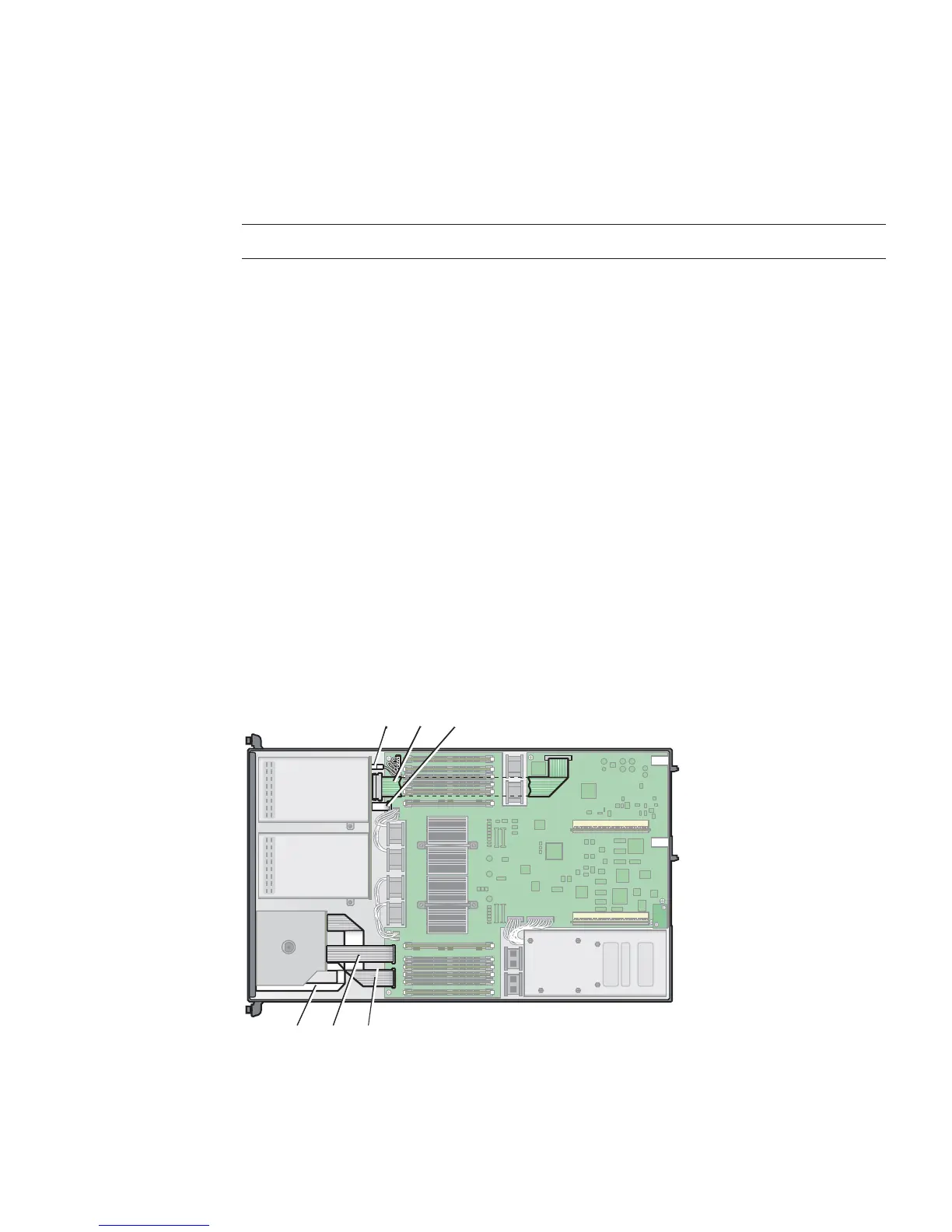
The following procedure describes how to remove and replace the following cables:
■ Five-pin power cable connecting the SCSI backplane to the motherboard (1).
■ 68-pin ribbon cable connecting the SCSI backplane to the motherboard (2).
■ Flat cable connecting the SCSI backplane to the motherboard (3).
■ Flat cable connecting the operator-panel board to the motherboard (4).
■ Flat cable connecting the CD-ROM/DVD to the motherboard (5).
■ Flat cable connecting the Diskette Drive to the motherboard (6).
1. Power off the server, including any attached peripherals, and disconnect the
server from the electrical outlet.
Refer to “Powering Off the Server and Removing the Cover” on page 3-2.
2. Identify the cable to be replaced (see
FIGURE 3-28 for the location).
FIGURE 3-28 System Cables in the Sun Fire V20z Server
2
3
5
6
1
4











 To Next Page