4-18 Sun Fire V20z and Sun Fire V40z Servers—User Guide • March 2005
6. Remove the PCI riser from the PCI card connector on the motherboard. Press on
the connector-release levers to release the riser.
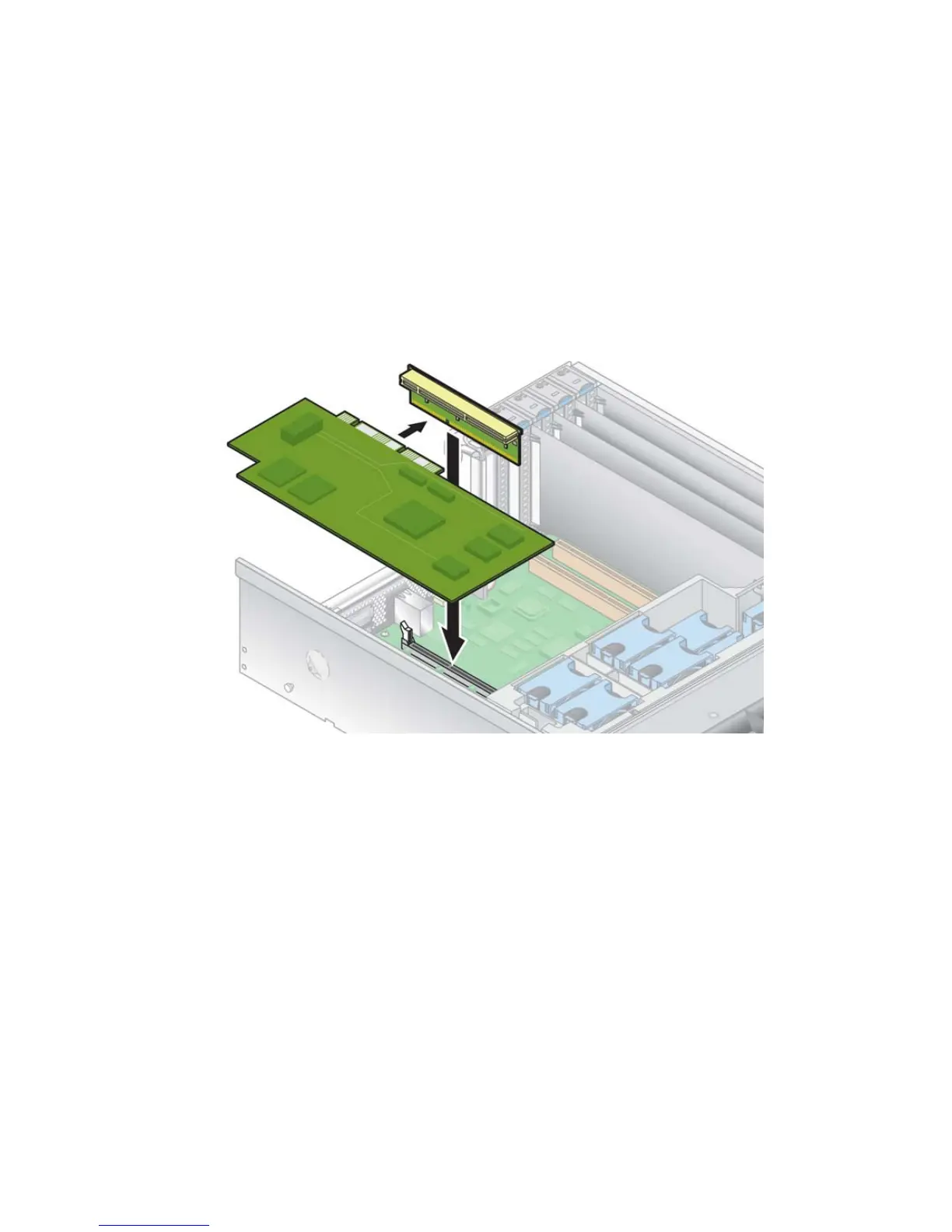
7. Install the new PCI card in the riser assembly (see
FIGURE 4-9).
8. Re-install the riser with card into the connector on the motherboard. Push down
evenly on both corners of the riser until the release levers close.
9. Pivot the back-panel card latch up and then slide it down until it captures the PCI
card bracket. Tighten the screw to secure the latch.
FIGURE 4-9 Installing the Horizontal PCI Card and Riser
10. If you are installing an LSI MegaRAID card:
For an original release of the server, go to “To Install an LSI MegaRAID Card with
Battery Backup in Original Release of the Sun Fire V40z Server” on page 4-19.
For an updated release of the server, go to “To Install an LSI MegaRAID Card with
Battery Backup in an Updated Release of the Sun Fire V40z Server” on page 4-20.
Otherwise, skip to Step 11.
11. Re-install the power-supply cage assembly: see “Replacing a Power-Supply Cage
Assembly” on page 4-39.
12. Before re-installing the cover on the server, check the routing of all cables for
obstructions.











 To Next Page